More Realistic Pipe Weapon Textures
⚪ Last updated 2015⚠️ Install Order · 2 steps
Install in this order, then this mod last — most mods fail to load without their framework and dependencies in place.
Preview
🔍 Analysis
- 👍 3.5% endorsement rate — high engagement, a strong quality signal
- 🏆 #132 of 271 Models and Textures mods in this game by downloads
📋 About This Mod
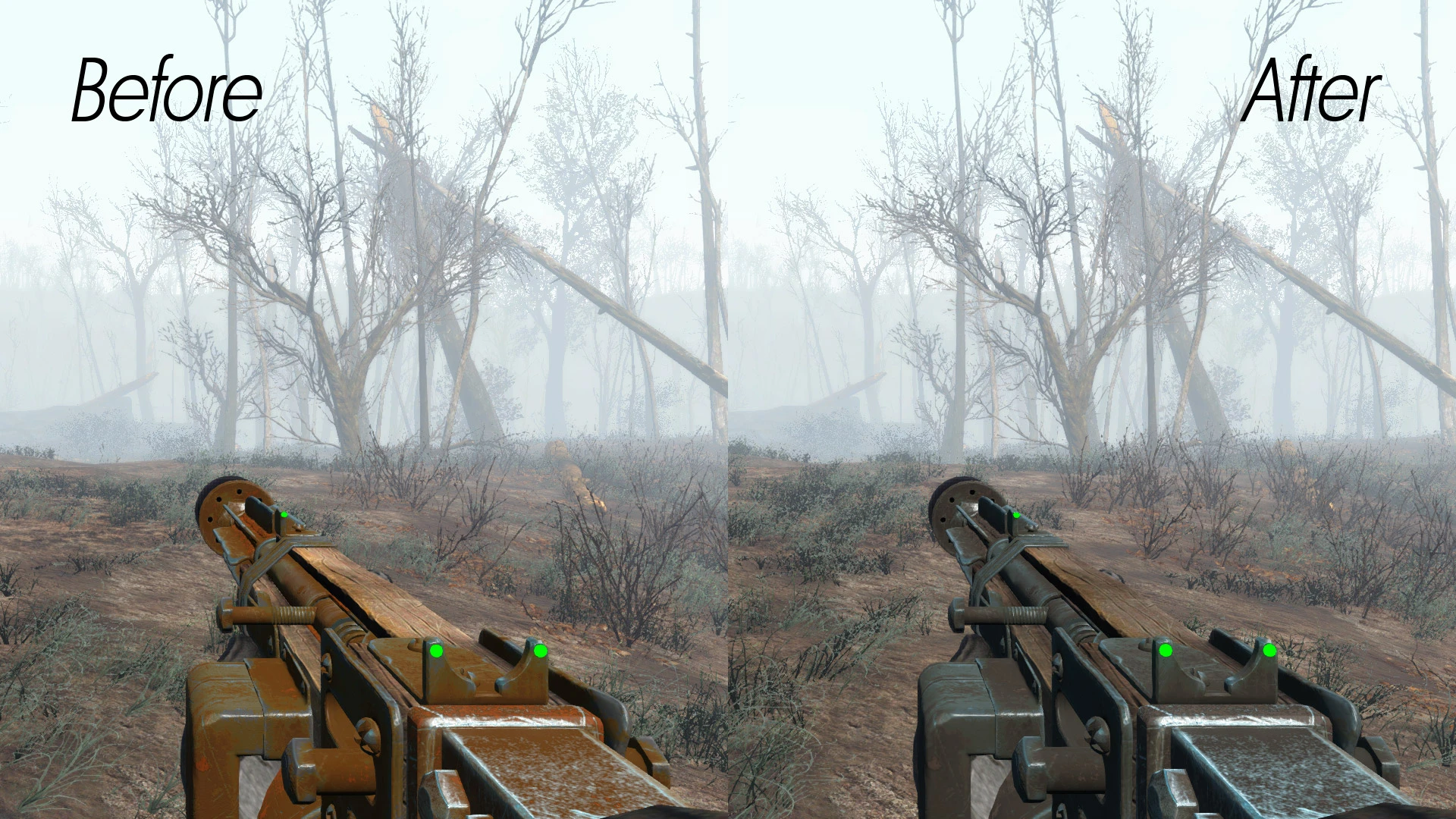
A very quick retexture I made, to make pipe weapons look more natural and realistic, while maintaining original feel. Why I made this mod? Well, original texture is way too rusty, a mechanism will not be able to work in such condition, especially a weapon, that can blow up in your face, if not maintained properly.
A video, made by The White Collar Players. Episode about this mod is at 8:01 mark. RZkRTkW0oXU
MANUAL INSTALL
1 - Unpack archive into "... Fallout 4\Data\" folder. 2 - Open "Fallout4Custom.ini" located in "... Documents\My Games\Fallout4". Add these lines:
bInvalidateOlderFiles=1 sResourceDataDirsFinal=
This mod retextures pipe weapons in Fallout 4 to reduce the bright orange tint, giving them a more realistic aged metal appearance. It's a simple visual enhancement for players who want grittier, more believable weapons without changing gameplay.
✨ Key Features
📊 Pros & Cons
✅ Pros
- Huge community trust — nearly 10k endorsements and 286k downloads.
- Does exactly what it says: kills the orange plastic look for a worn metal vibe.
- Lightweight texture swap — no performance hit or gameplay tweaks.
⚠️ Cons
- Last updated in 2015 — might not be patched for newer DLC or updates.
- Only affects pipe weapons — if you want a full weapon overhaul, this won't cut it.
- No before/after screenshots in the description, so you're flying blind on the exact look.
For Fallout 4 players who love the pipe weapon designs but hate the default orange tint. If you're after a quick, safe visual upgrade that keeps the vanilla feel, this is a solid pick. Skip if you want more drastic weapon changes or play with mods that already retexture pipe weapons.
💡 Beginner Tips
- Since it's a texture mod, just drop the files into your Data folder or use a mod manager — no load order headaches.
- If you use other pipe weapon retextures, this might conflict — check your mod order and let one win.
- Back up your original textures if you're manually installing, so you can revert if you don't like the look.
📊 Mod Details
- Game
- Fallout 4 Mods
- Author
- AlexSlesh
- Version
- 1.0
- Downloads
- 286,861
- Endorsements
- 9,978
- Category
- Models and Textures
- Created
- 11/27/2015
- Updated
- 11/27/2015
🧩 Commonly Used Together
Users add these mods to the same collections — a real compatibility signal, not an AI guess.
🔧 How to Install Fallout 4 Mods
Download from Nexus.
📖 Full step-by-step install guide for Fallout 4 →
Visit the official mod page for specific installation instructions for this mod.
🎮 Need cheat codes or console commands? Check ur gaming wiki for Fallout 4 commands, item IDs, and more.
Keep browsing — more Fallout 4 mods await