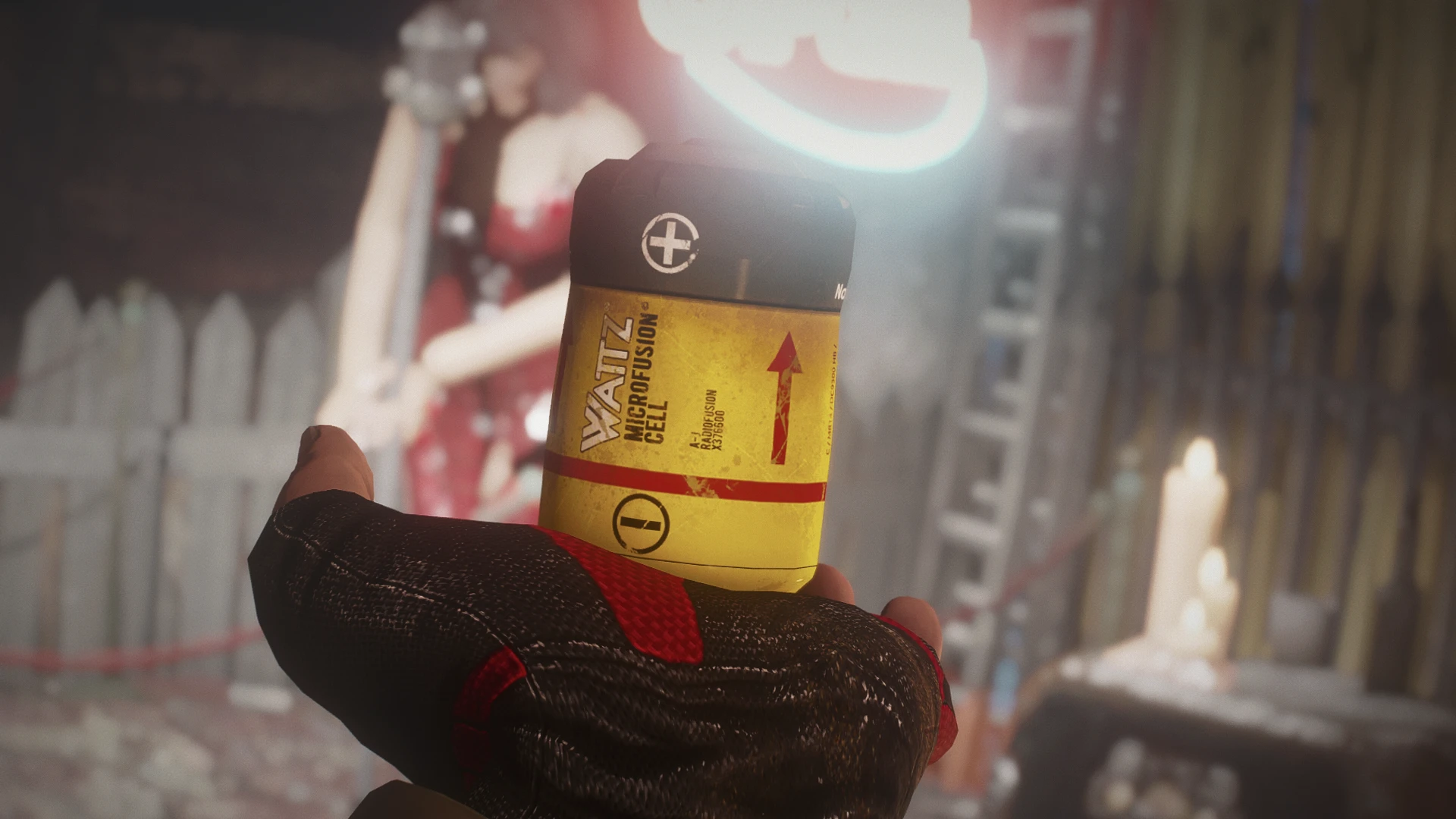
Fusion Cell Retexure - Wattz Microfusion Plus
⚪ Last updated 2024⚠️ Install Order · 2 steps
Install in this order, then this mod last — most mods fail to load without their framework and dependencies in place.
Preview
🔍 Analysis
- 👍 2.9% endorsement rate — high engagement, a strong quality signal
- 🏆 #25 of 241 Models and Textures mods in this game by downloads
📋 About This Mod
This mod is inspired by real life batteries, modified to be set accordingly in the Fallout Universe. Feels a bit more immersive to me. Includes a made-up logo for Wattz Electronics, and a disclaimer with specifications on the back of the label, like real batteries.
Check the optional file for an alternate version. It says "Wattz Microfusion Cell" instead of "Wattz Microfusion Plus". You can compare which one you like the most in the images section.
Installation:
Install with NMM or drop in your Data folder.
Uninstall:
Uninstall with NMM or delete the MicroFusionCell_d.dds from Data/Textures/LaserWeapons/
Compatibility:
Compatible with everything that doesn't retexture the Fusion Cell :P
Credits:
Textures - Wanaming0
Screenshots - DonJunk
Alternate texture with changed terminals: JackWallace
Note:
This says "Microfusion" explicitly on the side. If you want the Fusion Cells to be named "Microfusion Cell" too, I recommend Wasteland Imports by Mkdo40.
My Fallout 4 mods and patches:
Lever-Action Rifle Caliber Conversion mods
Paintable Raider Gas Masks
Eli's Armour Collection Remade Leveled List Integration
Clothing Of The Commonwealth Leveled List Tweaks
Wasteland Sniper Improved
Beast Master Treats Add-On
True Legendary Nightstrikers
Fusion Cell Retexure - Wattz Microfusion Plus
LAER - Laser Assisted Electrical Rifle
General Todd Howard Statues
THIS MATERIAL IS NOT MADE, GUARANTEED OR SUPPORTED BY THE PUBLISHER OF BETHESDA GAME STUDIOS OR ITS AFFILIATES.
A lore-friendly retexture for Fusion Cells in Fallout 4, giving the standard ammo a fresh look. With 634 endorsements and 21,999 downloads, it's a popular choice for players who want a subtle visual upgrade without straying from the game's aesthetic. Simple and effective.
✨ Key Features
📊 Pros & Cons
✅ Pros
- Community favorite with 634 endorsements and 21k downloads—clearly a go-to for lore-friendly visuals.
- Does exactly what it says: retextures Fusion Cells without messing with gameplay.
- Lightweight and safe—no new meshes or scripts, just a texture swap.
⚠️ Cons
- Only covers Fusion Cells—if you wanted other ammo types retextured, you're out of luck.
- No before/after screenshots in the description, so you're flying blind until you try it.
- Last updated in early 2024—might not be tested with the latest game patches, though texture mods usually survive.
For Fallout 4 players who want a subtle, lore-friendly visual tweak to their Fusion Cells without overhauling the whole game. If you're a purist who hates flashy retextures, this is right up your alley. Skip if you're looking for gameplay changes or a full ammo retexture pack.
💡 Beginner Tips
- Since it's a texture mod, just drop the files into your Data folder or use a mod manager—no load order worries.
- If you're using a mod manager, enable it and let it handle the file placement; it'll overwrite the vanilla textures automatically.
- Check the mod's comments for any user screenshots to see the result before installing.
📊 Mod Details
- Game
- Fallout 4 Mods
- Author
- Wanaming0
- Version
- 1
- Downloads
- 21,999
- Endorsements
- 634
- Category
- Models and Textures
- Created
- 6/26/2017
- Updated
- 2/23/2024
🔧 How to Install Fallout 4 Mods
Download from Nexus.
📖 Full step-by-step install guide for Fallout 4 →
Visit the official mod page for specific installation instructions for this mod.
🎮 Need cheat codes or console commands? Check ur gaming wiki for Fallout 4 commands, item IDs, and more.
Keep browsing — more Fallout 4 mods await