Blowtorch HQ Model Replacer (Including in animations)
⚪ Last updated 2022⚠️ Install Order · 2 steps
Install in this order, then this mod last — most mods fail to load without their framework and dependencies in place.
Preview
🔍 Analysis
- 👍 2.9% endorsement rate — high engagement, a strong quality signal
- 🏆 #233 of 241 Models and Textures mods in this game by downloads
📋 About This Mod
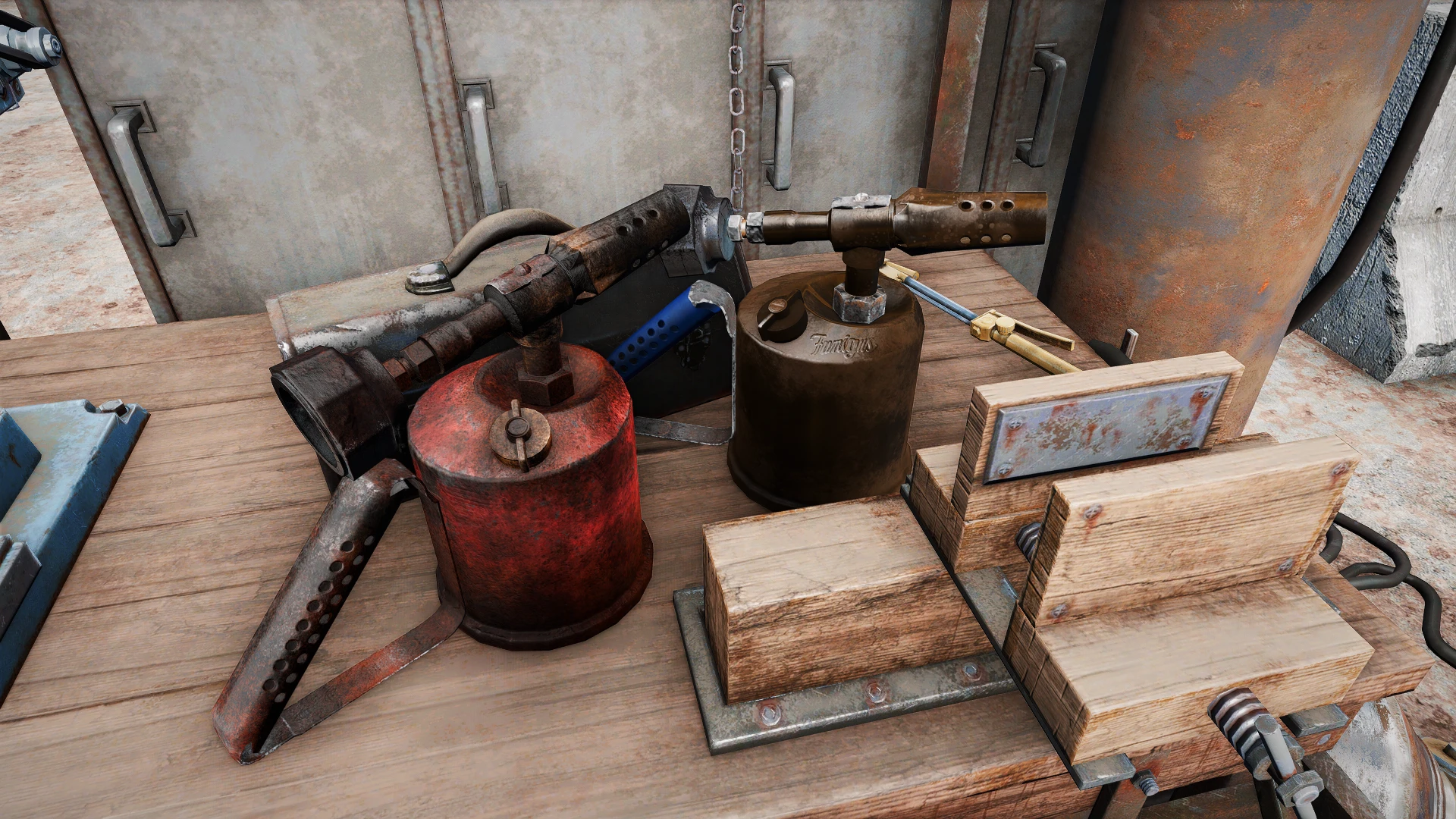
This is a quick and simple mod that replaces all blowtorches (lootable and used in idle animations) with a new model.
Shown above when used in animations.
The regular blowtorches now look like old, rusty steel blowtorches, covered in grime. The Fumigus Blowtorches (the rare variant) are almost-pristine bronze ones, and have the branding on the side, and kept the blue color scheme of the painted handle.
There are 1K (low quality), 2K (standard quality) and 4K (high quality) versions of the textures, packed in BA2 available with a ESL plugin to
load them.
By downloading this mod, you forfeit your skeleton for the upcoming skeleton war.
Recommended Mods
FlaconOil's Complete Retexture Project by FlaconOil(Fits well with this mod)
Pretty cool Shack Textures by NaiRae (also has the same vibe)
Sim Settlements 2 by Sim Settlements Team (Jake and settlers will use it, see image section)
Screwdriver HQ Replacer (lootable and in lockpicking) by me (shameless plug lmao)
InstallationUse MO2 or Vortex. Else follow one of the 8290348293 guides on how to install mods.
Don't pick the ESP option unless you know why do you want it.
Compatibility
Compatible with anything that doesn't change the Blowtorch mesh or the animObject meshes.
Model and (original) textures by apalkova.ksu under CC Attribution license
New textures by Wanaming0
Conversion, rigging and implementation also by Wanaming0
Ajhakra and Millenia3D for the fantastic cubemaps
This work, "Blowtorch HQ Model Replacer", is a derivative of "Burner Low" by apalkova.ksu, used under CC BY. "Blowtorch HQ Model Replacer" is licensed under the permissions set in this permissions tab by Wanaming0.
THIS MATERIAL IS NOT MADE, GUARANTEED OR SUPPORTED BY THE PUBLISHER OF BETHESDA GAME STUDIOS OR ITS AFFILIATES.
This mod replaces the standard and Fumigus blowtorches in Fallout 4 with a new custom model, including a version matching the welding animation at Power Armor Stations. It's a purely cosmetic upgrade for players who want a more detailed tool. With 408 endorsements and 14,095 downloads, it's a well-received visual tweak.
✨ Key Features
📊 Pros & Cons
✅ Pros
- Community favorite with 408 endorsements and over 14k downloads—clearly a popular pick.
- Gives both regular and Fumigus blowtorches a fresh look, so you get consistent visuals.
- Adds a model that syncs with the welding animation, making Power Armor crafting feel more immersive.
⚠️ Cons
- Pure cosmetic—no gameplay or stat changes, so if you want functional tweaks, this isn't it.
- Only affects blowtorches; other tools and weapons remain untouched, so the visual upgrade is narrow.
- Last updated in 2022, so it may not be compatible with the latest game patches or other mods that alter blowtorch models.
For Fallout 4 players who want a more detailed blowtorch when crafting or repairing. If you're into visual overhauls and don't mind a small, focused change, this is a nice touch. Skip if you're looking for gameplay alterations or if you rarely use blowtorches.
💡 Beginner Tips
- Since it's a model replacer, load it after any mods that change blowtorch textures to avoid conflicts.
- If you use a mod manager like Vortex, enable it and let it handle file overwrites—no manual placement needed.
- Check the mod's files to ensure it doesn't require a DLC you don't own, though the description doesn't mention any.
📊 Mod Details
- Game
- Fallout 4 Mods
- Author
- Wanaming0
- Version
- 1.0.1
- Downloads
- 14,095
- Endorsements
- 408
- Category
- Models and Textures
- Created
- 11/8/2021
- Updated
- 8/26/2022
🔧 How to Install Fallout 4 Mods
Download from Nexus.
📖 Full step-by-step install guide for Fallout 4 →
Visit the official mod page for specific installation instructions for this mod.
🎮 Need cheat codes or console commands? Check ur gaming wiki for Fallout 4 commands, item IDs, and more.
Keep browsing — more Fallout 4 mods await