FO4 Blurriness Remover
⚪ Last updated 2015⚠️ Install Order · 2 steps
Install in this order, then this mod last — most mods fail to load without their framework and dependencies in place.
Preview
🔍 Analysis
- 👍 5.0% endorsement rate — high engagement, a strong quality signal
- 🏆 #6 of 6 ReShade Presets mods in this game by downloads
📋 About This Mod
Previously known as Lasagna's Crispy Fallout This Reshade / SweetFX preset will make your game look amazing. I'm serious. You won't be able to play without this once you try it.
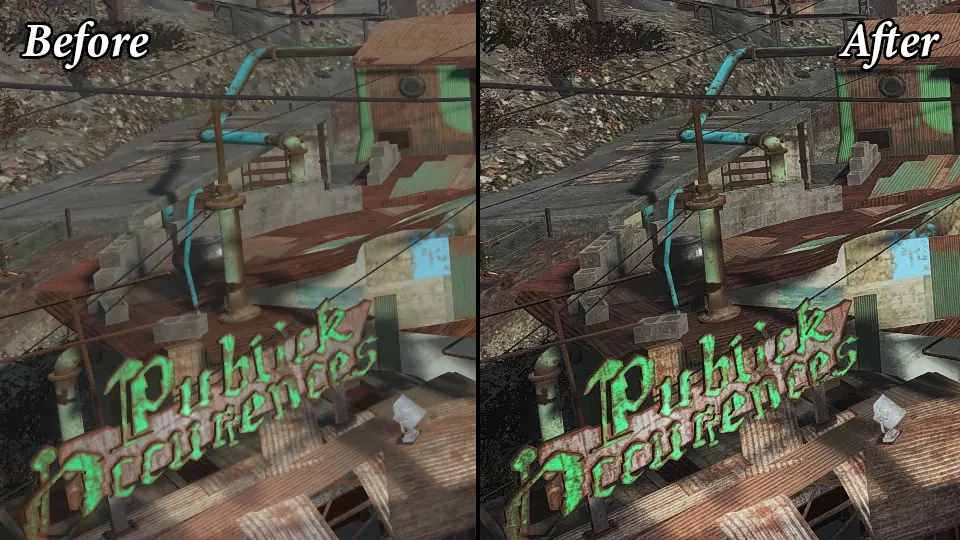
Ever notice how everything gets blurry when you move using TAA? Ever notice how every texture is a blurry mess? Well, this makes everything way less blurry. Eeeeverything. It looks best with TAA Antialing.
o0XIPAZkdtg Showcased Version: Default (1. 1. 0)
What it does -Makes colors slightly more vibrant -Makes darks a little darker -Improves all texture clarity -Improves blurry antialiasing
What it doesn't -Cost too much fps -Drastic color changes -Add cinematic bullshit
I'll say no more, just look at the screenshots.
Download Uncompressed Comparison Screenshots (134MB) (No ads)
Changes from default to darker: -Changes gamma to be darker -Decreases contrast
Best Fallout 4 Settings
Installation
- []Download and extract ReShade with Framework 1. 1. 0 to a folder (preferably on your desktop)(if you don't know what 7z is, click here) []Copy the ReShade folder from this mod into your ReShade Framework 1. 1. 0f1 folder (on your desktop) []Start Mediator.exe, click Add, find Fallout4.exe, and click confirm in Mediator.exe []If you placed the presets in the correct place, you should see them in the dropdown box just to the right of that confirm button. []Select your desired preset. []Click "Permanent Push To Application" []Enjoy! This only needs to be done once.
What your Fallout 4 folder should look like
Uninstallation
(because too many mods don't have this section) []Open Mediator.exe [*]Click Delete (right next to where you aFO4 Blurriness Remover is a SweetFX preset for Fallout 4 that eliminates motion blur and texture muddiness, delivering a crisper, more vibrant image with minimal performance impact. It's a lightweight visual enhancement for players who want a cleaner look without straying from vanilla aesthetics.
✨ Key Features
📊 Pros & Cons
✅ Pros
- Community favorite with 1,215 endorsements and over 24k downloads
- Delivers on its promise: crisper visuals without the blur
- Performance-friendly, so you won't tank your FPS
⚠️ Cons
- Last updated in 2015, so it may not be compatible with newer game patches or DLC
- SweetFX presets can conflict with other ReShade or ENB presets if you stack them
- No active updates means potential issues with future game updates remain unaddressed
For Fallout 4 players who hate the default motion blur and want a sharper, more vibrant image without heavy performance hits. If you're a purist who wants to keep the vanilla look but fix the blur, this is for you. Skip if you're looking for major graphical overhauls or if you already use a complex ENB setup.
💡 Beginner Tips
- Make sure you have SweetFX installed correctly before adding this preset, as it relies on that framework.
- If you're using a mod manager, install this preset through it to keep your load order clean and avoid overwriting other visual mods.
- Test the preset in a busy area like Diamond City to see the clarity difference and ensure your FPS stays stable.
📊 Mod Details
- Game
- Fallout 4 Mods
- Author
- LilEGrin
- Version
- 1.1.0
- Downloads
- 24,118
- Endorsements
- 1,215
- Category
- ReShade Presets
- Created
- 11/28/2015
- Updated
- 12/3/2015
🔧 How to Install Fallout 4 Mods
Download from Nexus.
📖 Full step-by-step install guide for Fallout 4 →
Visit the official mod page for specific installation instructions for this mod.
🎮 Need cheat codes or console commands? Check ur gaming wiki for Fallout 4 commands, item IDs, and more.
Keep browsing — more Fallout 4 mods await