Fallout 4 Enhanced Color Correction
⚪ Last updated 2015⚠️ Install Order · 2 steps
Install in this order, then this mod last — most mods fail to load without their framework and dependencies in place.
Preview
🔍 Analysis
- 👍 1.8% endorsement rate — high engagement, a strong quality signal
- 🏆 #5 of 76 Visuals and Graphics mods in this game by downloads
📋 About This Mod
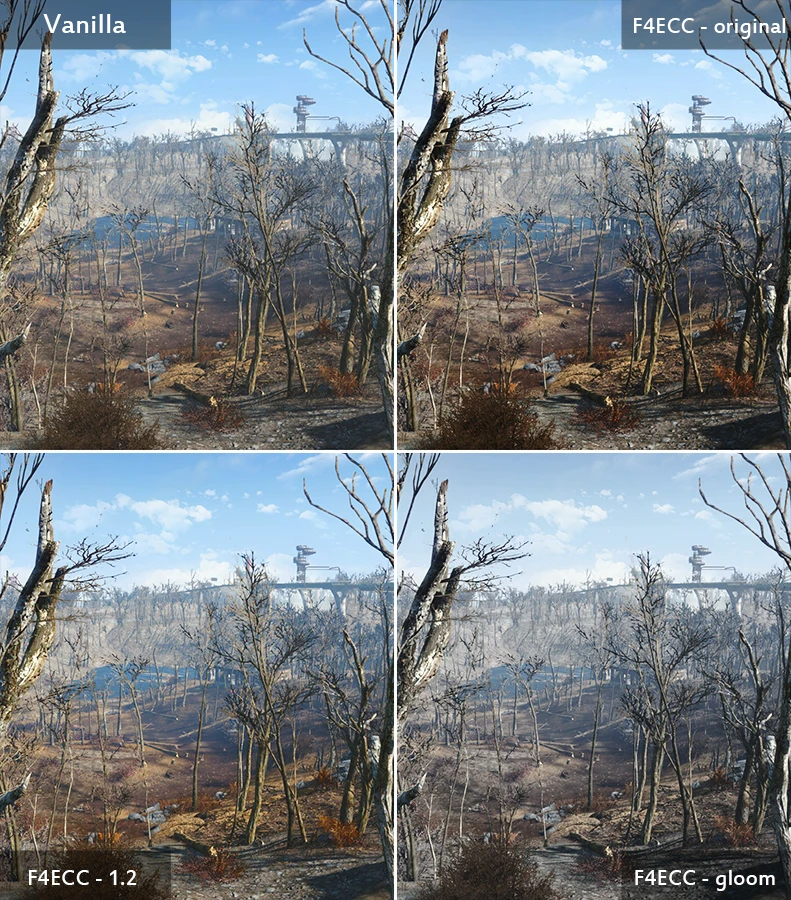
UPDATE: 2 new versions are available! F4CC-1. 2 lessens the darkening effect of the original, and F4CC-Gloom creates a more desaturated, gloomy look.
Check out this awesome video by Hodilton showing the differences between vanilla and the versions of this mod!
UTjbE_twpKE
Fallout 4 Enhanced Color Correction (F4ECC) is a mod that aims to increase the quality of the visuals in Fallout 4 without drastically changing the look of the game. I liked the vibrant colors in the vanilla game, but at times areas felt "washed out" and a bit bland looking. This mod stretches the value range, making the shadows deeper and the highlights more vibrant. As a result, brighter areas feel more alive and darker areas are a bit darker. Additionally, F4ECC subtly boosts certain colors. Because of this, shadows have additional saturation and characters have more liveliness by introducing a subtle red tint.
Fallout 4 Enhanced Color Correction has the same performance as vanilla and can be installed like any other mod! No additional tools or executables needed!
Give F4ECC a try, and say goodbye to the washed out wasteland!
Fallout 4 Enhanced Color Correction is a visual mod by ChaosWWW that improves color and contrast in Fallout 4 with no performance impact. It has 37,976 endorsements and 2.1 million downloads, last updated in December 2015.
✨ Key Features
📊 Pros & Cons
✅ Pros
- Massive community trust: 37,976 endorsements and 2.1 million downloads.
- Zero performance hit — great for low-end rigs.
- Simple visual upgrade that makes the wasteland pop.
⚠️ Cons
- Last updated in 2015 — may not be fully compatible with current game patches.
- Purely cosmetic — if you want gameplay tweaks, this isn't it.
For Fallout 4 players who want a quick, performance-friendly visual boost without messing with ENBs or reshades. Perfect for vanilla purists who just want better colors. Skip if you're looking for gameplay changes or need a mod that's actively maintained.
💡 Beginner Tips
- Since it's a simple texture/color mod, just drop the files into your Data folder or use a mod manager.
- If you're using other visual mods, try this one first to see if you like the color shift before stacking more.
- Check the mod's comments for any known issues with the latest game version, as it's old.
📊 Mod Details
- Game
- Fallout 4 Mods
- Author
- ChaosWWW
- Version
- 1.2
- Downloads
- 2,089,085
- Endorsements
- 37,976
- Category
- Visuals and Graphics
- Created
- 12/8/2015
- Updated
- 12/8/2015
🧩 Commonly Used Together
Users add these mods to the same collections — a real compatibility signal, not an AI guess.
🔧 How to Install Fallout 4 Mods
Download from Nexus.
📖 Full step-by-step install guide for Fallout 4 →
Visit the official mod page for specific installation instructions for this mod.
🎮 Need cheat codes or console commands? Check ur gaming wiki for Fallout 4 commands, item IDs, and more.
Keep browsing — more Fallout 4 mods await