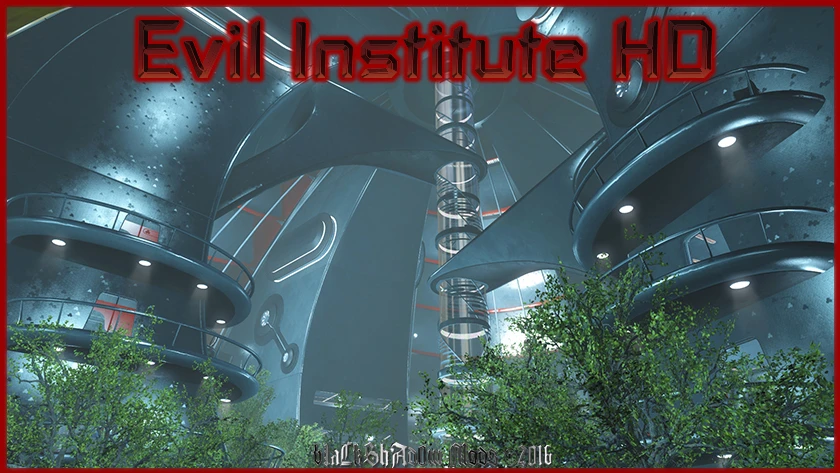
Evil Institute HD
⚪ Last updated 2023⚠️ Install Order · 2 steps
Install in this order, then this mod last — most mods fail to load without their framework and dependencies in place.
Preview
🔍 Analysis
- 👍 1.1% endorsement rate — high engagement, a strong quality signal
- 🏆 #111 of 271 Models and Textures mods in this game by downloads
📋 About This Mod
v-d9faHnS78
a4U1YEhAcwoUz6hwuwS8yQ
This mod is a texture replacer to make the institute look like a more evil place. Three texture sizes available.
Normal and specular included in 2K/4K downloads, 1K uses vanilla maps.
All Weapons HD
Labelled Foot Lockers - A Modders Resource
How to enable modding:
-
[]Navigate to your Fallout 4 Folder at the following location "Documents/My Games/Fallout 4"
[
]Within this folder will be a number of .ini files, highlight "Fallout4Prefs.ini" and "Fallout4.ini".[]Right Click, select Properties and ensure that these are NOT marked as read only.
[]Open Fallout4Prefs.ini with your favourite text editor (we use Notepad++).
[]Navigate to the very bottom and you will see the line . Directly underneath this, add the following line:bEnableFileSelection=1
[]Save and Close
[]Open Fallout4Custom.ini with your favourite text editor. Note that this file was changed from Fallout4.ini following update 1. 2
[]Add the following lines to your Fallout4Custom.inibInvalidateOlderFiles=1sResourceDataDirsFinal=
[]Save and close...
Installing the mod:
- Extract the downloaded content from the MAIN file into your Fallout4 Data folder. It should look like this:C:\Program Files (x86)\Steam\steamapps\common\Fallout4\Data\textures\interiors\Institute\%. DDS
V1. 0 - Initial Upload.
V1. 1 - Fixed Issue With Missing Maps For Wall Stripes.
V1. 2 - Added BA2/.esl File Formats.
V1. 3 - Fixed Issue With BA2 Archive.
V1. 4 - Converts the mod to ESP/FE format which is easier to manage opposed to .esl
- bLaCkShAd0w - Mod Author
- Nexus Mods - For Their Awesome Site
- Bethesda Game Studios - For Fallout 4!
Evil Institute HD is a texture replacer for Fallout 4 that gives the Institute a darker, more sinister appearance. It offers three resolution options (1K, 2K, 4K) with normal and specular maps included in the 2K/4K versions. With over 3,400 endorsements and 319K downloads, it's a popular choice for players seeking a visual overhaul of the Institute.
✨ Key Features
📊 Pros & Cons
✅ Pros
- Huge community trust with 3,437 endorsements and 319K downloads
- Flexible resolution choices to fit your rig and preference
- Adds a darker atmosphere without changing gameplay
⚠️ Cons
- Last updated in 2023 — may not be compatible with the latest Fallout 4 updates
- 1K version lacks custom normal/specular maps, so visual quality is reduced
- No screenshots or detailed previews in the description, so you're flying blind
For Fallout 4 players who want a more menacing Institute without overhauling the whole game. If you're into lore-friendly but darker aesthetics, this is a solid pick. Skip if you prefer the original clean look or want gameplay changes.
💡 Beginner Tips
- Pick the 2K version for a good balance of quality and performance on most systems.
- Use a mod manager like Vortex to easily switch between resolutions if you want to test.
- Make sure to place this mod after other texture mods in your load order to ensure it takes effect.
📊 Mod Details
- Game
- Fallout 4 Mods
- Author
- bLaCkShAd0w
- Version
- 1.4
- Downloads
- 319,166
- Endorsements
- 3,437
- Category
- Models and Textures
- Created
- 2/6/2016
- Updated
- 2/18/2023
🔧 How to Install Fallout 4 Mods
Download from Nexus.
📖 Full step-by-step install guide for Fallout 4 →
Visit the official mod page for specific installation instructions for this mod.
🎮 Need cheat codes or console commands? Check ur gaming wiki for Fallout 4 commands, item IDs, and more.
Keep browsing — more Fallout 4 mods await