Console Name Fix
⚪ Last updated 2017⚠️ Install Order · 3 steps
Install in this order, then this mod last — most mods fail to load without their framework and dependencies in place.
Preview
🔍 Analysis
- 👍 5.4% endorsement rate — high engagement, a strong quality signal
- 🏆 #44 of 62 Bug Fixes mods in this game by downloads
📋 About This Mod
★ About ★
Once upon a time in Bethesda games clicking on an object displayed its name. Bethesda broke name display in Skyrim and hasn't fixed it since!
After selecting the wrong object (ambient fog, grass, the ocean, Preston) for the hundredth time I decided enough was enough.
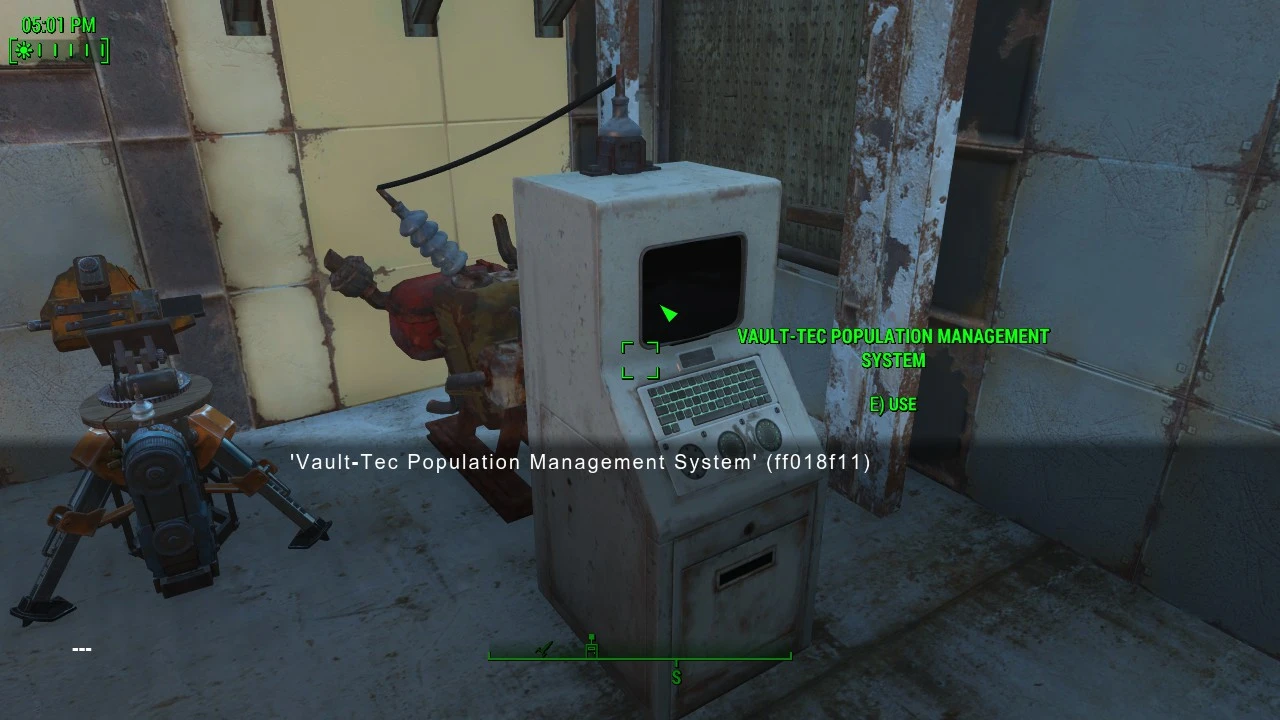
This F4SE plugin restores name display for objects selected in the console. Think of it as a quality-of-life fix.
Before : '' (00002f1f)
After : 'Piper' (00002f1f)
★ Requirements ★
Fallout 4 v1. 10. 20 or higher
F4SE v0. 3. 0 or higher
★ Installation ★
Install with your preferred mod manager, or copy the files in the download to your Fallout 4 Data folder.
This is a F4SE plugin. There is no ESP!
This is a code patch. It does not run in the background, does not attach any scripts to objects and is safe to remove at any time.
★ Screenshots ★
Expand to view.
You might also like:
Bullet Time - Bullet Time for Fallout 4.
Companions Go Home - Send your companions to their original homes or to Home Plate.
Outfit Switcher - Save entire loadouts and swap between them via hotkey. It's like favorites, but entire loadouts at a time.
Visible Weapons - 3rd Person Holster - Holster your weapon on your back, hip, or holster.
Take Cover - New gameplay mechanic - 3rd person cover system! Take cover behind objects and automatically lean out to shoot when you aim down sights.
FO4 Hotkeys - Hotkey anything to any key, including equipment, items, and even console commands.
Companion Command and Tactics - Shout to your companion from wherever you are. Position them, switch up their equipment and be a lot more tactical in your fights.
Journal of the Sole Survivor - Your very own personal journal that you can type in.
QuickTrade - Quicktrade with vendors and settlers.
Vertibird Jump - A F4SE plugin that lets you jump from Vertibirds.
HoloTime - A HUD clock widget.
Companion Status HUD - Your companions' health and AP on your HUD.
Rename Anything - Rename anything in your inventory or in the world, including containers, settlers, and more.
See all of my mods here.
Console Name Fix is a lightweight F4SE plugin for Fallout 4 that replaces the raw form ID in the console with the actual object name, like showing 'Piper' instead of '(00002f1f)'. It's a simple quality-of-life fix for modders and players who use the console frequently, with 3,645 endorsements and 68,034 downloads.
✨ Key Features
📊 Pros & Cons
✅ Pros
- Huge community trust with 3,645 endorsements and 68k downloads
- Solves a real annoyance for console users—no more squinting at hex codes
- Lightweight and focused; does exactly what it says without bloat
⚠️ Cons
- Requires F4SE, so you're locked into that dependency
- Last updated in 2017—might not play nice with the latest game patches or F4SE versions
- No documentation beyond the one-line description, so you're on your own for install
For Fallout 4 modders and power users who live in the console and want to quickly identify objects by name instead of form ID. Also great for anyone who's tired of looking up hex codes. Skip if you never touch the console—this does nothing for regular gameplay.
💡 Beginner Tips
- Make sure you have F4SE installed and launch the game through f4se_loader.exe, not the default launcher, or the plugin won't load.
- If you're using a mod manager like Vortex or MO2, install the plugin as a regular mod and enable it—it'll drop into your Data folder automatically.
- After installing, open the console in-game and click on an object; you should see the name instead of just the ID. If not, double-check your F4SE version matches your game version.
📊 Mod Details
- Game
- Fallout 4 Mods
- Author
- registrator2000
- Version
- 1.2
- Downloads
- 68,034
- Endorsements
- 3,645
- Category
- Bug Fixes
- Created
- 7/17/2017
- Updated
- 9/24/2017
🔧 How to Install Fallout 4 Mods
Download from Nexus.
📖 Full step-by-step install guide for Fallout 4 →
Visit the official mod page for specific installation instructions for this mod.
🎮 Need cheat codes or console commands? Check ur gaming wiki for Fallout 4 commands, item IDs, and more.
Keep browsing — more Fallout 4 mods await