Bash and Grenade key separator
⚪ Last updated 2016⚠️ Install Order · 2 steps
Install in this order, then this mod last — most mods fail to load without their framework and dependencies in place.
Preview
🔍 Analysis
- 👍 3.4% endorsement rate — high engagement, a strong quality signal
- 🏆 #20 of 145 Gameplay mods in this game by downloads
📋 About This Mod
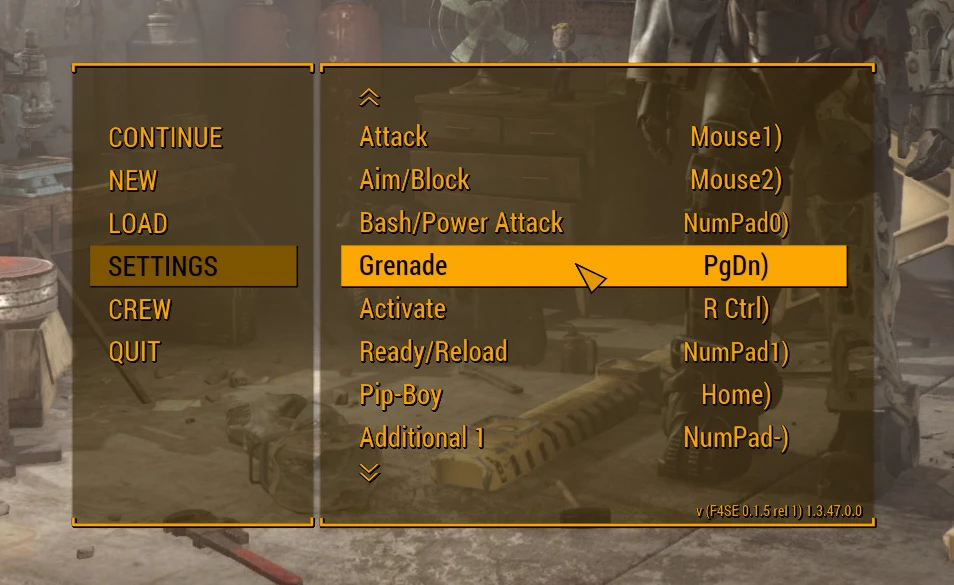
Adds a grenade key into the ingame controls menu to solve the bash/grenade issue.
Install and setup: Extract F4BGS.exe file into fallout4 root dir.
If you have F4CE then you are done, and you can ignore the f4se requirement. if you don't have F4SE already then I suggest to install F4CE instead to get it and extract exe.
As of 1. 4 it supports fThrowDelay in the ini file.
Because of some complaints from people (who are lazy to read mostly) I like to tell you again, use f4ce, do the whole process its not long and then this will work without any intervention! AND FOLLOW INSTRUCTIONS ALWAYS!
If you want the harder way (you have f4se and don't want f4ce, why would you want that?), follow the instructions below: CCM.txt = data\f4se\CustomControlMap.txt CMC.txt = mygames\fallout4\controlmapCustom.txt
1, modify your customcontrolmap.txt add line under melee in section #1: Grenade 0x43 0xff 0xff 1 1 1 0x40 USE mine if you run into problems, its in f4ce, just extract that.
2, modify your translation file
edit $Melee to remove grenade part behind tab
add line $Grenade Grenade
NOTE: in all the lines you'll edit the separator is TAB, not space!! AGAIN NO SPACES!!!
3, Run f4se_loader.exe, restore original controls, set new ones, save them, exit. READ CAREFULLY RESET THE DAMN CONTROLS!!!! that is what you usually mess up, READ dammit! deleting CMC works too, same thing...
note: ANY TIME YOU CHANGE CCM.txt (especially when adding a line to section 1) YOU HAVE TO RESET TO DEFAULT CONTROLS or DELETE CMC.txt, ALWAYS! SO WHEN YOU INSTALL THEN TOO!
How to Use: Run F4BGS.exe to play.This small gameplay mod for Skyrim adds a separate grenade key to the in-game controls menu, allowing players to bind bash and grenade actions to different keys. It solves the conflict where both actions share the same key by default. With 281 endorsements and over 8,000 downloads, it's a community-tested fix for a common annoyance.
✨ Key Features
📊 Pros & Cons
✅ Pros
- Community-approved fix with 281 endorsements and over 8,000 downloads.
- Directly solves a frustrating control conflict without needing extra mods.
- Simple and effective—just install and rebind your keys.
⚠️ Cons
- Last updated in 2016, so it may not be compatible with the latest Skyrim versions or other mods that alter controls.
- Only addresses the key binding issue; doesn't add new grenade types or gameplay features.
- Potential conflicts with other mods that modify the controls menu or input system.
For Skyrim players who use both bash and grenade attacks and are tired of accidentally triggering the wrong one. It's a must-have for melee-focused builds that also rely on grenades. Skip if you don't use grenades or if you're on a version of Skyrim that already separates these keys.
💡 Beginner Tips
- After installing, go to the Controls section in the game's settings to assign your preferred grenade key.
- If you use a mod manager like Vortex or Mod Organizer 2, install this mod through it to keep your load order clean.
- Test the new key binding in combat to ensure it doesn't conflict with other actions you've rebound.
📊 Mod Details
- Game
- Fallout 4 Mods
- Author
- retekkid
- Version
- 1.4
- Downloads
- 8,366
- Endorsements
- 281
- Category
- Gameplay
- Created
- 3/18/2016
- Updated
- 3/21/2016
🔧 How to Install Fallout 4 Mods
Download from Nexus.
📖 Full step-by-step install guide for Fallout 4 →
Visit the official mod page for specific installation instructions for this mod.
🎮 Need cheat codes or console commands? Check ur gaming wiki for Fallout 4 commands, item IDs, and more.
Keep browsing — more Fallout 4 mods await