Akira a save game file
⚪ Last updated 2015⚠️ Install Order · 2 steps
Install in this order, then this mod last — most mods fail to load without their framework and dependencies in place.
Preview
🔍 Analysis
- 👍 5.3% endorsement rate — high engagement, a strong quality signal
- 🏆 #16 of 20 Saved Games mods in this game by downloads
📋 About This Mod
No, not some Japanimation thing.
No, you will not find some Japanimation reference here.
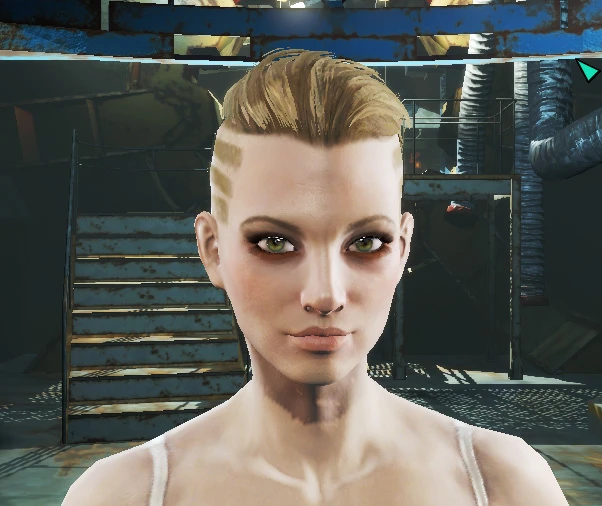
Akira is the name of one of my D&D characters. I created her in 1981.
The name Akira was fortunately included in the game's audio files, so if you leave the name, she will be addressed by it.
The save is directly outside of Vault 111. It is the only initial save I have of her.
INSTALLATION:
Place this save file into your saves folder usually found in My Documents\My Games\Fallout4\Saves
When you go to load the game, hit T to select character and then either click Show All Characters, or scroll through the list until you see Akira.
NAME AND STAT CHANGE:
To change her name and SPECIAL stats, click the tilde key ` and type in showspecialmenu then hit enter.
Please excuse my extremely low rez screenshots of her. My main rig died and I am on an abacus wired to a Lite-Brite. It is literally less than the minimum specs required to run the game.
RECOMMENDED MODS:
Eyes of Beauty
Eye Normal Map Fix
📊 Mod Details
- Game
- Fallout 4 Mods
- Author
- Mr Dave
- Version
- 1
- Downloads
- 6,521
- Endorsements
- 345
- Category
- Saved Games
- Created
- 12/1/2015
- Updated
- 12/19/2015
🔧 How to Install Fallout 4 Mods
Download from Nexus.
📖 Full step-by-step install guide for Fallout 4 →
Visit the official mod page for specific installation instructions for this mod.
🎮 Need cheat codes or console commands? Check ur gaming wiki for Fallout 4 commands, item IDs, and more.
Keep browsing — more Fallout 4 mods await