Unique Dogmeat
⚪ Last updated 2009⚠️ Install Order · 2 steps
Install in this order, then this mod last — most mods fail to load without their framework and dependencies in place.
Preview
🔍 Analysis
- 👍 4.4% endorsement rate — high engagement, a strong quality signal
- 🏆 #155 of 429 Models and Textures mods in this game by downloads
📋 About This Mod
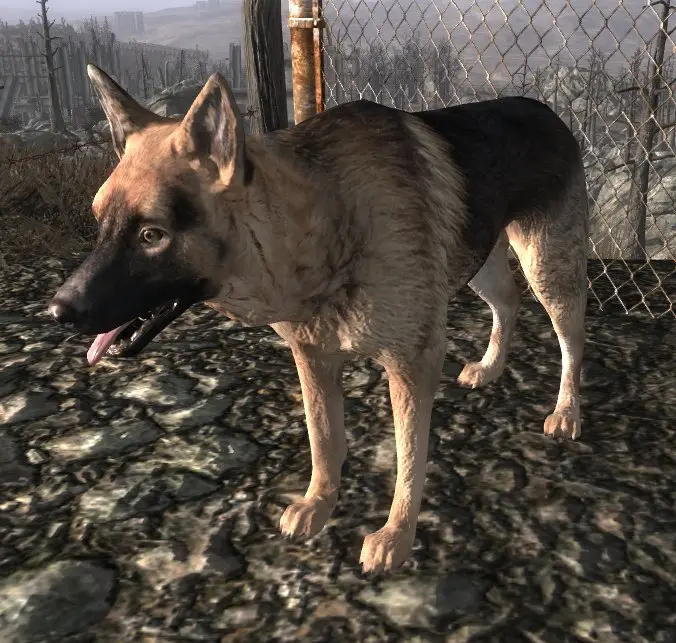
Dogmeat - Steak Edition
*** 4/21/09 Please Note: I\'ve just noticed this uses the name mesh name as Dogmeat Outfits. Still compatible with Dogmeat Leather Armor though. I will update tonight. Sorry for the inconvenience. (note that their esp\'s will be incompatible either way, since only one can change Dogmeat.) *
What is it?
===========
The purpose is to let you change Dogmeat\'s look without changing other dogs. A mesh (dogmeatskin.nif) that points to different textures (dogmeatskin.dds), so that replacing Dogmeat\'s textures only affects him.
German Shepherd can be used with Dogmeat Leather Armor v1. 1, just don\'t use the esp in the German Shepherd download.
]If you don\'t have any mods that alter Dogmeat, the included esp will work. It will make Dogmeat the only one that is a German Shepherd.
[]If you have a mod that alters Dogmeat already, you will have to modify that mod if you want Dogmeat to be the only one... instructions below in HOW-TO.
[]If you have a mod that alters Dogmeat and you don\'t care if Dogmeat and all dogs look the same, you can choose not to use the esp and just rename the texture to overwrite dog.dds.
[]If you use compatible mods (like the dogmeat armor), you don\'t need the included esp.
This mod has two parts:
[]Part 1 is a modder\'s resource, to be used by any mod that changes Dogmeat\'s stats, AI, etc.
[]Part 2 is a player\'s resource, which will include an array of replacer furs. I have for now uploaded a German Shepherd pack--it is NOT stolen from alienslof, the textures are already in the vanilla game bsa, they\'re just not used. This part is not finished yet, but will include at least 4 furs and 5 eyes when released. I expect to have it down within a few days. Part 2 when released will be a Fallout Mod Manager scripted installed, so when activating, it will ask you a series of questions to make it idiot-proof, complete with pictures of each option. For example: What body shape? Dog, vicious, puppy, vicious puppy. What fur? Default mutt, vicious/ghoul, snow dog, one-eyed dog, one eyed dog 2 (scars on body). What eyes? Yellow, blue, one yellow one blue, vicious, one dead.
The reason is, as the game is right now, Dogmeat by default shares a model and texture with other dogs.
Dogmeat and all dogs use dogskin.nif. Dogskin.nif (model) points to dog.dds (texture). If you replace dog.dds, you change Dogmeat along with other dogs. In order to have Dogmeat unique, you need to do two things: you need to give him a custom mesh to point to a different set of textures, and you need a plugin file to make him use that new mesh.
The modder\'s resource part is a set of pre-made meshes, textures, and a plugin file. All you need to do is install this mod, then replace dogmeatskin.dds texture with the one you want. If you have no mods that alter Dogmeat, the included esp in the download is all you need. If
Unique Dogmeat is a Fallout 3 mod that lets you customize Dogmeat's appearance without affecting other dogs. It provides a custom mesh that points to separate textures, so texture replacements only apply to Dogmeat. Ideal for players who want a unique look for their canine companion.
✨ Key Features
📊 Pros & Cons
✅ Pros
- Community favorite with 1,233 endorsements and over 28,000 downloads
- Does exactly what it says: isolates Dogmeat's textures from other dogs
- Lightweight and easy to use for texture modding
⚠️ Cons
- Last updated in 2009, so may not be compatible with newer Fallout 3 versions or mods
- Requires manual file placement, which might confuse modding newcomers
For Fallout 3 players who want to give Dogmeat a unique look without affecting other dogs. Perfect for texture modders who want a clean base to work from. Skip if you're looking for gameplay changes or if you play with mods that overhaul all dog textures.
💡 Beginner Tips
- Place the mesh and texture files in your Fallout 3 Data folder, then enable the mod via the launcher or mod manager.
- If you're using a mod manager like FOMM, you can install the mod as a package for easier management.
- Check the mod's file structure to ensure you're replacing the correct textures for Dogmeat only.
📊 Mod Details
- Game
- Fallout 3 Mods
- Author
- pintocat
- Version
- 0.1
- Downloads
- 28,093
- Endorsements
- 1,233
- Category
- Models and Textures
- Created
- 4/18/2009
- Updated
- 4/18/2009
🔧 How to Install Fallout 3 Mods
Download from Nexus.
📖 Full step-by-step install guide for Fallout 3 →
Visit the official mod page for specific installation instructions for this mod.
🎮 Need cheat codes or console commands? Check ur gaming wiki for Fallout 3 commands, item IDs, and more.
Keep browsing — more Fallout 3 mods await