Triple Buffering (FOSE)
⚪ Last updated 2024This mod was updated after the recent game update — it should work on the current version. (Fallout 3 - Game Launcher Update)
⚠️ Install Order · 3 steps
Install in this order, then this mod last — most mods fail to load without their framework and dependencies in place.
Preview
🔍 Analysis
- 👍 2.1% endorsement rate — high engagement, a strong quality signal
- ✅ Updated 5 days after the latest game patch — actively maintained
- 🏆 #8 of 13 Performance mods in this game by downloads
📋 About This Mod
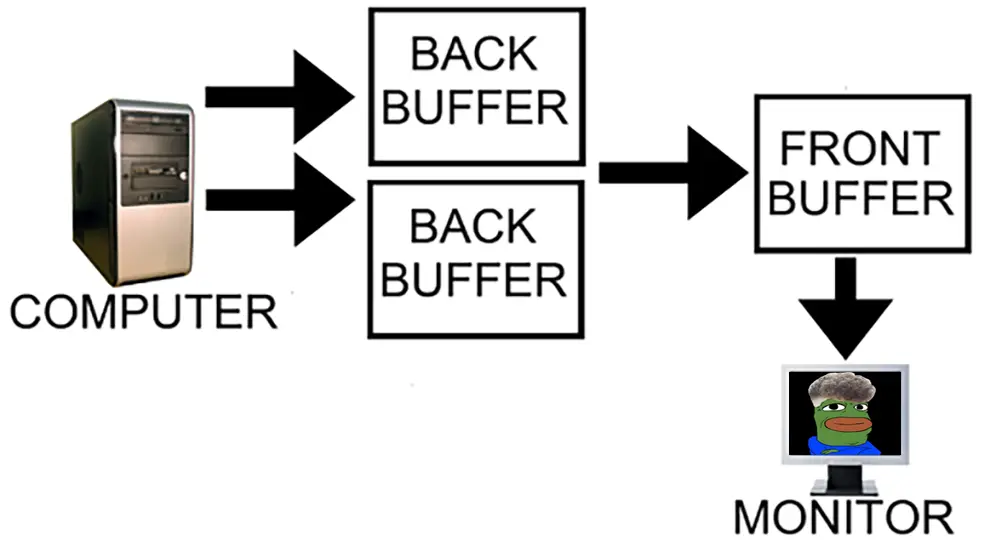
Enables triple buffering, which gets rid of problematic framerate halving on FPS drops and instability caused by the default double-buffer V-Sync.
Triple buffering offers slightly smoother overall performance at the cost of slightly increased latency, but your mileage may vary.
For this to do anything, V-sync must be enabled in game launcher (or the INI). If you use external V-sync or play without it altogether, you won't benefit from this mod.
Functions the same as bToggleTripleBuffering option in New Vegas Tick Fix.
Requires FOSE 1. 3b2.
Source code is available on Github.
A FOSE plugin that adds triple buffering to Fallout 3, improving frame pacing and reducing stutter. With 420 endorsements and nearly 20k downloads, it's a popular performance tweak for modded setups.
✨ Key Features
📊 Pros & Cons
✅ Pros
- Community-approved with 420 endorsements and nearly 20k downloads.
- Simple drop-in plugin—no complex setup.
- Directly addresses stutter and frame pacing issues.
⚠️ Cons
- Requires FOSE, so it won't work on the Steam/GOG versions without it.
- No detailed documentation on compatibility with other mods.
- Last updated in June 2024—may not be tested with the latest game patches.
For Fallout 3 players who experience stutter or uneven frame pacing, especially those with high refresh rate monitors. Skip if you're playing without FOSE or prefer ENB-style tweaks.
💡 Beginner Tips
- Make sure FOSE is installed and you launch the game via fose_loader.exe, not the default launcher.
- If you use a mod manager like Vortex, you can install the plugin directly, but manual placement into the Data folder works too.
- Combine with a frame limiter to avoid excessive FPS that can break physics.
📊 Mod Details
- Game
- Fallout 3 Mods
- Author
- c6
- Version
- 1.0
- Downloads
- 19,871
- Endorsements
- 420
- Category
- Performance
- Created
- 6/9/2024
- Updated
- 6/9/2024
🧩 Commonly Used Together
Users add these mods to the same collections — a real compatibility signal, not an AI guess.
🔧 How to Install Fallout 3 Mods
Download from Nexus.
📖 Full step-by-step install guide for Fallout 3 →
Visit the official mod page for specific installation instructions for this mod.
🎮 Need cheat codes or console commands? Check ur gaming wiki for Fallout 3 commands, item IDs, and more.
Keep browsing — more Fallout 3 mods await