The ENB of the Apocalypse
⚪ Last updated 2014⚠️ Install Order · 2 steps
Install in this order, then this mod last — most mods fail to load without their framework and dependencies in place.
Preview
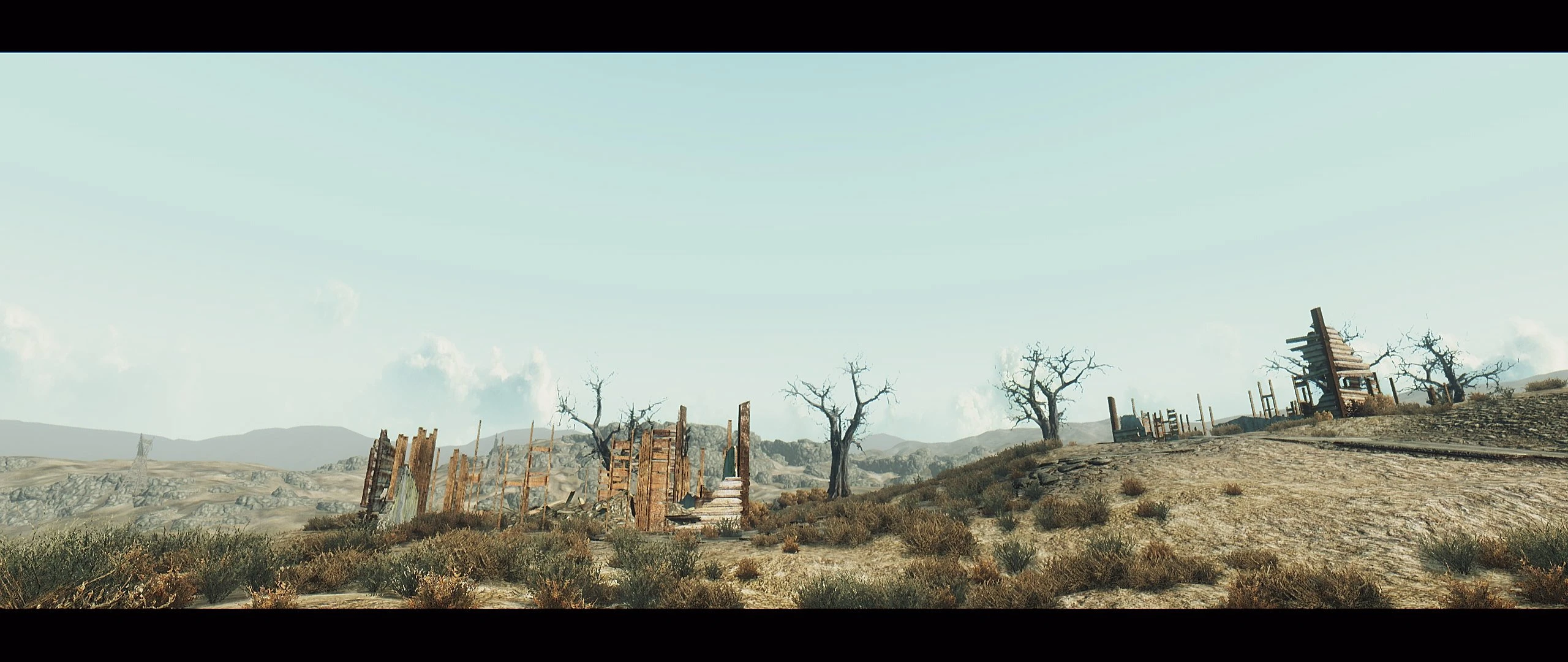
🔍 Analysis
- 👍 2.9% endorsement rate — high engagement, a strong quality signal
- 🏆 #65 of 420 Gameplay Effects and Changes mods in this game by downloads
📋 About This Mod
The New Vegas version of this ENB can be found here
- []Boris Vorontsovs’ ENB series (SHIFT+F12 TO TOGGLE)[]SweetFX by CeeJay.dk (SCROLL LOCK to TOGGLE)
Videos: D6xxhcTHJDQ08I_m8XgR0A A showcase by Hodilton, and some random footage by me
Installation:
- []First you need to download these ENB files.[]Unzip the downloaded file; it contains 2 folders, Wrapper and Injector; copy the files from the “Wrapper” folder to your Fallout 3 folder (Not DATA!)(Note: Some of you may have to use the “Injector” files instead, please read the Injector/Wrapper note below)[]Download the file uploaded here, unzip it, and copy all the files inside the 'Core' folder to your Fallout 3 folder (Again NOT DATA!), overwrite when prompted.[]Disable AA in Falloutlauncher.exe (SweetFX adds post-process AA with a lower performance cost)[]Run Fallout 3![]OPTIONAL: The ‘Optional Effects’ folder contains optional effects (Really!); in order to use them just copy them to your Fallout 3 folder (Overwrite)
Common Issues: These are the common problems that may be faced by ENB users:
- [] Weird Flickering/White Squares on screen: This is because you have not switched Anti-aliasing off in Falloutlauncher.[] A lot of Jaggies: By default SMAA is enabled through SweetFX; if jaggies still persist, it most likely means that SweetFX isnt working.[]MSI Afterburner OSD/ FRAPS: Overlays are not compatible with ENB, they will cause CTDs even before the main menu; FRAPS over-rides SweetFX, so if you have FRAPS on before you start the game, SweetFX wont start and only the ENB will work.[]Falloutlauncher Settings: All Antialiasing must be disabled (even graphic card control panel) and HDR must be enabled.[]You need the latest version of Direct X[]Note that the interiors of this ENB are slightly on the darker side (has to be kept that way in order to preserve the nights), I recommend using Flashlight or SmoothLight - Pip-Boy Light Enhancer
- Make sure that SweetFX is working: there is a big difference between it being ON/OFF, check the screens below. (Left=OFF)
A lighting overhaul for Fallout 3 that enhances the game's visuals with improved lighting effects. With 1,576 endorsements and 55,123 downloads, it's a popular choice for players seeking a more atmospheric wasteland. Last updated in 2014, it remains a classic for fans of the original game.
✨ Key Features
📊 Pros & Cons
✅ Pros
- Community favorite with 1,576 endorsements — clearly a lot of players dig it.
- Massive download count (55k+) shows it's been tried and tested by many.
- Simple concept: just a lighting overhaul — no gameplay changes, so it's safe for purists.
⚠️ Cons
- Last updated in 2014 — might have compatibility issues with newer mods or patches.
- Lighting overhauls can be performance-heavy on older systems — no optimization info given.
For Fallout 3 veterans who want a fresh look without altering gameplay. If you're a modder looking to enhance atmosphere, this is a solid pick. Skip if you want gameplay changes — this is purely visual.
💡 Beginner Tips
- Since it's a lighting mod, make sure your graphics drivers are up to date to avoid weird glitches.
- If you're using a mod manager like FOMM, just drop the files in and activate — no load order worries for a simple overhaul.
- Test in a few different areas (like Megaton and the wasteland) to see if the lighting suits your taste before committing.
📊 Mod Details
- Game
- Fallout 3 Mods
- Author
- Shrutesh
- Version
- 2.0
- Downloads
- 55,123
- Endorsements
- 1,576
- Category
- Gameplay Effects and Changes
- Created
- 12/22/2012
- Updated
- 11/6/2014
🔧 How to Install Fallout 3 Mods
Download from Nexus.
📖 Full step-by-step install guide for Fallout 3 →
Visit the official mod page for specific installation instructions for this mod.
🎮 Need cheat codes or console commands? Check ur gaming wiki for Fallout 3 commands, item IDs, and more.
Keep browsing — more Fallout 3 mods await