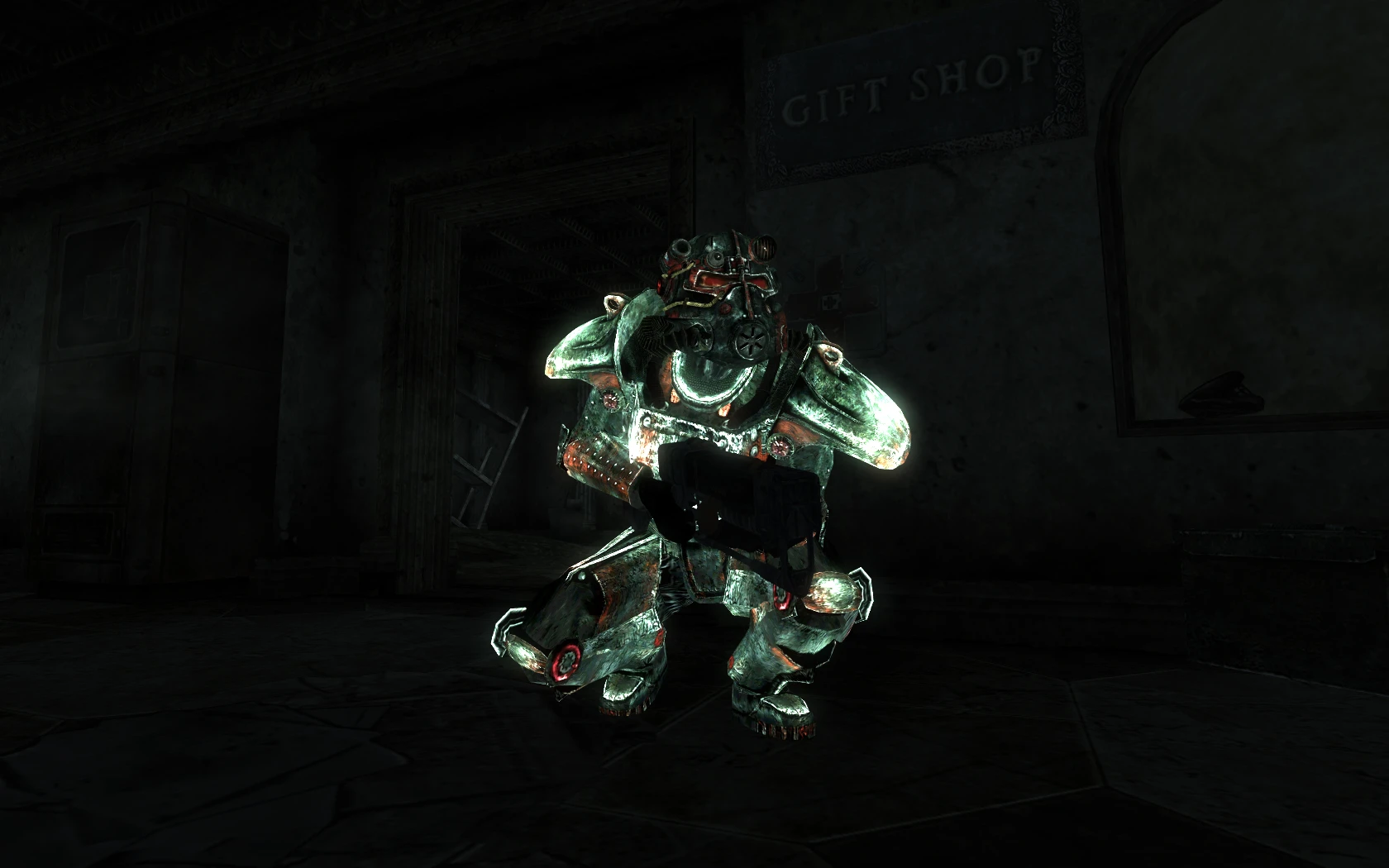
Outcast DX - FWE patch

⭐ — (84 endorsements) 📥 1,490 downloads 📌 v1.2 📅 6/30/2010
⚪ Last updated 2010

By pintocat · Armour

⬇ Download Mod Source: Nexus Mods ↗ 📅 Updated: 7/1/2010 📅 Created: 6/30/2010
⚠️ Install Order · 2 steps
1🛠️ FOSE — Fallout Script Extender Download ↗
2🔧 UFO3P — Unofficial Fallout 3 Patch Download ↗

Install in this order, then this mod last — most mods fail to load without their framework and dependencies in place.

🔍 Analysis

  • 👍 5.6% endorsement rate — high engagement, a strong quality signal
  • 🏆 #27 of 199 Armour mods in this game by downloads

📋 About This Mod

Compatibility patch for weijiesen\'s Outcast DX armor textures and FWE (Fallout Wanderer\'s Edition)

=============== Description: =============== Patch for weijiesen\'s Outcast DX to work with FWE. =============== Details: =============== Update 1. 2 (7/1/2010): Changed glove from BOS grey glove to proper Outcast black glove. Update 1. 1 (6/30/2010): Fixed mesh pointer on helmet and dirty world reference, thanks Cag93. This is a patch to make weijiesen\'s Outcast DX armor texture work with FWE (Fallout Wanderer\'s Edition).

  • []You still need the Outcast DX download for the meshes, textures, etc. []Load this after FWE esp plugins.
  • You don\'t need the original Outcast DX.esp with this, but if you want to leave it on, load this after the original.
Outcast DX creates a new model/texture/texture set for Outcast armor, so depending on load order, other mods changing the Outcast armor will either be overridden by Outcast DX, or the Outcast DX changes will be lost. FWE changes the weight, durability, and DR... without a patch either the FWE changes are lost, or the glowing is messed up (the full armor would glow). This is just a patch so the two will play nicely together. =============== Requirements: =============== Fallout 3 Patch 1. 7 Outcast DX 0. 9 FWE 5. 04 =============== Install: =============== 1. Extract the files from the archive. 2. Copy files to (install folder)\\Fallout 3\\Data\\ 3. Start Fallout 3 Launcher, click \'Data Files\', place a checkmark beside the .esp file. =============== Un-Install: =============== 1. Start Fallout 3 Launcher, click Data Files, uncheck the .esp file. 2. Delete the files/folders associated with the mod. =============== Compatibility: =============== No compatiblity issues so far. =============== Bugs/Issues: =============== No known issues so far, please let me know if you find any. =============== History: =============== 1. 0 6/30/2010 - Initial Release =============== Contact: =============== pintocat =============== Recommended Mods: =============== None =============== Credits: =============== Thanks to Bethesda for creating Fallout 3. Thanks to InsanitySorrow for ReadMe Generator this readme is based on. Thanks to weijiesen for Outcast Dx. Thanks for FWE team for FWE. =============== Tools Used: =============== GECK Fallout 3 ReadMe Generator =============== License/Legal: =============== This file is provided as is and the author holds no responsiblity for anything that may come to happen from using this file.

📊 Mod Details

Game
Fallout 3 Mods
Author
pintocat
Version
1.2
Downloads
1,490
Endorsements
84
Category
Armour
Created
6/30/2010
Updated
7/1/2010

🔧 How to Install Fallout 3 Mods

Download from Nexus.

📖 Full step-by-step install guide for Fallout 3 →

Visit the official mod page for specific installation instructions for this mod.

🎮 Need cheat codes or console commands? Check ur gaming wiki for Fallout 3 commands, item IDs, and more.

Keep browsing — more Fallout 3 mods await

📋 All Fallout 3 Mods 🏆 Top 25 📂 More Armour 👤 More by pintocat 🔎 Similar Mods 🌐 Best Armour (All Games) 💾 Save Files 🔀 Check Compatibility ⚖️ Compare Mods 🆕 New Mods