Motion Blur and Depth of Field Modular
⚪ Last updated 2009⚠️ Install Order · 2 steps
1🛠️ FOSE — Fallout Script Extender Download ↗
2🔧 UFO3P — Unofficial Fallout 3 Patch Download ↗
Install in this order, then this mod last — most mods fail to load without their framework and dependencies in place.
Preview
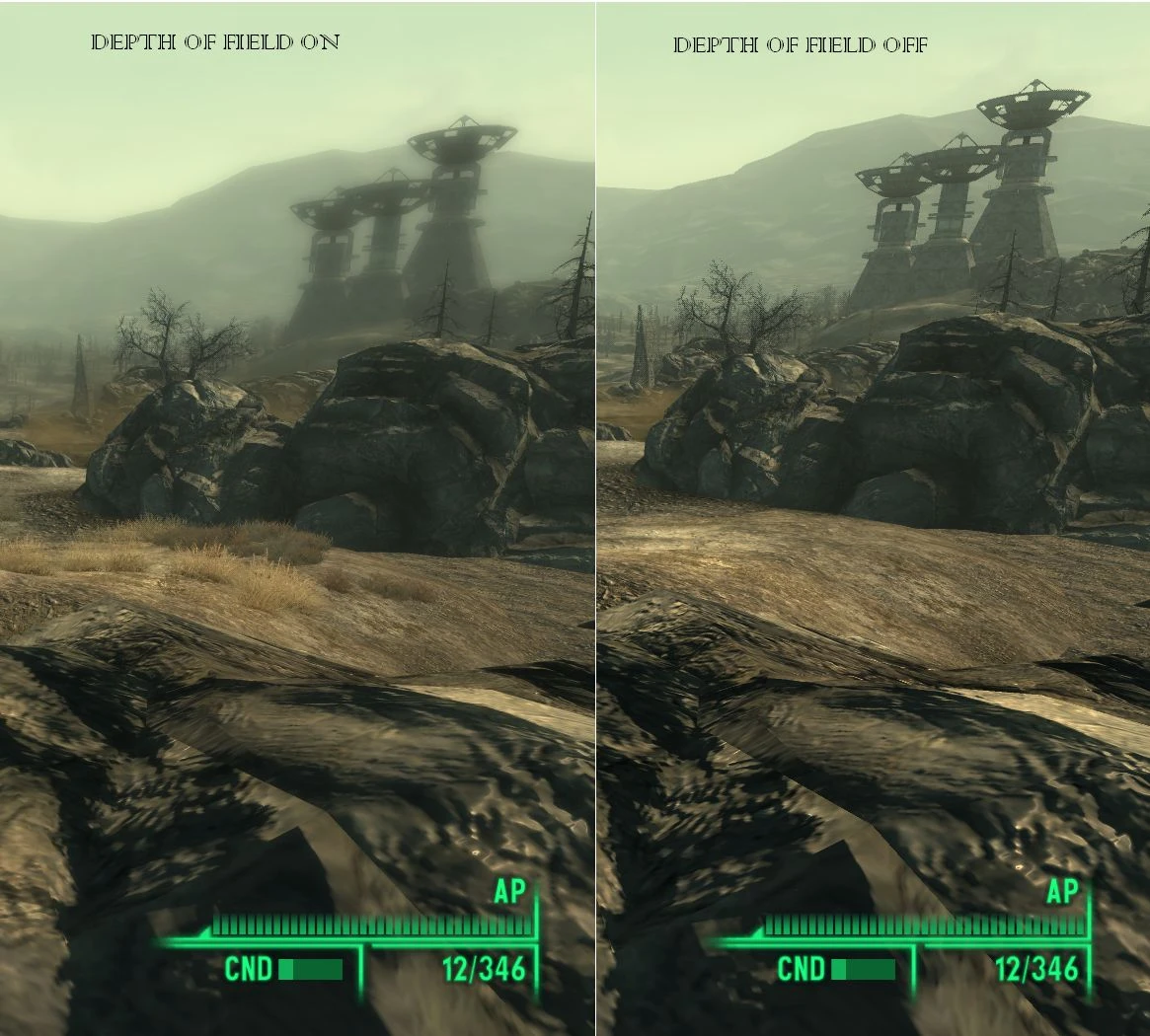
🔍 Analysis
- 👍 2.5% endorsement rate — high engagement, a strong quality signal
- 🏆 #45 of 217 Miscellaneous mods in this game by downloads
📋 About This Mod
✅ ---------------
✅ VERSION 1. 1b
✅ ---------------
✅ More FPS (from V1. 1a)
✅ V1. 1b: Indoor optimization ESPs have better FPS in exterior cells (Outdoors).
✅ Details of files:
- ---------------
- VERSION 1. 1b
- ---------------
- More FPS (from V1. 1a)
- V1. 1b: Indoor optimization ESPs have better FPS in exterior cells (Outdoors).
- Details of files:
- ------------
- DEPTH OF FIELD
- ------------
- 5 different levels of strength, going upwards:
- Subtle
- Medium
- Strong
- Extreme
- Insane
- 3 different levels of distance:
- Close
- Far
- Very Far
- 2 different folders:
- Without Indoor Optimization:
- This contains the files that do not change or turn off the DOF effect in interiors in any way,
- only recommended for PCs that don\'t get a slow down because of the effect indoors, you will have to test that yourself.
- With Indoor Optimization (RECOMMENDED)
- This completely turns off the DOF effect indoors, speeding up FPS.
- NOTE: Insane Esps are not intended to work perfectly, no complaining if you see a visual glitch!
- ------------
- MOTION BLUR
- ------------
- 5 different levels of strength, going upwards:
- Subtle
- Medium
- Strong
- Extreme
- Insane
- That\'s it. They have been optimized and should NOT reduced FPS by more than 1-2, if any...
- ------------
- INSTRUCTIONS
- ------------
- Installation:
- 1. Open the .rar file you downloaded
- 2. Drag, or extract the file you would like to use to your data folder(you can also extract all of them, and then pick one later).
- 3. Repeat with other .rar file if you downloaded one.
- 4. Open Fallout 3 Launcher, or FOMM, go to Data Files, and tick the checkbox next to the 2 files you choose.
- 5. Run the game...
- Uninstallation:
- Either-
- 1. Uncheck the 2 files you chose in Data Files
- OR
- 2. Go to your data folder, usually C:\\Program Files\\Bethesda softworks\\Fallout 3\\Data and delete the 2 files you chose before.
- -------------
- INCOMPATIBILITY
- -------------
- Motion Blur-
- None.
- Depth Of Field-
- StapleNinja\'s DOF(Why would you combine them?)
- -------------
- FUTURE PLANS IN ORDER
- -------------
- Option to automatically turn off Motion Blur indoors (just in case)
- Optional file:
- Drug Effects-
- Visuals activate when taking certain drugs, i.e. More saturation for Jet, Inverted(Almost) colours for Psycho, Double Vision for any alcohol, etc.
- Include a menu, for only 1 ESP file
- ------------------
- CHANGELOG
- ------------------
- V1. 1b:
- Interior optimization ESPS (in the folder Depth of Field-With Indoor Optimization) should no longer be slower than the other ESPs outdoors (Depth of Field-WithOUT Indoor Optimization). I FULLY recommend these.
- V1. 1:
- Subtle Motion Blur FPS Drop Fixed (If other Motion Blur files gave you any slowdowns then these are fixed too).
- Depth Of Field With no Indoor optimization now available, for people where it runs smooth indoors anyways.
- Motion blur option Insane added.
- Motion blur reduced in general.
- New Optional file added:-V. A. T. S. DOF effect.
- There should be less FPS redcution!
- V1. 0:
- Distances Adjusted correctly.
- Added Insane option for DOF. Causes graphical anomalies!
- 0. 75 Bet
🤖 AI-enhanced — based on mod data
This Fallout 3 mod adds Depth of Field, Motion Blur, or both via modular .esp files. You pick the effect you want. It's a classic post-processing mod from 2009 with a solid following.
✨ Key Features
Adds Depth of Field effect to Fallout 3.
Adds Motion Blur effect to Fallout 3.
Modular .esp files let you choose Depth of Field, Motion Blur, or both.
Similar to StapleNinja's mod but with modular options.
📊 Pros & Cons
✅ Pros
- Community favorite with 604 endorsements and over 23k downloads.
- Modular design means you can pick just the effect you want without extra bloat.
- Lightweight and simple—just drop in the .esp you need.
⚠️ Cons
- Last updated in 2009—may have compatibility issues with modern setups or DLC.
- Visual effects are subjective; some players may find them distracting or outdated.
🎯 Is This For You?
For Fallout 3 players who want to add cinematic depth of field or motion blur without a heavy ENB. If you're a purist who likes vanilla visuals, skip this—it's purely cosmetic.
For Fallout 3 players who want to add cinematic depth of field or motion blur without a heavy ENB. If you're a purist who likes vanilla visuals, skip this—it's purely cosmetic.
📦 Install:Easy· Under 1 minute
💡 Beginner Tips
- Place the chosen .esp file in your Fallout 3 Data folder and activate it in the launcher or mod manager.
- If you have Fallout 3 GOTY, test with all DLC active to ensure no conflicts.
- Try each .esp separately to see which effect you prefer before combining.
📊 Mod Details
- Game
- Fallout 3 Mods
- Author
- FuzzySlash
- Version
- 1.1b
- Downloads
- 23,751
- Endorsements
- 604
- Category
- Miscellaneous
- Created
- 6/18/2009
- Updated
- 6/20/2009
🔧 How to Install Fallout 3 Mods
Download from Nexus.
📖 Full step-by-step install guide for Fallout 3 →
Visit the official mod page for specific installation instructions for this mod.
🎮 Need cheat codes or console commands? Check ur gaming wiki for Fallout 3 commands, item IDs, and more.
Keep browsing — more Fallout 3 mods await