Loot Menu
⚪ Last updated 2021⚠️ Install Order · 3 steps
Install in this order, then this mod last — most mods fail to load without their framework and dependencies in place.
Preview
🔍 Analysis
- 👍 1.5% endorsement rate — high engagement, a strong quality signal
- 🏆 #21 of 420 Gameplay Effects and Changes mods in this game by downloads
📋 About This Mod
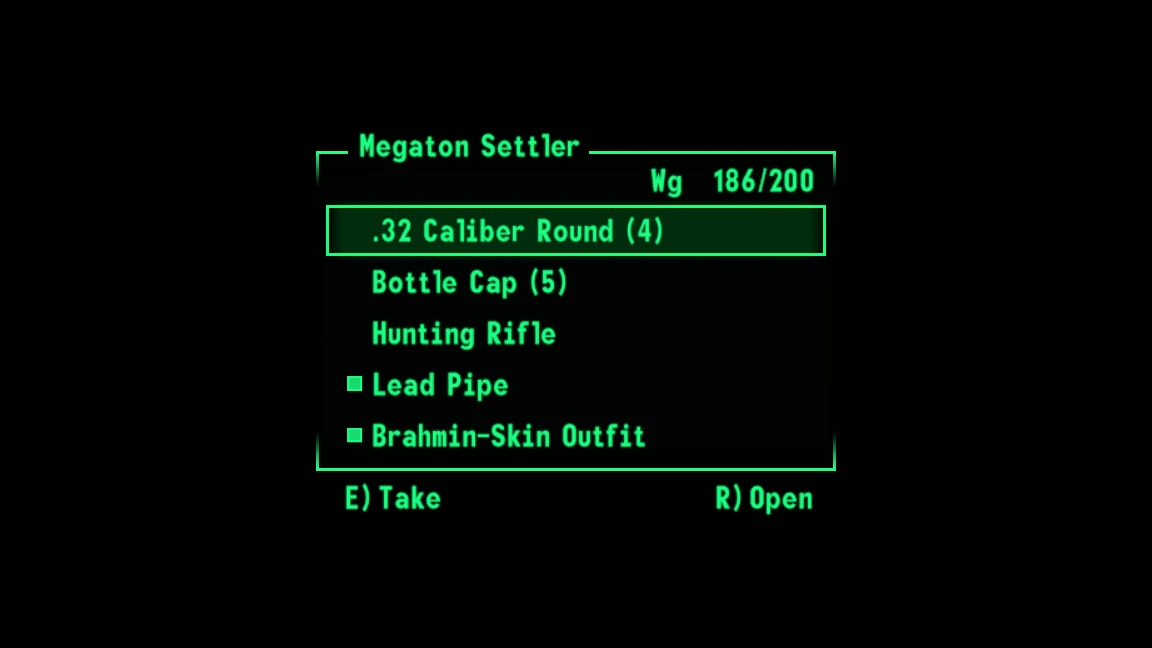
Loot menus in real-time!
Adds a real-time menu that can be used to take or equip items from containers and dead NPCs.
Take items with the 'Activate' key. Scroll with mouse-wheel or DPAD. Open containers with the 'Reload' key.
Holding shift or DPAD Left/Right allows equipping or taking all items.
The INI allows configuring the max number of items, whether the vanilla prompt is hidden, and various UI properties.
Items are sorted for ease of use:
Quest Items, Weightless Items, Keys, Notes, Books, Ammo, Aid, Weapons, Armor and Misc.
Example
r3mHUZPG7h0
Installation
Use Mod Organizer 2/Nexus Mod Manager/FOMM, or manually extract the .zip file into your Fallout 3 'Data' folder. It is safe to install, update or uninstall mid-playthrough (a new save is not required).
For several other optional Quality-of-Life improvements see:
lStewieAl's Tweaks
Source
Available in downloads.
Credits
Thanks jazzisparis for their NV functions which proved essential for porting this mod.
Yvileapsis for the original mod.
Brodie Thiesfield for their SimpleINI library.
Finally thanks AVeryUncreativeUsername and your testing, feedback and support.
Loot Menu is an engine plugin for Fallout 4 that replaces the default looting interface with a real-time menu, based on Just Loot Menu by Yvileapsis. It has 2,998 endorsements and 205,077 downloads, last updated in December 2021.
✨ Key Features
📊 Pros & Cons
✅ Pros
- Huge community trust: 2,998 endorsements and over 205k downloads.
- Real-time looting keeps the action going—no more pausing to grab loot.
- No esp means it's lightweight and won't clutter your load order.
⚠️ Cons
- Last updated in 2021—might have issues with newer game patches or DLC.
- Requires the original Just Loot Menu mod as a base, so you need to install that first.
For Fallout 4 players who want a more immersive, fast-paced looting experience without pausing the game. If you're tired of the vanilla pause-and-loot menu and want to keep moving, this is for you. Skip if you prefer the classic pause menu or want a full overhaul with extra features.
💡 Beginner Tips
- Make sure you have the original Just Loot Menu installed first, as this mod is built on it.
- Since it's an engine plugin, it won't show up in your load order—verify it's active in your mod manager.
- Test in a low-stakes area first to get used to looting while enemies might still be around.
📊 Mod Details
- Game
- Fallout 3 Mods
- Author
- lStewieAl - Yvileapsis
- Version
- 1.5
- Downloads
- 205,077
- Endorsements
- 2,998
- Category
- Gameplay Effects and Changes
- Created
- 9/16/2020
- Updated
- 12/18/2021
🧩 Commonly Used Together
Users add these mods to the same collections — a real compatibility signal, not an AI guess.
🔧 How to Install Fallout 3 Mods
Download from Nexus.
📖 Full step-by-step install guide for Fallout 3 →
Visit the official mod page for specific installation instructions for this mod.
🎮 Need cheat codes or console commands? Check ur gaming wiki for Fallout 3 commands, item IDs, and more.
Keep browsing — more Fallout 3 mods await