Interior Optimization Project
🟡 Updated this year⚠️ Install Order · 2 steps
Install in this order, then this mod last — most mods fail to load without their framework and dependencies in place.
Preview
🔍 Analysis
- 👍 1.9% endorsement rate — high engagement, a strong quality signal
- 🏆 #12 of 13 Performance mods in this game by downloads
📋 About This Mod
>> The TTW version can be found here <<
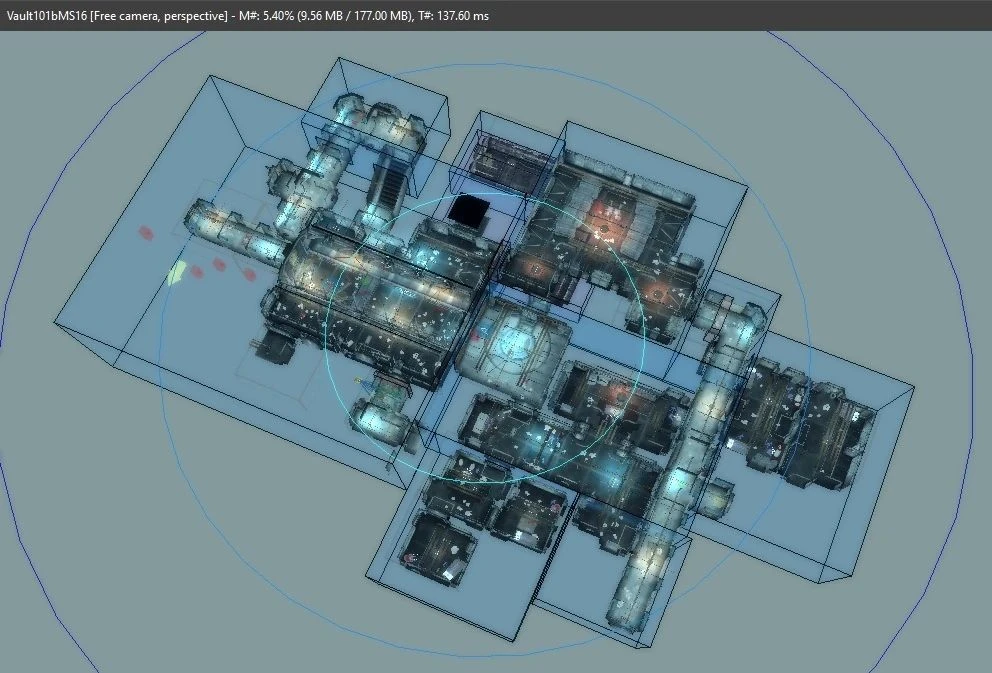
This mod is the Fallout 3 equivalent to New Vegas' ExRB - Extended Roombounds, though far bigger in scope, as I've optimized more than 200 interior cells (217, to be exact, the list of which can be found at the bottom) across both the main game and its expansions, many of which hadn't been optimized at all. And I'm not just talking about tiny insignificant buildings, but factories, offices, metro tunnels, and multiple vaults. How did I achieve that? By placing a ton of roombounds and portals, and in some cases occlusion planes. And while most of these are entirely new, I've also modified some cells that had actually been optimized before, but could have been optimized further, in my opinion. And I did actually cover some tiny building here and there. Not because they needed it, but because their layout was so simple that each of them took like 30 seconds, so I thought "Why the hell not?"
However, due to the number of cells covered, I cannot guarantee that I didn't miss any occlusion bugs (objects flickering in and out of existence, holes in the world, the entire cell vanishing for a second). But I did test every single cell and used the JIP MiniMap to try and cover every nook and cranny, though it wasn't very helpful on vertically designed maps. So if you notice any of the afforementioned issues, and have made sure that my mod wins every conflict in regards to room markers and portals, please open the console, click on a nearby object and give me the FormID so I can quickly check on it.
But keep in mind that this mod is NOT compatible with any mod that makes major changes to the layout of the affected cells, or adds new sections to those cells. So if you notice giant gaping holes where part of the map should be, or areas that are never rendered at all, then you've most likely found a conflict (unless I was too blind to notice such glaring issues). Fixing it should be easy in most cases, but only if you tell me which mod is responsible. Don't just drop your modlist in the comments and expect me to figure it out myself! And if you don't want to wait for a patch, just delete the affected cell from my mod.
Questions:
Q: Does this mean a fully modded game runs smooth as butter now?
A: I wish. But some cells are so open in their design (like the Citadel lab or the Rivet City Market), or so tightly packed together and chaotic in their layout that fully optimizing them is nigh impossible without making changes to their layout, which goes beyond the scope of this mod.
Q: So how much of a difference will this mod make?
A: No idea. Depends entirely on what mods you have installed. And since I don't have the space to install lots of texture and mesh replacers right now, I can't test how much of a difference a heavily modded game would make.
Interior Optimization Project is a performance mod for Skyrim that optimizes over 200 interior cells by adding roombounds and occlusion planes, reducing draw calls and improving FPS. It's for players who want smoother interiors without visual changes.
✨ Key Features
📊 Pros & Cons
✅ Pros
- Solid community trust with 255 endorsements and 13,740 downloads.
- Targets a common performance issue—interiors—so you'll likely see a noticeable FPS boost.
- Lightweight and compatible with most setups since it only adds roombounds and occlusion planes.
⚠️ Cons
- Last updated in February 2026—if you're on a newer Skyrim version, you might need to test for compatibility.
- Performance gains vary by system; some players may see minimal improvement if their GPU is already strong.
For Skyrim players who struggle with FPS drops in interiors like caves, dungeons, and buildings. If you're on a mid-range PC or use heavy mod lists, this is a must-have. Skip if you're on a high-end rig and already get smooth framerates everywhere.
💡 Beginner Tips
- Use a mod manager like Vortex or MO2 to install—it's a simple drag-and-drop, but a manager helps with load order.
- Place this mod early in your load order, before other mods that modify interiors, to avoid conflicts.
- If you use ENB, test in a few interiors to ensure the occlusion planes don't cause visual glitches.
📊 Mod Details
- Game
- Fallout 3 Mods
- Author
- detra
- Version
- 1.14
- Downloads
- 13,740
- Endorsements
- 255
- Category
- Performance
- Created
- 5/1/2024
- Updated
- 2/28/2026
🔧 How to Install Fallout 3 Mods
Download from Nexus.
📖 Full step-by-step install guide for Fallout 3 →
Visit the official mod page for specific installation instructions for this mod.
🎮 Need cheat codes or console commands? Check ur gaming wiki for Fallout 3 commands, item IDs, and more.
Keep browsing — more Fallout 3 mods await