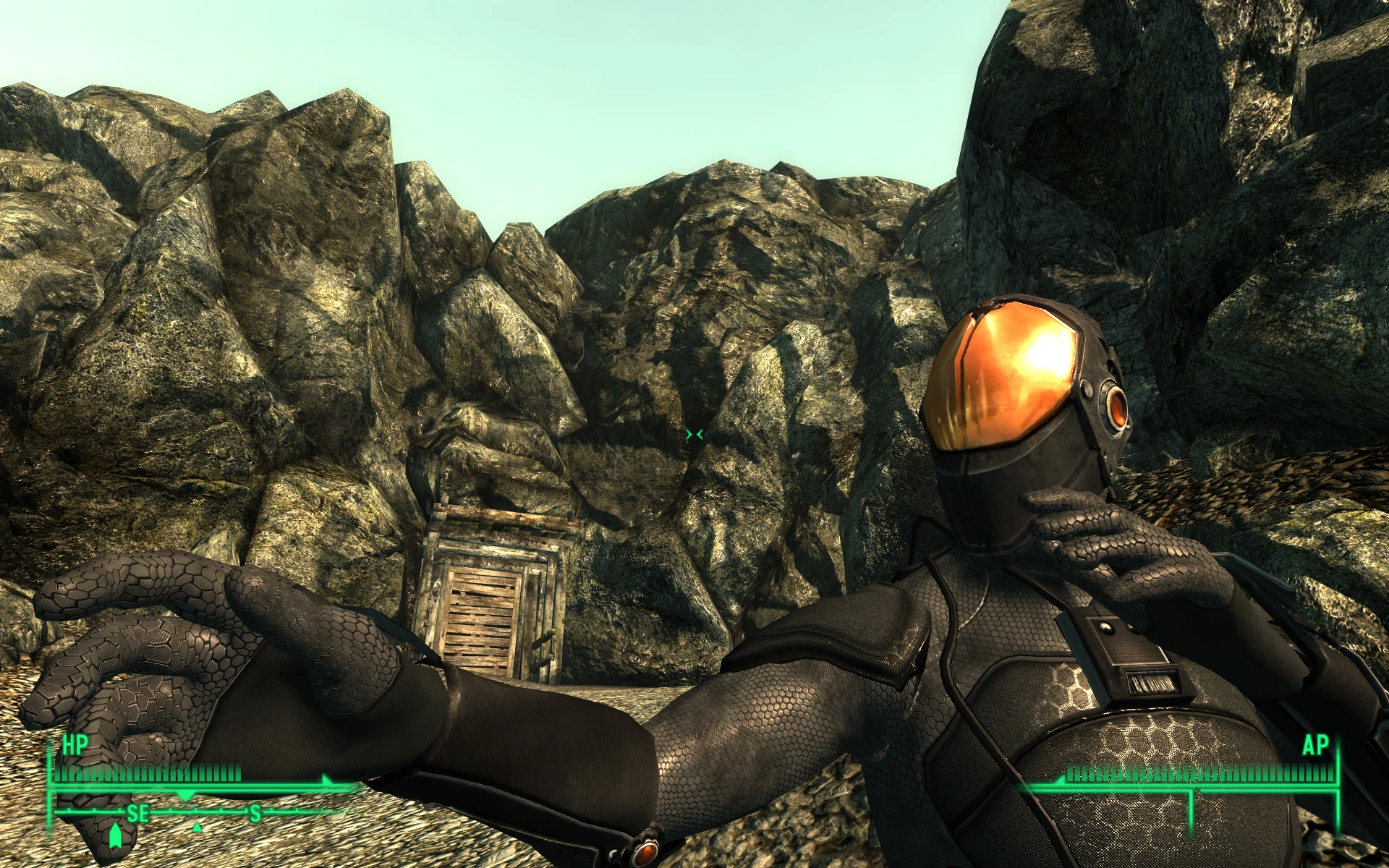
HiRes Chinese Stealth Armor
⚪ Last updated 2009⚠️ Install Order · 2 steps
Install in this order, then this mod last — most mods fail to load without their framework and dependencies in place.
Preview
🔍 Analysis
- 👍 1.0% endorsement rate — high engagement, a strong quality signal
- 🏆 #16 of 429 Models and Textures mods in this game by downloads
📋 About This Mod
16,000 DOWNLOADS AND ONLY 113 RATINGS! THE ONLY REASON I HAVE TO MAKE MY WORK AVAILABLE IS RATINGS! IF YOU DOWNLOAD PLEASE RATE! PLEASE RATE IF YOU DOWNLOAD! UPDATE: TheLeeHarvey has made an ACU MARPAT Digital camo version of this armor that is top-notch. Check it out here: http://www.fallout3nexus.com/downloads/file.php?id=9520d UPDATE: Neutral MultiEye file corrected to make metal portions match darker armor. MULTI-EYE UPDATE: New HiRes versions of the glowing eye textures for the Japanese Menace Multi-Eye incarnation of the helmet in the Default and Azure color schemes to match the Default and Azure suit texture sets. In order for these textures to be of any use to you, you must first have installed the Japanese Menace Mod found here: http://www.fallout3nexus.com/downloads/file.php?id=5962 His mod must be installed first and then my textures installed over his Chinese Stealth Suit textures. Further instructions can be found in the Read Me files included in the archives. STEALTH HELMET UPDATE: Added a green version of the retextured stealth helmet, as I forgot about it earlier. It has been added to the Stealth Helmet Retexture archive. MINOR CHANGE: Updated the glow map for the neutral version of the HiRes Multi-Eye Japanese Menace texture to match the intensity of the green version. LAST UPDATE: (Really this time!) Three new archives are up. One new version of the armor with green highlight areas instead of the orange, blue and neutral. And for the heck of it, HiRes versions of the glowing textures for the Japanese Menace Multi-Eye incarnation of the helmet in Green and Neutral. In order for these textures to be of any use to you, you must first have installed the Japanese Menace Mod found here: http://www.fallout3nexus.com/downloads/file.php?id=5962 His mod must be installed first and then my textures installed over his Chinese Stealth Suit textures. Further instructions can be found in the Read Me files included in the archives. No new screenshots, as I currently don\'t have the time to play the game. The green version of the armor shouldn\'t take alot of imagination, but I\'d like to eventually get screenshots of the Multi-Eye Helmet. Anyone with good hi-res shots feel free to post for approval. INFO UPDATE: This mod is 100 percent compatible with the excellent Reinforced Chinese Stealth Suit mod found here: http://www.fallout3nexus.com/downloads/file.php?id=5981 It is also compatible with the amazing Japanese Menace mod found here: http://www.fallout3nexus.com/downloads/file.php?id=5962 In the case of Japanese Menace, install his mod first and then overwrite his Stealth Suit textures with mine. The glowing eye textures are new files and will be left over when the standard Stealth Suit textures are overwritten. FURTHER DISCLAIMER: A texture modification is not capable of modifying the attributes of a set of armor. If Bethesda ma
A high-resolution retexture of the Chinese Stealth Armor from Fallout 3, boosting the original texture to 4096x4096 for sharper detail. With over 3,700 endorsements and 357k downloads, it's a popular visual upgrade for players who want the stealth suit to look crisper in-game.
✨ Key Features
📊 Pros & Cons
✅ Pros
- Huge community trust (3,735 endorsements) — this is a proven texture upgrade.
- Massive download count (357k) shows it's a go-to for stealth armor fans.
- Boosts texture detail significantly, making the armor look sharper in-game.
⚠️ Cons
- Last updated in 2009 — may not be compatible with mod managers or newer setups without manual tweaking.
- Only affects the Chinese Stealth Armor — if you want other armor retextures, you'll need to look elsewhere.
For Fallout 3 players who want a crisper-looking Chinese Stealth Armor without overhauling the whole game. If you're a stealth build enthusiast or just want higher-res textures for that iconic suit, this is a solid pick. Skip if you're looking for gameplay changes or retextures for other armors.
💡 Beginner Tips
- Place the texture files in your Fallout 3 Data folder, typically under 'Textures\armor\' — make sure to overwrite when prompted.
- If you're using a mod manager like FOMM, you can install the mod as a package, but manual installation works fine for this simple retexture.
- Since it's an older mod, check that your game is fully patched to avoid any texture glitches.
📊 Mod Details
- Game
- Fallout 3 Mods
- Author
- eidospsogos
- Version
- FINAL
- Downloads
- 357,364
- Endorsements
- 3,735
- Category
- Models and Textures
- Created
- 4/15/2009
- Updated
- 9/13/2009
🔧 How to Install Fallout 3 Mods
Download from Nexus.
📖 Full step-by-step install guide for Fallout 3 →
Visit the official mod page for specific installation instructions for this mod.
🎮 Need cheat codes or console commands? Check ur gaming wiki for Fallout 3 commands, item IDs, and more.
Keep browsing — more Fallout 3 mods await