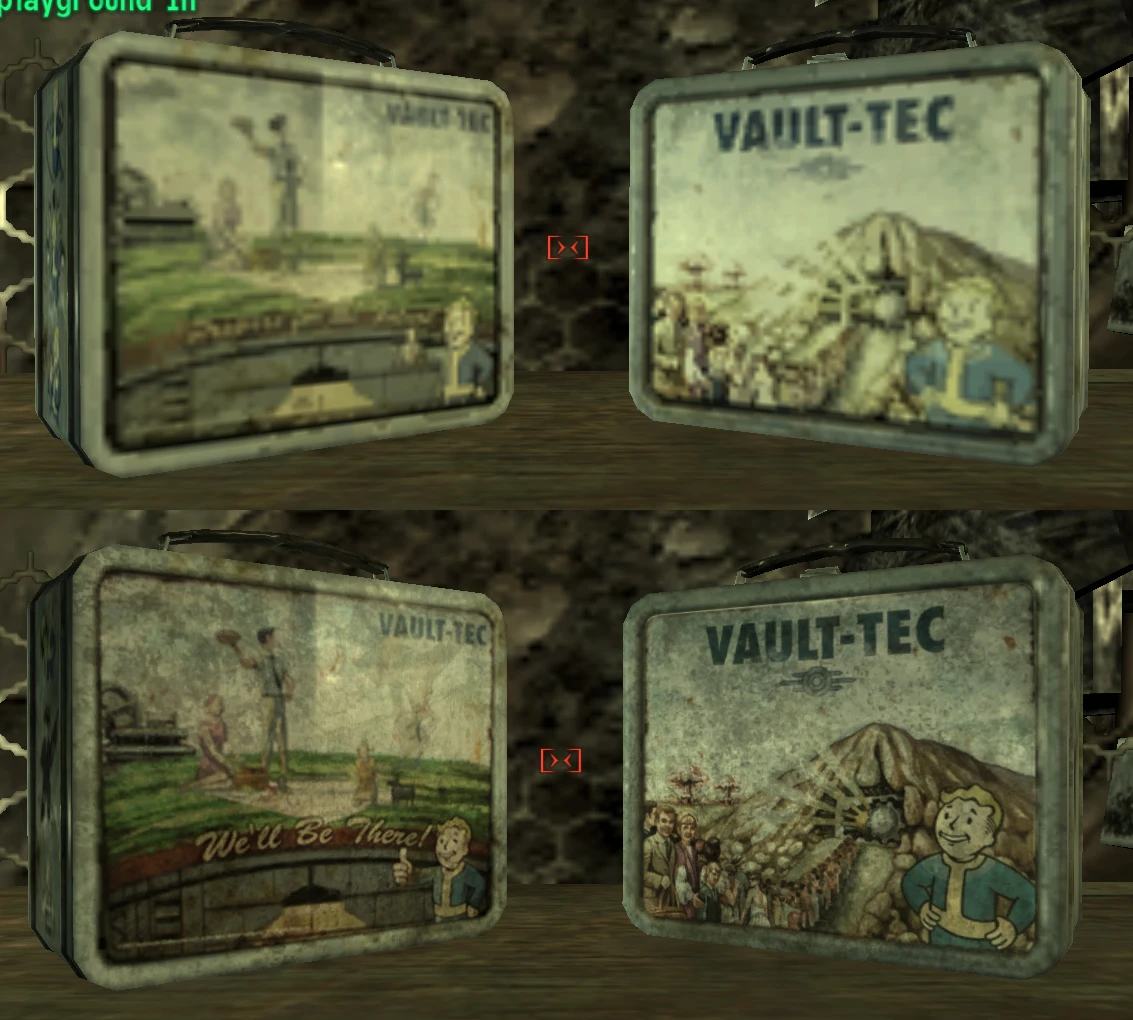
Hi-Res Lunchbox Retexture
⚪ Last updated 2009⚠️ Install Order · 2 steps
Install in this order, then this mod last — most mods fail to load without their framework and dependencies in place.
Preview
🔍 Analysis
- 👍 1.8% endorsement rate — high engagement, a strong quality signal
- 🏆 #42 of 429 Models and Textures mods in this game by downloads
📋 About This Mod
My first attempt at anything graphic/texture related so I know it\'s not perfect but it\'s defiantly better than the original. Hi-Res Lunchbox Retexture Version 1. 0 Author: Dazington E-Mail: Dazington@hotmail.com DESCRIPTION: ..................................................................................... Replaces the standard 256x256 lunchbox texture with a higher resolution 1024x1024. INSTALLATION: ..................................................................................... 1. Extract the textures folder into the \"Fallout 3/Data\" folder Example of what it should look like, \"C:\\program files\\bethesda\\fallout 3\\Data\\\" may be different depending where you installed it. 2. I recommend using ArchiveInvalidation Invalidated so search for it at Fallout3Nexus 3. SKIP THIS STEP IF USING ArchiveInvalidation Invalidated Find the fallout.ini in \"my documents\\my games\\fallout 3\\\" Open it and look for this line: \"bInvalidateOlderFiles=0\" Change it to: \"bInvalidateOlderFiles=1\" If you have an \"ArchiveInvalidation.txt\" in your \"Fallout 3\" game folder add this line: \"textures/clutter/junk/lunchbox.dds\" Otherwise take the one in this archive. USE: ..................................................................................... Feel free to use this texture for anything you want, you don\'t have to ask permission but please give credit where it\'s deserved.
This mod replaces the standard 256x256 lunchbox texture with a 1024x1024 version, offering a significant visual upgrade for Fallout 3. With 3,481 endorsements and 190,626 downloads, it's a popular choice for players seeking higher fidelity textures. Last updated in 2009, it remains a simple, effective enhancement.
✨ Key Features
📊 Pros & Cons
✅ Pros
- Huge community trust (3,481 endorsements) — this is a proven texture upgrade
- Massive download count (190k+) shows it's a go-to for many players
- Simple drop-in texture replacement — no complex setup
⚠️ Cons
- Last updated in 2009 — may not be compatible with newer game versions or mods
- Only affects the lunchbox — if you want more high-res textures, you'll need other mods
For Fallout 3 players who want a sharper lunchbox without overhauling the whole game. If you're a texture purist or just notice the blurry original, this is a quick fix. Skip if you're looking for broader visual improvements — this is a single-item tweak.
💡 Beginner Tips
- Since it's a texture replacement, just drop the file into your Data folder and enable it in the launcher or mod manager.
- If you use a mod manager like FOMM, install it there to keep track of your mods easily.
- Check if you have other texture mods that might conflict — load order can affect which texture wins.
📊 Mod Details
- Game
- Fallout 3 Mods
- Author
- Dazington
- Version
- 1.0
- Downloads
- 190,626
- Endorsements
- 3,481
- Category
- Models and Textures
- Created
- 2/5/2009
- Updated
- 2/5/2009
🧩 Commonly Used Together
Users add these mods to the same collections — a real compatibility signal, not an AI guess.
🔧 How to Install Fallout 3 Mods
Download from Nexus.
📖 Full step-by-step install guide for Fallout 3 →
Visit the official mod page for specific installation instructions for this mod.
🎮 Need cheat codes or console commands? Check ur gaming wiki for Fallout 3 commands, item IDs, and more.
Keep browsing — more Fallout 3 mods await