Flashlight
⚪ Last updated 2010⚠️ Install Order · 2 steps
Install in this order, then this mod last — most mods fail to load without their framework and dependencies in place.
Preview
🔍 Analysis
- 👍 4.5% endorsement rate — high engagement, a strong quality signal
- 🏆 #20 of 217 Miscellaneous mods in this game by downloads
📋 About This Mod
NAME: Flashlight AUTHOR: Documn CATEGORY: Miscellaneous
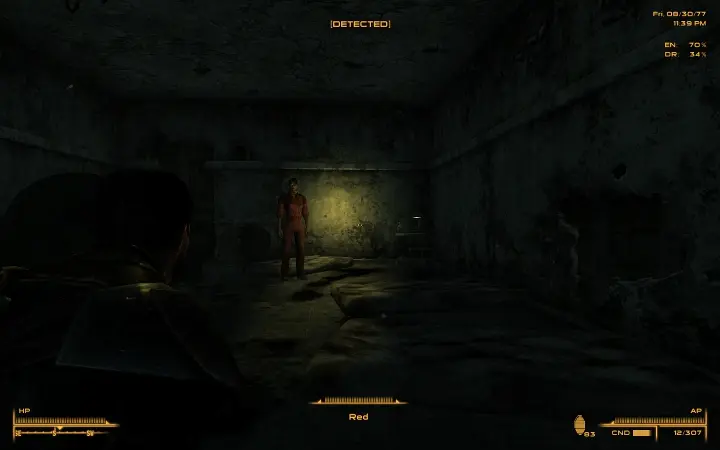
SHORT DESCRIPTION ================= This mod gives you an invisible, hands-free flashlight.
HISTORY ======= 1. 5, Nov 04 2010 - Added non-FOSE performance version 1. 4, Oct 27 2010 - Added non-FOSE version. 1. 3, Oct 22 2010 - Added white color. 1. 2, Oct 16 2010 - Added menu so you can change your flashlight hotkey. 1. 1, Oct 15 2010 - Optimized the scripts a little. 1. 0, Oct 13 2010 - Initial release.
REQUIREMENTS ============ 1. Fallout 3, version 1. 7. 2. Fallout Script Extender (if you want to use a FOSE version).
LONGER DESCRIPTION ================== The flashlight is a light beam that follows your line of sight. It's effective up to 1000 units away. (For reference, an average player character about 125 units tall.) The beam magically comes out of your player's face, so in that sense it's not really a flashlight. This light is not connected to your Pip-Boy light; your Pip-Boy light will continue to work as normal.
FOSE VERSIONS: Toggle your flashlight on and off by pressing your flashlight hotkey. The default key is B. The default color is orange, though the light may appear white or yellow depending on what area you're in. You can change the flashlight's color or hotkey by opening your Pip-boy and navigating to Items > Apparel > < Flashlight Options >.
The download file includes two esps because I want you to be able to choose how you want to work around the "only one light allowed bug" described in the Known Issues section. Each esp has a different solution to the problem. Choose only one to use. - Flashlight-Performance.esp uses a quick math formula to approximate a good spot to illuminate, assuming you're on level ground. The approximation is pretty bad if you're looking uphill or downhill. - Flashlight-LOS.esp uses the line-of-sight function to find a good spot to illuminate. This method is generally more accurate, but is also more taxing on your computer.
NON-FOSE VERSION: The flashlight is an apparel item. Wear it to turn the flashlight on; remove it to turn it off.
SHOUT OUT TO PELINOR: This mod follows the same principle as Pelinor's Directional Piplight (download here: http://fallout3nexus.com/downloads/file.php?id=9084) Thanks to Pelinor for giving me permission to improve on the mod.
KNOWN ISSUES ============ Using the light will decrease your frame rate. If your frame rate becomes too low, I suggest using the performance esp and/or Fallout Stutter Remover (download here: http://fallout3nexus.com/downloads/file.php?id=8886) to help deal with any performance problems, but neither of these are magical fixe
This mod adds an invisible, hands-free flashlight to the game. It's a simple utility that keeps your hands free while illuminating dark areas. With over 3,000 endorsements and 70,000 downloads, it's a popular quality-of-life addition. Last updated in 2010, so compatibility with current versions may be an issue.
✨ Key Features
📊 Pros & Cons
✅ Pros
- Huge community trust (3,138 endorsements) — this is a proven classic.
- Hands-free lighting is a game-changer for exploring dark dungeons without sacrificing your weapon.
- Invisible design keeps your screen clear — no bulky flashlight model blocking your view.
⚠️ Cons
- Last updated in 2010 — likely outdated and may not work with current game versions.
- Only one feature — if you want more lighting options, you'll need other mods.
For players who hate switching to a torch or lantern and want to keep both hands on their weapon. Also great for stealth builds where a visible light source would give you away. Skip if you're on a modern game version — this mod is ancient and may break your game.
💡 Beginner Tips
- Since this mod is from 2010, check if your game version is compatible before installing — you may need to find a patch or alternative.
- If you're using a mod manager, try installing manually first to avoid conflicts with newer mods.
- Test in a dark area to see if the light works as expected — if not, remove it immediately to avoid save corruption.
📊 Mod Details
- Game
- Fallout 3 Mods
- Author
- documn
- Version
- 1.4
- Downloads
- 70,351
- Endorsements
- 3,138
- Category
- Miscellaneous
- Created
- 10/14/2010
- Updated
- 11/4/2010
🔧 How to Install Fallout 3 Mods
Download from Nexus.
📖 Full step-by-step install guide for Fallout 3 →
Visit the official mod page for specific installation instructions for this mod.
🎮 Need cheat codes or console commands? Check ur gaming wiki for Fallout 3 commands, item IDs, and more.
Keep browsing — more Fallout 3 mods await