Descriptive Icons for Fallout 3
⚪ Last updated 2016⚠️ Install Order · 2 steps
Install in this order, then this mod last — most mods fail to load without their framework and dependencies in place.
Preview
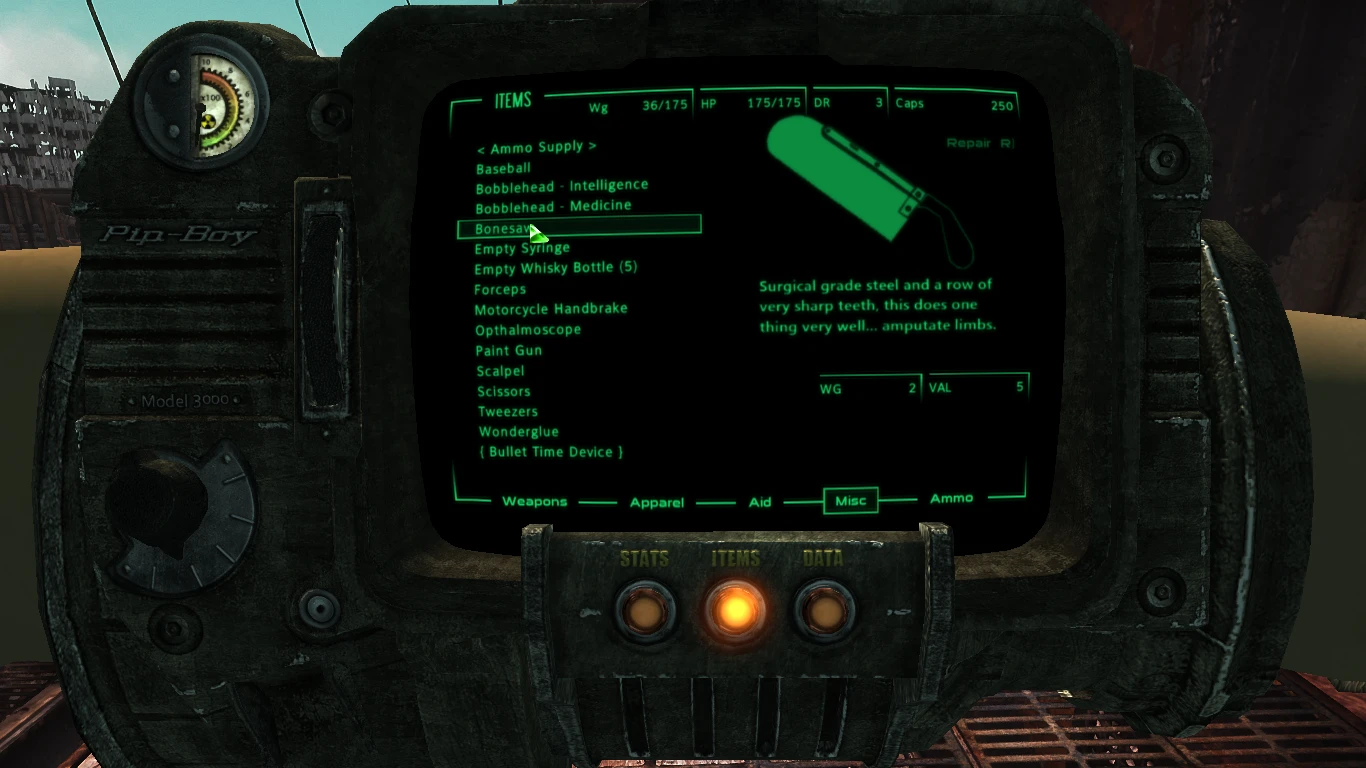
🔍 Analysis
- 👍 3.7% endorsement rate — high engagement, a strong quality signal
- 🏆 #159 of 429 Models and Textures mods in this game by downloads
📋 About This Mod
Descriptive Icons for Fallout 3
by MistakenMystic & Deadmano
Descriptive Icons for Fallout New Vegas (under construction).
Description
Your PipBoy is supposed to be the one tool that provides you with ALL the vital information about the world you find yourself in. Yet on many occasions it seems to make judgement calls about what is, or isn't, of use as you try to survive in the wasteland.
We've all been there, scrolling through the list of items in our inventories when, although your PipBoy tells you what it is, it gives you a picture of 'junk', as though it's saying; "why did you pick that up?".
Or you see a note but nothing about the contents is shown or anything to indicate what the note actually says. Or after receiving some weapon or armour that looks just like every other piece of armour you have, you have to examine the details to determine if it is worth keeping or not.
Well no more, using DIFF (Descriptive Icons for Fallout 3), means every item found in the wasteland will now be shown in your PipBoy as it appears in the world. Additionally the icons themselves will have some descriptive text attached to add to the data you need to survive. Notes or scrolls or other items that should tell you something, will. (still to do.) Unique weapons or armour will tell you where, or who, it came from and what makes it 'unique'.
DIFF is inspired by the great work done by modders such as: The 3rd Type - T3T Misc Item Icons Mikael Grizzly - Fallout3 Item Descriptions BlackJRajder - Fallout 3 DLC Item Descriptions weedking - Pipboy Item Descriptions Mod
Mods like those go a long way to making the game more enjoyable. Credit must be given to those great modders, and if you haven't already, endorse any of their mods or otherwise give them kudos for their work.
What does DIFF do?
Unfortunately, those aforementioned mods are suffering from some serious setbacks.
There are numerous glaring spelling mistakes, odd grammar and phrasing, some inaccuracies regarding the details (particularly regarding weapons) and they don't cover all the DLCs.
Those mods also include icons from 3rd party mods, I wont be including those icons in the main mod. Any extra mods that are deemed necessary might be added later.
As for T3T's work, well it goes without saying his is the standard that all others are judged by. I will, where necessary, be using the icons he has done, and only creating new ones if necessary, but of course the finished work will be DIFF'
A lightweight cosmetic mod for Fallout 3 that adds descriptive text to Pip-Boy icons, making inventory management clearer. With 951 endorsements and over 25k downloads, it's a community favorite for UI clarity. Last updated in 2016, so it's stable for the original game but may need compatibility checks with mods that alter the Pip-Boy interface.
✨ Key Features
📊 Pros & Cons
✅ Pros
- Community-approved with 951 endorsements—clearly a go-to for UI clarity.
- Tiny mod that does exactly what it says: no bloat, just descriptions.
- Over 25k downloads means it's been tested by a lot of players.
⚠️ Cons
- Last updated in 2016—might conflict with newer mods that overhaul the Pip-Boy.
- Only adds text, so if you're after fancy icons or full UI overhauls, this won't cut it.
For Fallout 3 players who squint at their Pip-Boy trying to tell a Stimpak from a RadAway. If you want a cleaner inventory without changing the game's feel, this is for you. Skip if you're using a full UI overhaul that already adds descriptions.
💡 Beginner Tips
- Since it's a texture mod, make sure to place the files in your Data folder and enable the .esp (if any) in your mod manager.
- If you're using a Pip-Boy retexture mod, install this after to avoid overwriting conflicts.
- Test in-game by opening your Pip-Boy—descriptions should appear next to item icons.
📊 Mod Details
- Game
- Fallout 3 Mods
- Author
- MistakenMystic and Deadmano
- Version
- 0.8
- Downloads
- 25,881
- Endorsements
- 951
- Category
- Models and Textures
- Created
- 4/7/2015
- Updated
- 2/19/2016
🔗 Required By 1 Mod
These mods list this mod as a dependency.
🔧 How to Install Fallout 3 Mods
Download from Nexus.
📖 Full step-by-step install guide for Fallout 3 →
Visit the official mod page for specific installation instructions for this mod.
🎮 Need cheat codes or console commands? Check ur gaming wiki for Fallout 3 commands, item IDs, and more.
Keep browsing — more Fallout 3 mods await