Deathclaw Gauntlet re-tex
⚪ Last updated 2009⚠️ Install Order · 2 steps
Install in this order, then this mod last — most mods fail to load without their framework and dependencies in place.
Preview
🔍 Analysis
- 👍 3.0% endorsement rate — high engagement, a strong quality signal
- 🏆 #393 of 429 Models and Textures mods in this game by downloads
📋 About This Mod
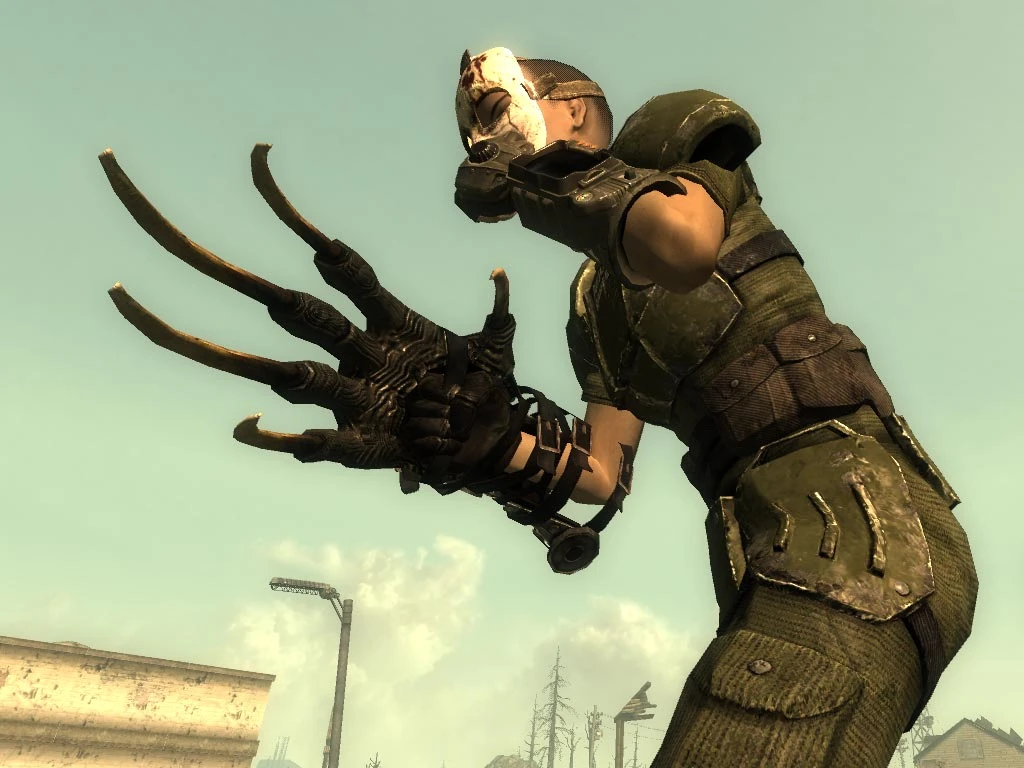
DEATHCLAW GAUNTLET RE-TEX v1. 2 plus new bloody claw version and Pipboy black glove by Idealmilk Introduction I love my claw but really didn\'t like the colour or plasticky feel so... finally got round to a re-texture. The texture has been given more detail, metal darkened, claws lightened a touch (probably won\'t notice) and the leather re-worked in black and dark tan versions. The claw\'s glove has also been re-worked, you will get a glimpse of it when you block. Thinking about re-working the Pipboy glove cos that\'s looking a bit sad. The tan version is a little lighter and more \'leathery\' so it will go better with leather and camo armours. Black version is for all you stealth ninjas =] Bloody version is for fluffy pet lovers and flower arranging enthusiasts ^^ --- Update --- Bloody Claw (deathclaw_gauntlet_bloody) Couldn\'t resist a (tasteful) gory version - but also makes sense from an inmersive point of view: you aren\'t going to use any precious carried water to clean you claw after a kill, you aren\'t a lion so ur not going to lick it clean (ok so cannibals and vampires use the clean version :)) so a quick wipe on the victim or on the grass, or a quick rinse in a radioactive puddle will be about it. Also re-did the leather base texture so it is more reptilian looking in keeping with the giant gnarly-skinned lizard that the deathclaw is. --- Update --- Pipboy3000 Glove Black v1. 0 Simple re-working of the Pipboy 3000 leather glove texture to make it black (with a hint of green) to make it work better with the Black Claw or any other stealth apparel/weapons. Still a touch of green in it so it sits well with the metalwork. Also sharpened up the metalwork texture and the leather grain. Installation 1. Select either the deathclaw_gauntlet_black, deathclaw_gauntlet_tan or the deathclaw_gauntlet_bloody version and unzip the enclosed \"textures\" folder into: Bethesda Softworks\\Fallout 3\\Data 2. Edit your ArchiveInvalidation.txt (or create one in Bethesda Softworks\\Fallout 3\\Data) with these additional lines: data/textures/weapons/hand2hand/deathclawgauntlet.dds data/textures/weapons/hand2hand/deathclawgauntletglove.dds 3. If you have not already done so, you must also edit the following line in fallout.ini (found in My Documents\\My Games\\Fallout3): bInvalidateOlderFiles=1 4 Optional - If you want to switch gloves then simply unzip your chosen \"textures\" folder into: Bethesda Softworks\\Fallout 3\\Data and overwrite the file two files with the alternatives. Uninstallation 1 If you are nuts and need to revert to the original Deathclaw :P, simply remove the following files from the data/textures/weapons/hand2hand folder: deathclawgauntlet.dds deathclawgauntletglove.dds 2 Remove any entries you added to ArchiveInvalidation.txt
A cosmetic re-texture for the Deathclaw Gauntlet in Fallout 3, addressing the original's plasticky look. It darkens the metal, lightens claws, and reworks leather for more detail. With 174 endorsements and 5,759 downloads, it's a small but appreciated visual improvement for players who want a more realistic weapon.
✨ Key Features
📊 Pros & Cons
✅ Pros
- Community-approved with 174 endorsements and 5,759 downloads
- Fixes the plasticky look that bothered many players
- Simple cosmetic change that doesn't affect gameplay
⚠️ Cons
- Only affects the Deathclaw Gauntlet, so limited scope
- Claw lightening is subtle and may not be noticeable
- Old mod from 2009, so potential compatibility issues with newer mods or DLC
For Fallout 3 players who love the Deathclaw Gauntlet but hate its default shiny texture. If you want a more grounded, detailed look without changing stats, this is a quick fix. Skip if you're looking for gameplay tweaks or if you rarely use the gauntlet.
💡 Beginner Tips
- Place the texture files in your Fallout 3 Data folder, or use a mod manager like FOMM for easy installation.
- If you have other texture mods for the gauntlet, this may conflict—let this one overwrite or load it last.
- Check the in-game appearance in first-person and third-person to ensure the texture looks right.
📊 Mod Details
- Game
- Fallout 3 Mods
- Author
- Idealmilk
- Version
- 1.2
- Downloads
- 5,759
- Endorsements
- 174
- Category
- Models and Textures
- Created
- 1/6/2009
- Updated
- 1/8/2009
🔧 How to Install Fallout 3 Mods
Download from Nexus.
📖 Full step-by-step install guide for Fallout 3 →
Visit the official mod page for specific installation instructions for this mod.
🎮 Need cheat codes or console commands? Check ur gaming wiki for Fallout 3 commands, item IDs, and more.
Keep browsing — more Fallout 3 mods await