Big Red Square Exclamation Mark Error Remover
⚪ Last updated 2009⚠️ Install Order · 2 steps
Install in this order, then this mod last — most mods fail to load without their framework and dependencies in place.
Preview
🔍 Analysis
- 👍 1.7% endorsement rate — high engagement, a strong quality signal
- 🏆 #26 of 420 Gameplay Effects and Changes mods in this game by downloads
📋 About This Mod
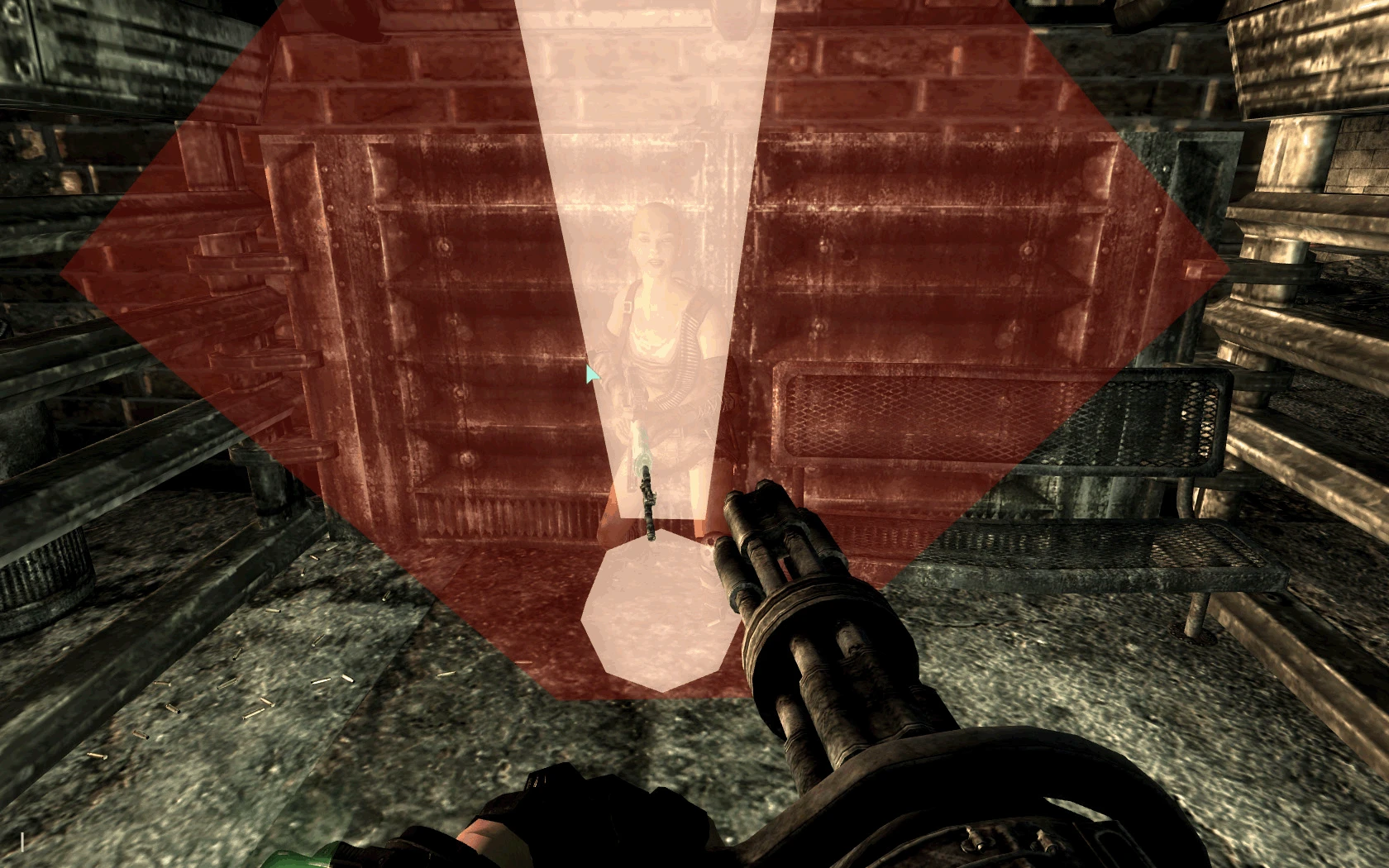
This mod is for if you have BIG RED SQUARES WITH ! MARKS IN THE MIDDLE and you dont want to see them any more. Keep in mind though with this mod you will not see the big red error marker any more, but whatever texture/mesh that was missing, will still be missing. I made this becasue i have a conflict i can not resolve with 1 of my 100 mods, it put the red [!] mark error on every 1/50 or so raiders yet these specific raiders seemed to have no issues. This fix I did made my game playable again, so I thaught it might help others too.
This mod removes the big red square exclamation mark error icons from Oblivion, which appear when the game can't find a mesh or texture. It's a simple fix for players who want a cleaner visual experience without those distracting placeholders. With over 2,200 endorsements and 136,000 downloads, it's a proven solution for a common issue.
✨ Key Features
📊 Pros & Cons
✅ Pros
- Community favorite with over 2,200 endorsements—clearly works for many players.
- Massive download count (136k) shows it's a go-to fix for this annoying issue.
- Zero hassle—no complex setup, just install and forget.
⚠️ Cons
- Last updated in 2009—might not be compatible with newer mods or game versions.
- Only addresses the visual error icon, not the underlying missing mesh/texture problem.
- No detailed instructions or compatibility notes from the author.
For Oblivion players who are tired of seeing those big red exclamation marks when a mod is missing assets. If you're a modder or heavy user who frequently encounters this issue, this is a quick quality-of-life fix. Skip if you want to actually fix the missing files—this only hides the error.
💡 Beginner Tips
- Make sure to place the file in your Oblivion Data folder, usually at C:\Program Files\Bethesda Softworks\Oblivion\Data.
- If you use a mod manager like Oblivion Mod Manager, you can install it with a single click.
- This mod doesn't fix the actual missing meshes—consider using Wrye Bash to detect and resolve missing assets.
📊 Mod Details
- Game
- Fallout 3 Mods
- Author
- Kman420
- Version
- 1.0
- Downloads
- 136,638
- Endorsements
- 2,275
- Category
- Gameplay Effects and Changes
- Created
- 3/9/2009
- Updated
- 3/9/2009
🔧 How to Install Fallout 3 Mods
Download from Nexus.
📖 Full step-by-step install guide for Fallout 3 →
Visit the official mod page for specific installation instructions for this mod.
🎮 Need cheat codes or console commands? Check ur gaming wiki for Fallout 3 commands, item IDs, and more.
Keep browsing — more Fallout 3 mods await