Shadow Fall ReShade Collection - Vivid__Cinematic__Balanced
⚪ Last updated 2022⚠️ Install Order · 1 step
Install in this order, then this mod last — most mods fail to load without their framework and dependencies in place.
Preview
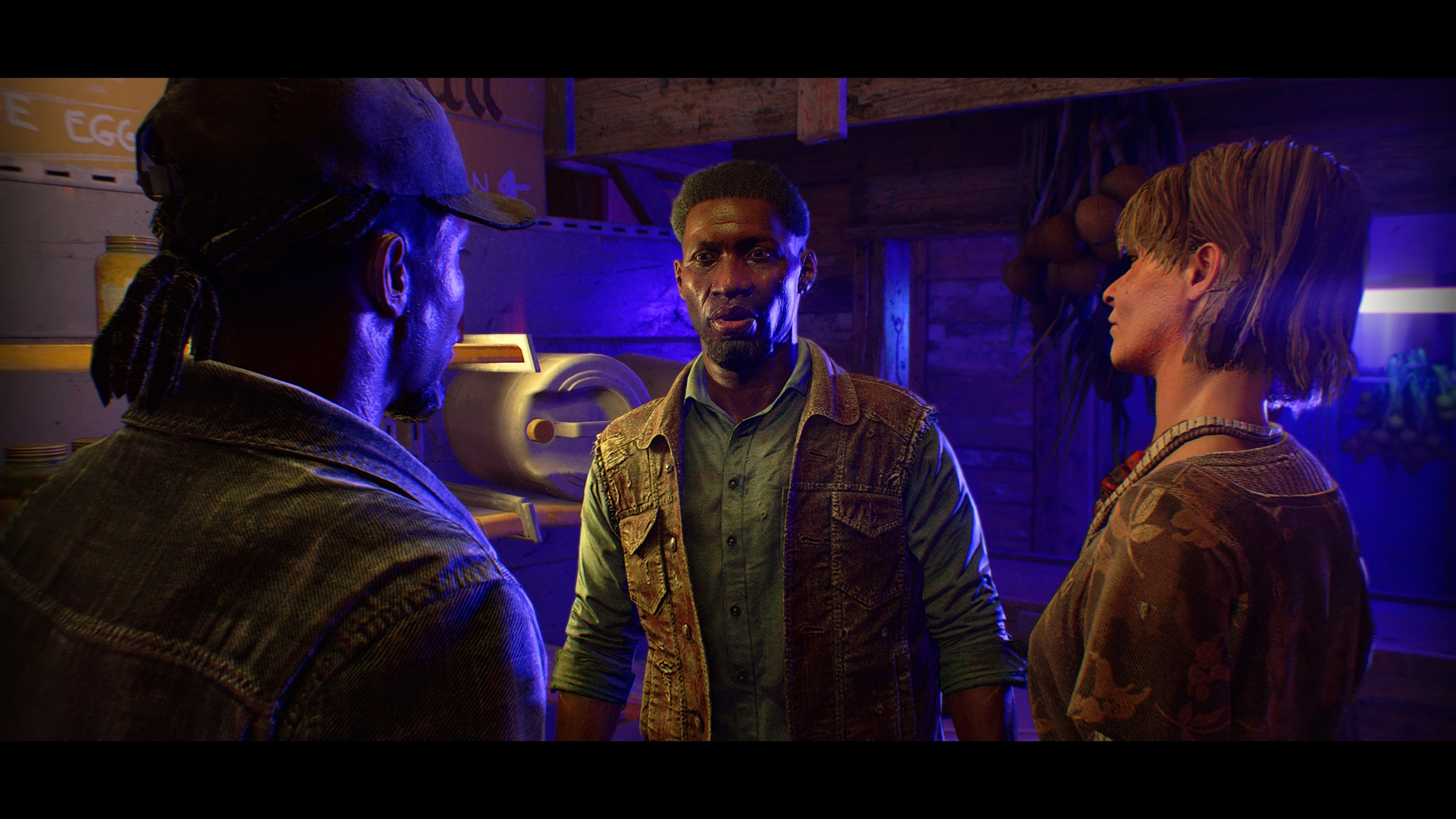
🔍 Analysis
- 👍 4.3% endorsement rate — high engagement, a strong quality signal
- 🏆 #70 of 193 Visuals mods in this game by downloads
📋 About This Mod
*If you like this, please feel free to come back and hit that endorse button (top right) if you get a chance. Means a lot to me, thank you so much! Cheers.
Shadow Fall ReShade Collection
Vivid & Cinematic Color Grading w/OPTIONAL Balanced Photographic Camera Lens Effects
by TheMercsAssassin
WHAT IS THIS?
Shadow Fall ReShade Collection is a set of four ReShade presets that aims to bring a sense of cinematic flair to the game while also offering more vivid color grading. The lighting and color changes have been play-tested for many hours to ensure you basically maintain visibility just as well as the vanilla game at night and in interiors both during the day and night. The added cinematic effects (depth-of-field, anamorphic camera lens emulation (warping), vignette, chromatic aberration, and film grain) have been thoroughly tested and tweaked as well to ensure they look great while not impacting the gameplay experience negatively. Importantly, each added effect has been given a separate hotkey for quick toggling whenever you'd like. In sum, I have played with all the new effects on for many hours and never once came close to dying because of anything I've added.
The four presets available at launch (more planned for a later date) are Warm (most recommended), Warm Alt., Cool, and Cool Alt. The names are pretty self explanatory, but the main thing to know is that both the Alts have their lighting (exposure and dark levels) reduced to be more milder in case the cinematic flair of the regular versions is not to your liking. I will note that the Warm Alt is the preset with the closest lighting and colors to vanilla. It is also the closest to reality. All the presets maintain the same settings for the cinematic effects, as the goal of the collection in general was to offer the most cinematic experience possible while still keeping the image believable and natural feeling. Basically you should get a photorealistic image though not necessarily a realistic image, per se. As said, the Warm Alt does provide, arguably, a pretty
A ReShade preset collection offering three visual styles—Vivid, Cinematic, and Balanced—for photorealistic lighting and cinematic color grading. Includes optional filmic effects like depth-of-field, anamorphic lens warping, vignette, film grain, and chromatic aberration. For players seeking enhanced visuals without permanent changes.
✨ Key Features
📊 Pros & Cons
✅ Pros
- Three distinct presets cover different tastes—vivid for pop, cinematic for drama, balanced for everyday play
- Optional effects let you dial in exactly how much filmic flair you want
- Small but active community (37 endorsements, 858 downloads) suggests it works for those who try it
⚠️ Cons
- Last updated in 2022—may not be compatible with the latest ReShade versions or game updates
- No screenshots or installation guide in the description, so you're flying blind until you test it
- Requires ReShade installed separately, which adds setup complexity for newcomers
For players who want to enhance their game's visuals with ReShade but don't want to fiddle with settings—just pick a preset and go. Great for screenshot enthusiasts and streamers looking for a cinematic look. Skip if you prefer vanilla graphics or don't want to install ReShade.
💡 Beginner Tips
- Make sure ReShade is installed and working before adding these presets—test with a simple preset first
- Use the in-game ReShade overlay (Home key) to toggle effects and see which style suits your scene
- If the presets look off, adjust the intensity sliders in ReShade's effect panel—they're meant to be tweaked
📊 Mod Details
- Game
- Dyinglight2 Mods
- Author
- TheMercsAssassin
- Version
- 1.1
- Downloads
- 858
- Endorsements
- 37
- Category
- Visuals
- Created
- 2/7/2022
- Updated
- 2/18/2022
🔧 How to Install Dying Light 2 Mods
Download from Nexus Mods.
📖 Full step-by-step install guide for Dying Light 2 →
Visit the official mod page for specific installation instructions for this mod.
🎮 Need cheat codes or console commands? Check ur gaming wiki for Dying Light 2 commands, item IDs, and more.
Keep browsing — more Dying Light 2 mods await