Simple Realistic 3D for Dragon Dogma 2
⚪ Last updated 2024Preview
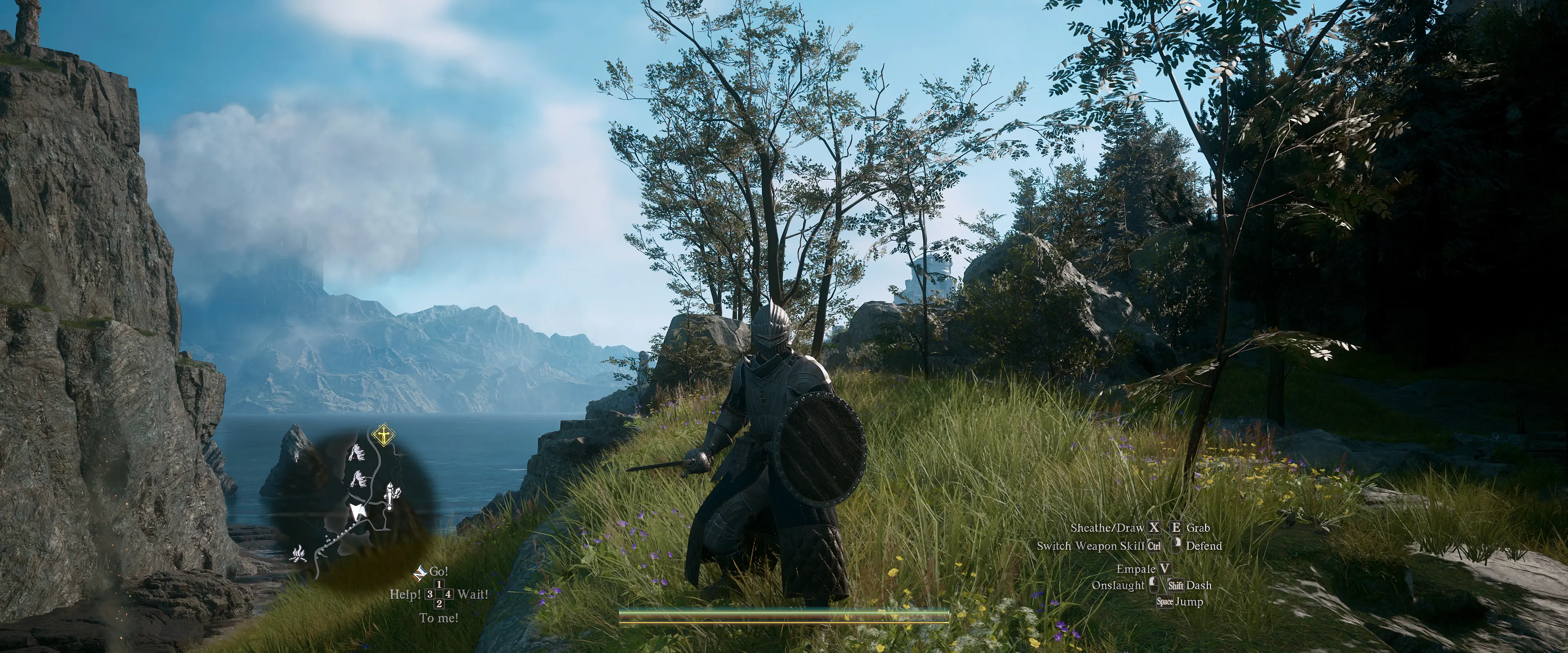
🔍 Analysis
- 👍 2.6% endorsement rate — high engagement, a strong quality signal
- 🏆 #12 of 106 Visuals mods in this game by downloads
📋 About This Mod
A simple custom shader for Dragon Dogma 2
This shader makes Dragon Dogma 2 become slightly brighter (stronger global lighting effects) but with better shading, details and post processing effects.
CREDITS:
CAPCOM (for created this great game)
Timothy Lottes (EPIC games)
Reshade Team (Crosire, CeeJay, Marty McFly, Thalixte, Ganossa/Hawk, Bacondither, Ioxa, Otis, Jose Negrete, et al. ~ https://reshade.me )
PrayDog (RE Framework)
- - It's based on Reshade 5.x.x framework, BUT may not work properly with the other version of Reshade or other standard shaders.
Therefore, Please CLEAN-UP your previous all Reshade files and configuration (if you already installed it) from your Dragon Dogma 2 folder.
DO NOT mixed up with the other Reshade files!
How to install:
- Clean-up your previous all Reshade files and configuration (if you already installed it) from Dragon Dogma 2 folder before install this mod
- Extract these files (just extract it, do not run Reshade installer) into where your game executable (DD2.exe) resides. e.g C:\Program Files (x86)\Steam\steamapps\common\Dragons Dogma 2\
- Run the game!
Command Keys:
- Del (Delete) : Toggle Effects ON/OFF (default: ON)
- PgDn (Page-Down) : Toggle Stereoscopic mode ON/OFF (default will use Top-Bottom 3D format, you can change it to Side by Side (SBS) 3D format via UI).
- END : to Show up Reshade UI, so you can adjust Color Saturation, Light Intensity, Dark Level and Sharpeness to fit your monitor/your liking.
Chris Rubino
Simple Realistic 3D is a custom shader for Dragon's Dogma 2 that brightens global lighting while improving shading, details, and post-processing. It's a lightweight visual enhancement for players who want a more realistic look without overhauling the game's graphics.
✨ Key Features
📊 Pros & Cons
✅ Pros
- Community-approved with 606 endorsements
- High download count (23,623) shows real demand
- Simple installation—just drop in the shader files
⚠️ Cons
- Last updated April 2024—may not work with future game patches
- Only affects lighting and shading, not textures or models
For Dragon's Dogma 2 players who want a quick visual upgrade without heavy performance hits. If you're after a full graphics overhaul, this isn't it—it's a subtle tweak for better lighting and detail.
💡 Beginner Tips
- Back up your original shader files before replacing them, so you can revert if needed.
- Test the shader in different lighting conditions (day/night, indoors) to see if the brightness suits your taste.
- If you use other visual mods, check load order to avoid conflicts.
📊 Mod Details
- Game
- Dragonsdogma2 Mods
- Author
- Chris Rubino
- Version
- 1.0
- Downloads
- 23,623
- Endorsements
- 606
- Category
- Visuals
- Created
- 3/24/2024
- Updated
- 4/14/2024
🔧 How to Install Dragon's Dogma 2 Mods
Download from Nexus Mods.
📖 Full step-by-step install guide for Dragon's Dogma 2 →
Visit the official mod page for specific installation instructions for this mod.
🎮 Need cheat codes or console commands? Check ur gaming wiki for Dragon's Dogma 2 commands, item IDs, and more.
Keep browsing — more Dragon's Dogma 2 mods await