HD HP - Custom GUI textures and icons Overhaul by vj88 (fixed file type)
⚪ Last updated 2024Preview
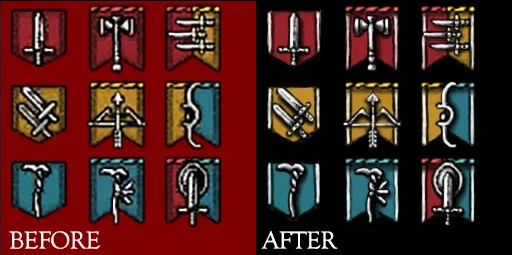
🔍 Analysis
- 👍 2.5% endorsement rate — high engagement, a strong quality signal
- 🏆 #16 of 28 User Interface mods in this game by downloads
📋 About This Mod
Years ago vj88 made a mod that improved the look of many UI elements. However, as the years have gone on DDDA modding has changed, making the usage of HD HP somewhat tedious. vj88 said on his mod page that should someone wish to fix the file names and reupload the mod had his permission.
The original mod page can be found here: https://www.nexusmods.com/dragonsdogma/mods/97
This page has the fully updated arc files, so you only need to move the nativePC folder to your DDDA root folder, as well as the merge files should you already have mods that modify either game_main.arc OR bbsrpg_core.arc
Should you use the merge files, you will need this program: https://www.nexusmods.com/dragonsdogma/mods/500
or this program: https://www.nexusmods.com/dragonsdogma/mods/25
A very helpful tutorial for modding .arc files can be found here
This mod updates vj88's HD HP UI overhaul for Dragon's Dogma: Dark Arisen, fixing file types to simplify installation. It improves the look of many UI elements with custom textures and icons. For players who want a cleaner interface without tedious setup.
✨ Key Features
📊 Pros & Cons
✅ Pros
- Revives a classic UI overhaul for modern modding (67 endorsements).
- Simplifies installation compared to the original tedious process.
- Enhances visual consistency across menus and icons.
⚠️ Cons
- Only 67 endorsements — niche appeal, may not suit everyone's taste.
- No screenshots or detailed feature list provided by the author.
- Requires manual installation; no mod manager support mentioned.
For Dragon's Dogma: Dark Arisen players who want a cleaner, more polished UI without dealing with outdated file formats. Skip if you prefer the vanilla look or want more extensive UI customization.
💡 Beginner Tips
- Place the files in your DDDA 'nativePC' folder, merging with existing directories.
- If you have other UI mods, install this one last to avoid overwriting conflicts.
- Back up your original files before replacing, so you can revert if needed.
📊 Mod Details
- Game
- Dragonsdogma Mods
- Author
- PrimePerferatedPierre
- Version
- 0.46
- Downloads
- 2,670
- Endorsements
- 67
- Category
- User Interface
- Created
- 3/22/2024
- Updated
- 3/22/2024
🔧 How to Install Dragon's Dogma: Dark Aris Mods
Download from Nexus Mods.
📖 Full step-by-step install guide for Dragon's Dogma: Dark Aris →
Visit the official mod page for specific installation instructions for this mod.
🎮 Need cheat codes or console commands? Check ur gaming wiki for Dragon's Dogma: Dark Aris commands, item IDs, and more.
Keep browsing — more Dragon's Dogma: Dark Aris mods await