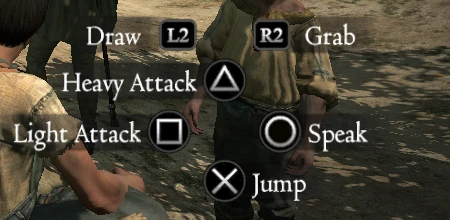
DualShock 3 Buttons for Dragon's Dogma
⚪ Last updated 2016Preview
🔍 Analysis
- 👍 4.2% endorsement rate — high engagement, a strong quality signal
- 🏆 #10 of 28 User Interface mods in this game by downloads
📋 About This Mod
DualShock 3 Buttons for Dragon's Dogma v2
Description:
Replaces X360/Generic buttons with DualShock 3 buttons that retain the PC version's art style.Disclaimer:
This mod replaces the following files:nativePC\rom\bbs_rpg.arc
- []id\common\font\button_360_00_ID.tex
- []id\common\font\button_360_00_ID.tex
- []id\common\cubutton_360_ID.tex []id\common\cubutton_360_ID_DE.tex []id\common\cubutton_360_ID_ES.tex []id\common\cubutton_360_ID_IT.tex []id\common\cubutton_360_ID_JP.tex []id\common\cubutton_360_ID_JP.tex []id\common\custskl0_360_HQ_ID.tex
- []id\common\cubutton_360_ID.tex []id\common\cubutton_360_ID_DE.tex []id\common\cubutton_360_ID_ES.tex []id\common\cubutton_360_ID_FR.tex []id\common\cubutton_360_ID_IT.tex []id\common\cubutton_360_ID_JP.tex []id\common\custskl0_360_HQ_ID.tex
- []id\common\cubutton_360_ID.tex []id\common\custskl0_360_HQ_ID.tex
- []id\common\cubutton_360_ID.tex []id\common\custskl0_360_HQ_ID.tex
- []id\common\cubutton_360_ID.tex []id\common\custskl0_360_HQ_ID.tex
- []id\common\cubutton_360_ID.tex []id\common\custskl0_360_HQ_ID.tex
How to install:
1. Extract all the contents of this ZIP on Dragon's Dogma folder. It can be found by right-clicking Dragon's Dogma on Steam, going into "Properties", "Local Files" tab and clicking "Browse Local Files...". 2. Download ARCtool from http://www.tzarsectus.com/tools/ARCtool.rar and extract it to Dragon's Dogma folder. 3.🤖 AI-enhanced — based on mod data
This UI mod replaces Xbox/Generic button prompts in Dragon's Dogma with DualShock 3 buttons, keeping the PC version's art style. It's for players using a PS3 controller who want authentic button icons. With 644 endorsements and 15,365 downloads, it's a popular cosmetic fix.
✨ Key Features
Replaces Xbox/Generic buttons with DualShock 3 buttons
Retains the PC version's art style
Simple UI replacement mod
📊 Pros & Cons
✅ Pros
- Community-approved with 644 endorsements and over 15k downloads
- Keeps the original art style so it blends in seamlessly
- Essential for PS3 controller users who hate seeing Xbox prompts
⚠️ Cons
- Last updated in 2016 — may not work with the current version of the game
- Only changes button icons, no other UI improvements
🎯 Is This For You?
For Dragon's Dogma players using a DualShock 3 controller who want the on-screen prompts to match their input device. It's a must-have for immersion-focused players. Skip if you use an Xbox controller or don't mind the default prompts.
For Dragon's Dogma players using a DualShock 3 controller who want the on-screen prompts to match their input device. It's a must-have for immersion-focused players. Skip if you use an Xbox controller or don't mind the default prompts.
📦 Install:Easy· Under 1 minute
💡 Beginner Tips
- Make sure to back up your original UI files before replacing them, in case you want to revert.
- If you're using a mod manager, check if it supports this mod for easier installation and uninstallation.
- Verify that the mod is compatible with your game version, as it hasn't been updated since 2016.
📊 Mod Details
- Game
- Dragonsdogma Mods
- Author
- weaktofire
- Version
- 2
- Downloads
- 15,365
- Endorsements
- 644
- Category
- User Interface
- Created
- 1/18/2016
- Updated
- 1/29/2016
🔧 How to Install Dragon's Dogma: Dark Aris Mods
Download from Nexus Mods.
📖 Full step-by-step install guide for Dragon's Dogma: Dark Aris →
Visit the official mod page for specific installation instructions for this mod.
🎮 Need cheat codes or console commands? Check ur gaming wiki for Dragon's Dogma: Dark Aris commands, item IDs, and more.
Keep browsing — more Dragon's Dogma: Dark Aris mods await