DDDA Save Manager
⚪ Last updated 2016This mod may not work until the author updates it. Check for an update, or see the rollback guide.
Preview
🔍 Analysis
- 👍 4.9% endorsement rate — high engagement, a strong quality signal
- 🏆 #1 of 26 Utilities mods in this game by downloads
📋 About This Mod
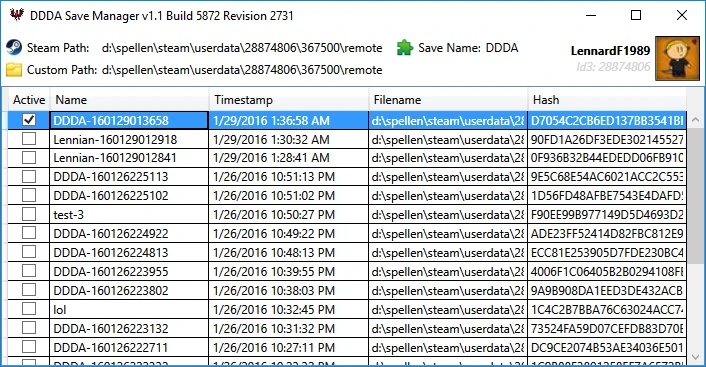
What is it? DDDA Save Manager will keep track of your saves and allow you to set them as active as you play the game, virtually giving you infinite save slots.
Installation After extracting, simply run the DDDASaveManager.exe. It will require administrator rights in order to make it possible to read into protected folders (especially the C-drive is filled with those, where most people install Steam) and access the registry.
For the security freaks among us, fear not! The application is digitally signed with a valid and personal SSL certificate, meaning I wouldn't even dare to do weird stuff with your PC. It will also prevent anti-viruses trying to block the file, although some might still do so regardless.
You will need to have . NET Framework 4. 5 installed! If the tool won't start, download and install this: https://www.microsoft.com/en-US/download/details.aspx?id=30653
Usage After the first launch, your Steam-path will be automatically retrieved from the registry. If no Steam profiles are found, it will instead ask you where your saves are located.
The tool is portable. After the first start, it will create a "DDDASaveManager.json"-file aside of the executable, this file will contain all settings, mind you it is PC specific!
How does it work? While both the game and this tool are running, it will create a backups of your saves when it notices the game made a new one (eg. after a manual save or autosave).
Then what? The tool also lists all available backups to you in order of creation time, allowing you to switch between different saves on the fly! You don't even have to restart the game for this!
Simply go back to the main menu, right-click a backup and choose "Set as active save". Now load the game as usual and you're back in time!
Changelog v1. 1c (04-02-2016) - Fixed an issue where a non-numeric folder in the Steam userdata-folder would cause a crash on startup. - Refreshing the Steam Users list now rescans for new profiles, rather than just updating the existing ones.
v1. 1b (03-02-2016) - Got rid of the System. Windows. Interactivity.dll dependency. - Merged Newtonsoft. Json.dll into the executable. - An error-log is now created when the tool unexpectedly crashes.
v1. 1a (30-01-2016) - Fixed a small oversight where retrieving Steam usernames obviously does not work offline. - When switching between Steam-profiles, you can now refresh the view by right-clicking. > This will add newly found profiles and update existing ones. - Added possibility to a set a custom Steam path. Left-click to change, right-click to reset.
v1. 1 (29-01-2016) - Will now try to retrieve the Steam path from Windows registry. W
DDDA Save Manager is a utility mod for Dragon's Dogma: Dark Arisen that tracks your saves and lets you switch between them, effectively giving you infinite save slots. It's a straightforward tool for players who want multiple playthroughs without losing progress.
✨ Key Features
📊 Pros & Cons
✅ Pros
- Community favorite with 3,521 endorsements and 71,804 downloads
- Simple concept that solves a real problem for players who want multiple playthroughs
- Last updated in 2016, but still widely used, so it's proven stable
⚠️ Cons
- Last updated in 2016 — may not be compatible with the latest game version or future updates
For Dragon's Dogma players who want to run multiple characters or experiment with different choices without losing their main save. Skip if you're fine with the game's default save system.
💡 Beginner Tips
- Make sure to back up your save folder manually before using the manager, just in case.
- Use the manager to create a separate save before major story decisions so you can go back.
- If you're on Steam, disable cloud saves for Dragon's Dogma to avoid conflicts.
📊 Mod Details
- Game
- Dragonsdogma Mods
- Author
- Lennard Fonteijn
- Version
- v1.1c
- Downloads
- 71,804
- Endorsements
- 3,521
- Category
- Utilities
- Created
- 1/19/2016
- Updated
- 2/4/2016
🔧 How to Install Dragon's Dogma: Dark Aris Mods
Download from Nexus Mods.
📖 Full step-by-step install guide for Dragon's Dogma: Dark Aris →
Visit the official mod page for specific installation instructions for this mod.
🎮 Need cheat codes or console commands? Check ur gaming wiki for Dragon's Dogma: Dark Aris commands, item IDs, and more.
Keep browsing — more Dragon's Dogma: Dark Aris mods await