Arc Extractor and Repacker and Image Viewer
⚪ Last updated 2016This mod may not work until the author updates it. Check for an update, or see the rollback guide.
Preview
🔍 Analysis
- 👍 3.9% endorsement rate — high engagement, a strong quality signal
- 🏆 #1 of 19 Modders Resources and Tutorials mods in this game by downloads
📋 About This Mod
Please read this! Some important info below
Thanks to chrisco from residentevilmodding site and with his permission i uploaded an usefull tool that can open .arc files of dragos dogma game, extract them, extract all texture files from them, open texture files and repack evertyhing to .arc file For editing textures you need some other programs like photoshop.
Now everyone can edit and modify textures, i am really wait for hd rework of that game, some textures are really ugly
Here some info from chrisco about his tool:
Quick notes to keep in mind...
- []When extracting or repacking files, please make sure that none of your folders have and spaces in the name. I will fix this later on, but for now. NO SPACES! []This program can take some time to run if you are extracting mass amounts of tex files. Please have patience.
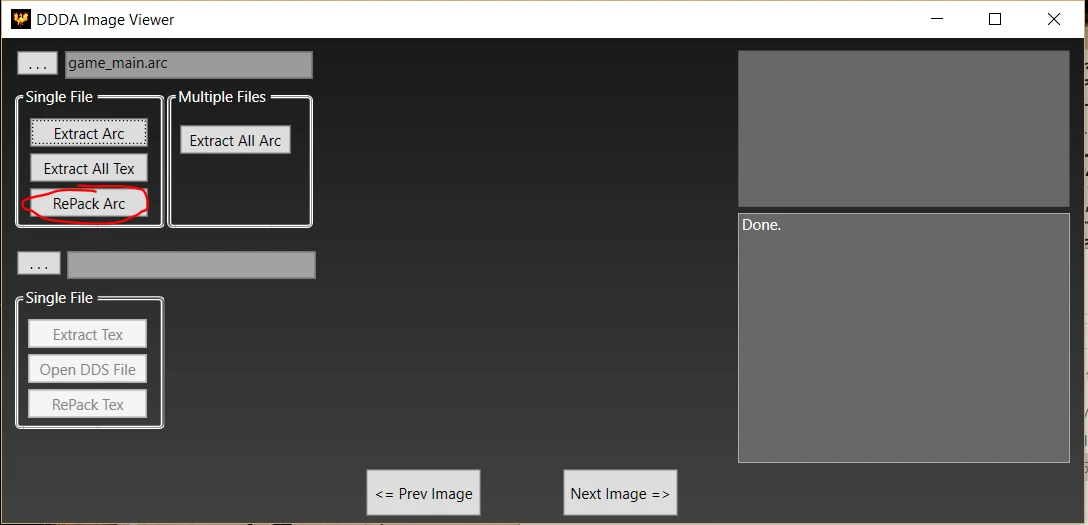
- Error messages are displayed in the box in the top right. Please pay close attention to these.
Quick Tutorial:
Extract Single Arc File: Simple, Select the file you want to extract and hit the extract arc button.
Extract All Tex from ^that file: This will Extract all of the Tex Files from the selected Arc File
Extract multiple Arc Files: To do this, open the folder that holds all of the Arc files you want to extract. Select one of them and hit Extract all Arc
Repack Arc File: When you are finished editing everything that you want, Make sure that you still have the Arc file selected and hit repack.
Extract Single Tex File: This is used when you want to edit a single file's image. Just select your Tex file and hit extract.
If you used the Extract all Arc button above, this function is run on ALL tex files found in the Arc
Open Image File:
Use this when you want to edit the image. This button will open the image with whatever program you have set as a default for the .dds file type. I use Photoshop.
Repack Image File: When you are finished editing the dds file, us this to repack the image back into the Tex File. This GUI uses FluffyQuack arctool, so big thanks to him also
Some important sites where you find some usefull information:
Here Original chrisco thread of his GUI for arctool
Here Original FluffyQuack thread of arctool
Here FluffyQuack detailed thread about arctool.
A modder's resource tool for opening .arc files, extracting textures, and repacking them quickly. With 4,999 endorsements and 127,177 downloads, it's a proven utility for modding workflows, though it hasn't been updated since 2016.
✨ Key Features
📊 Pros & Cons
✅ Pros
- Community staple with 4,999 endorsements and 127k downloads
- Streamlines the extract-edit-repack cycle for texture mods
- All-in-one tool: no need for separate archive and image viewers
⚠️ Cons
- Last updated in 2016 — may not work with newer game versions or formats
- Requires manual file handling; no mod manager integration
For modders and texture artists who need a quick way to unpack and repack .arc files. If you're a player just looking to install mods, this isn't for you — it's a behind-the-scenes tool.
💡 Beginner Tips
- Always back up your original .arc files before repacking to avoid corrupting game data.
- Test repacked files in a clean install or with a mod manager to ensure they work.
- Check the mod's comment section for community-made guides if you're new to .arc editing.
📊 Mod Details
- Game
- Dragonsdogma Mods
- Author
- FluffyQuack and chrisco
- Version
- 1.0
- Downloads
- 127,177
- Endorsements
- 4,999
- Category
- Modders Resources and Tutorials
- Created
- 1/17/2016
- Updated
- 1/17/2016
🔧 How to Install Dragon's Dogma: Dark Aris Mods
Download from Nexus Mods.
📖 Full step-by-step install guide for Dragon's Dogma: Dark Aris →
Visit the official mod page for specific installation instructions for this mod.
🎮 Need cheat codes or console commands? Check ur gaming wiki for Dragon's Dogma: Dark Aris commands, item IDs, and more.
Keep browsing — more Dragon's Dogma: Dark Aris mods await