The Dragon Age 2 Character Creator - Inquisition Edition
🟠 Updated over a year agoPreview
🔍 Analysis
- 👍 1.1% endorsement rate — high engagement, a strong quality signal
- 🏆 #7 of 26 Utilities mods in this game by downloads
📋 About This Mod
Dragon Age 2: Inquisition Style Head and Morphs
By IceBuckets
NOTE FOR 2. 0: If you are using any morphs from other mods as of 10/22 - PLEASE DOWNLOAD the previous version found in the archive!
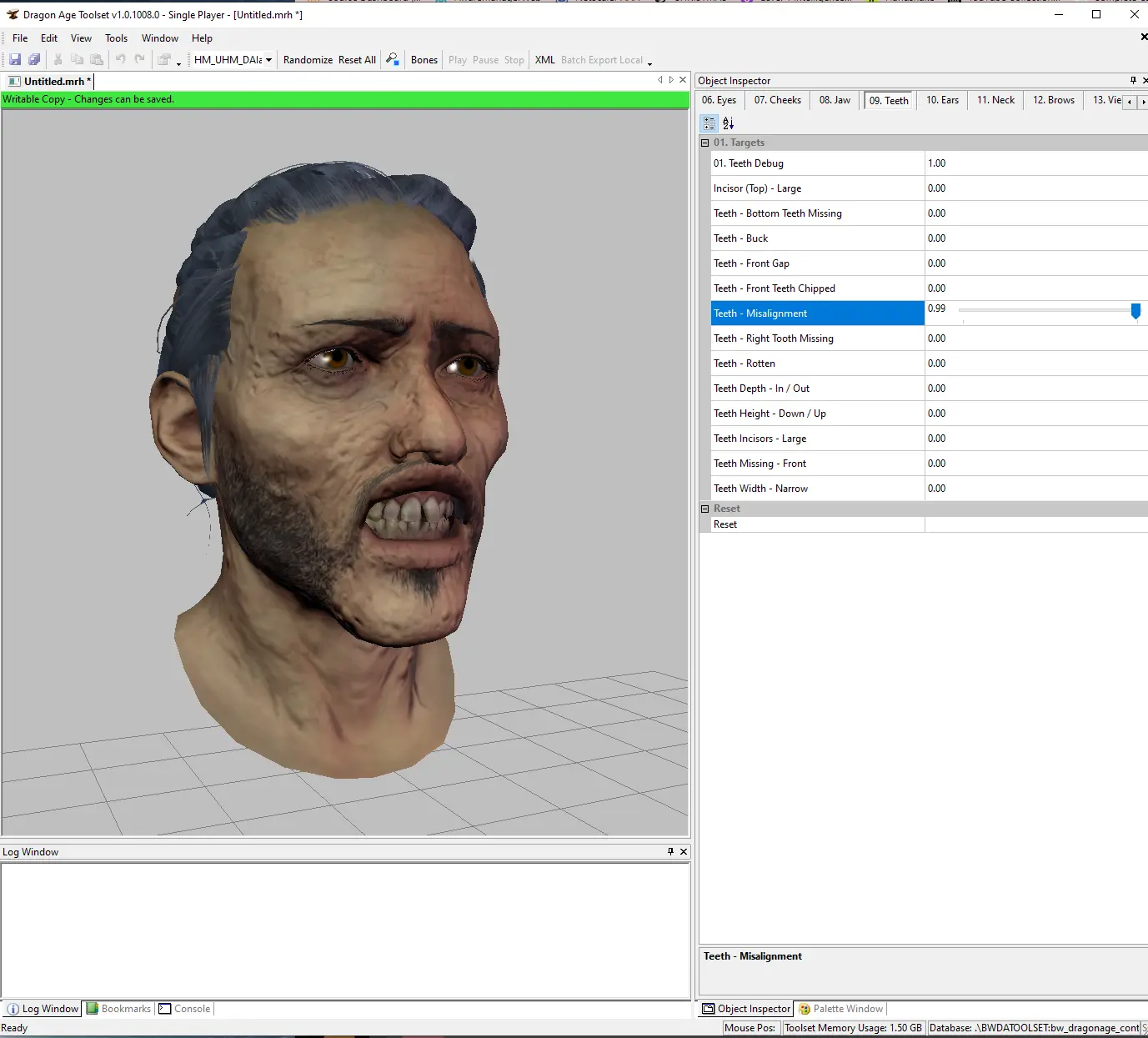
Adds Inquisition heads and morph targets into the Dragon Age Origins Toolset for use within Dragon Age 2.
Every single Inquisition morph target, complexion, hair, beard has been added for use. Additionally, each race/sex will have a set of morph presets (i.e. Dagna, Alistair, Celene, Abelas, etc.) for you to use in creating unique morphs for Dragon Age 2 - finally changing out DA2s more cartoon styled heads.
Installation:
-
[]Drag all contents of the DAO Folder into your Dragon Age Origins override folder. For me, this is located at: users/documents/bioware
[
]Drag all contents of the DA2 folder into your Dragon Age 2 override folder. For me this is located at:[]Replace your Settings for the Toolset here (this is the default location):
C:\Program Files (x86)\Origin Games\Dragon Age\tools
Be sure to patch your Toolset with the 4GB patcher! This uses alot more memory!
Using this mod:
[]Open the Toolset - and select New / Morph
[]From the drop-down menu, you should see you have 6 new options at the bottom underneath DAI (don’t select this option - this is only meant as a divider)
[]Make your morph.
[]Save and export
[]Open up your . MOR file in pyGff
[]Drop down the first dropdown.
[]Drop down the MORPH_PARTS section
[]Paste this line in front of the item in the 0/1/2/3 row (if there is an reference there) (replacing RACEGENDER with your morphs race and gender): art\characters\playercharacter\RACEGENDER\
[]Drop down the MORPH NODES section
[]Find HAIRM1 and change the name to SCALPM1
[]Find HAIRM2 and change to HAIRM1
[]Find HAIRM3 and change to HAIRM2
[]In the new SCALPM1, drop it down and drop down MORPH_TEXTUREPARAM
[]There should be about 3-6 lines here. Drop down each and add "art\characters\playercharacter\shared\heads\textures\" in front of each item. Be sure to save.
[]Repeat for FACEM1
[*]Save your morph in your DA2 override
Mops will work exactly the same way except you will need to drop down the MORPH_MODEL_PARAMS section and add "art\characters\playercharacter\RACEGENDER\" in front of each model it lists.
You will also be adding this to the MORPH_PARTS section.
Drop down the MORPH_MAT_PARAMS and change each instance of HAIRM1 to SCALPM1
Same for when you drop down MORPH_TEXT
This utility mod integrates Inquisition headmorphs into the Dragon Age 2 toolset, allowing players to morph and export custom headmorphs for use in Dragon Age 2. With 140 endorsements and nearly 13,000 downloads, it's a niche but popular tool for character creators seeking more variety.
✨ Key Features
📊 Pros & Cons
✅ Pros
- Solid community backing with 140 endorsements and nearly 13k downloads.
- Bridges the gap between Dragon Age Inquisition and Dragon Age 2, giving you more head options.
- Actively maintained—last updated January 2025.
⚠️ Cons
- Requires the Dragon Age toolset, so it's not for console players or those who just want a quick install.
- No detailed instructions provided—you'll need to know your way around the toolset.
- Only adds headmorphs, not other character creation features like hair or body sliders.
For Dragon Age 2 modders who want to bring Inquisition-style faces into their game. If you're a casual player looking for a simple character overhaul, this isn't for you—it's a toolset utility for creators.
💡 Beginner Tips
- Make sure you have the Dragon Age toolset installed and properly configured before attempting to use this mod.
- Familiarize yourself with the toolset's morphing interface—this mod doesn't provide a GUI, it's all backend.
- Check the mod's forum posts for user-created tutorials, as the description is sparse on details.
📊 Mod Details
- Game
- Dragonage2 Mods
- Author
- IceBuckets
- Version
- 1.2
- Downloads
- 12,985
- Endorsements
- 140
- Category
- Utilities
- Created
- 7/10/2023
- Updated
- 1/9/2025
🔧 How to Install Dragon Age 2 Mods
Download from Nexus Mods.
📖 Full step-by-step install guide for Dragon Age 2 →
Visit the official mod page for specific installation instructions for this mod.
🎮 Need cheat codes or console commands? Check ur gaming wiki for Dragon Age 2 commands, item IDs, and more.
Keep browsing — more Dragon Age 2 mods await