Wolf Replacers
⚪ Last updated 2024Preview
🔍 Analysis
- 👍 4.7% endorsement rate — high engagement, a strong quality signal
- 🏆 #169 of 306 Models and Textures mods in this game by downloads
📋 About This Mod
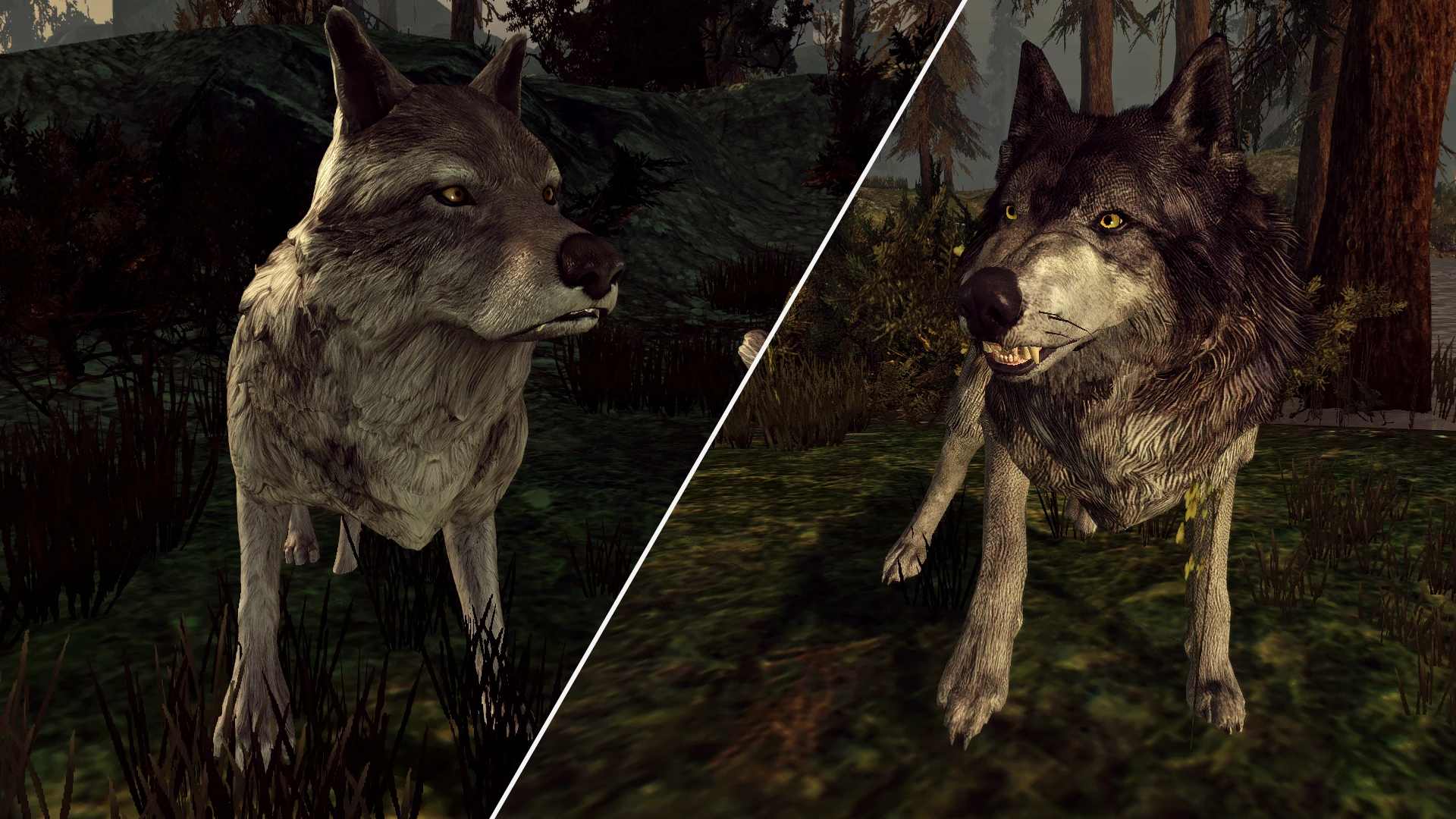
New two higher quality wolf models to choose from.
Two different wolf replacements. One model is ported from Dragon Age: Inquisition, the other is ported from The Witcher 3.
There are four versions of this mod to choose from:
-
[]DAI Wolf Replacer - replaces all wolf models (including Witherfang) with the model from Inquisition.
[
]TW3 Wolf Replacer - replaces all wolf models (including Witherfang) with the model from The Witcher 3.[]DAI Wolf Replacer (TW3 Witherfang) - replaces the normal wolf model with the DAI model, and Witherfang's model with the TW3 model.
[]TW3 Wolf Replacer (DAI Witherfang) - replaces the normal wolf model with the TW3 model, and Witherfang's model with the DAI model.
A variety of wolf colors are available for both replacements.
DAI Wolf Replacer:
-
[]Normal wolves: grey fur and yellow eyes.
[
]Alpha wolves: black fur and orange eyes.[]Witherfang: white fur and blue eyes.
TW3 Wolf Replacer:
-
[]Normal wolves: grey fur and yellow eyes.
[]Alpha wolves: dark grey fur and yellow eyes.
[]Witherfang: white fur and blue eyes.
Attention! At the moment, Witherfang has a standard wolf model. I don't work well with textures, so I couldn't draw the branches on his legs. Instead, I've uploaded an archive with uncompressed textures (only avaible for DAI Wolf Replacer), so you can try to improve them if you like.
INSTALLATION
-
[]Unpack the downloaded archive using the 7-zip archiver.
[
]Move the unpacked folder to your "override" folder (... Documents\BioWare\Dragon Age\packages\core\override). - Done!
If you do not want to replace Witherfang with a new model, open the installed folder and delete the "Witherfang" folder.
The same goes for alpha wolves. If you want to see them with grey fur, open the installed folder and delete the "Alpha" folder.
To uninstall the entire mod, just delete the installed folder from your "override" folder.
COMPATIBILITY
This mod is not compatible with other wolf model replacements, but it is compatible with all texture mods because the new models use the textures with new names.
It is also not compatible with mods that modify the alpha_wolf.utc file.
The alpha wolf model uses appearance base variation ID 1138.
Standalone wolf models use appearance base variation IDs 1139-1144.
-
[]Unpack the downloaded archive using the 7-zip archiver.
-
[]Normal wolves: grey fur and yellow eyes.
📊 Mod Details
- Game
- Dragonage Mods
- Author
- MoonAerin
- Version
- 2.1
- Downloads
- 4,136
- Endorsements
- 195
- Category
- Models and Textures
- Created
- 4/7/2024
- Updated
- 8/20/2024
🔧 How to Install Dragon Age: Origins Mods
Download from Nexus Mods.
📖 Full step-by-step install guide for Dragon Age: Origins →
Visit the official mod page for specific installation instructions for this mod.
🎮 Need cheat codes or console commands? Check ur gaming wiki for Dragon Age: Origins commands, item IDs, and more.
Keep browsing — more Dragon Age: Origins mods await