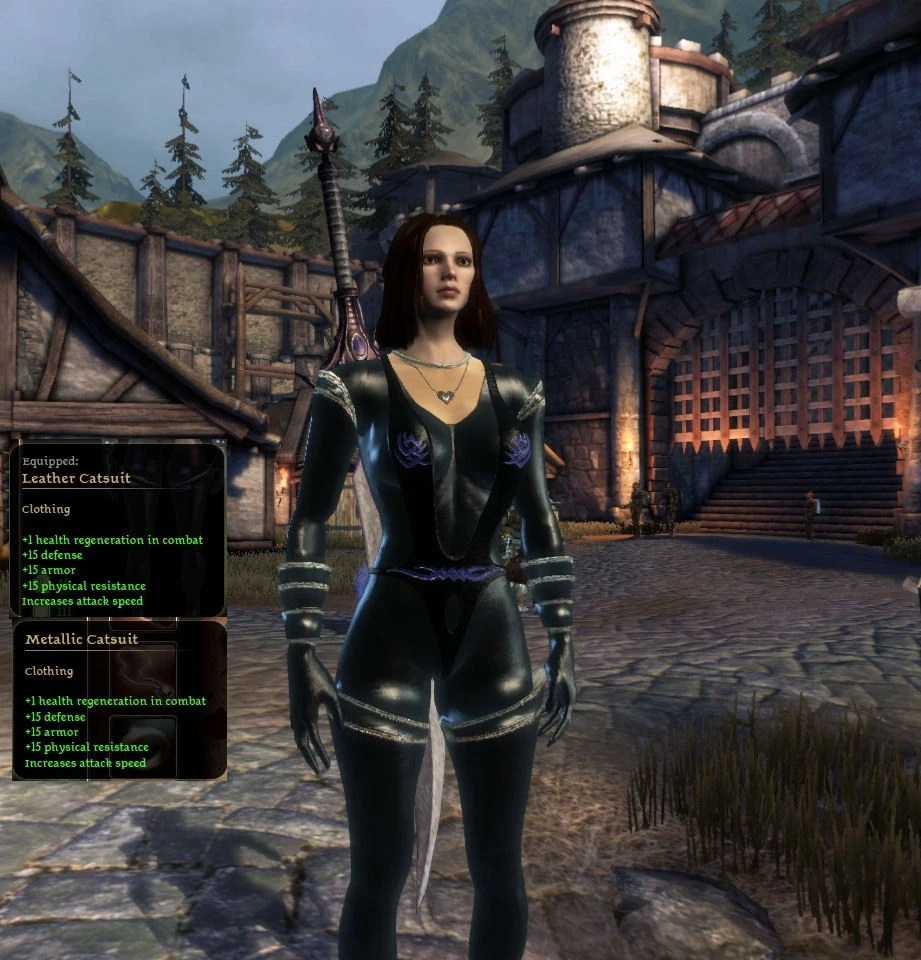
Tintable retexture of TnT EnArmored
⚪ Last updated 2010Preview
🔍 Analysis
- 👍 4.0% endorsement rate — high engagement, a strong quality signal
- 🏆 #117 of 224 Armour mods in this game by downloads
📋 About This Mod
I originally made this file for myself and my girlfriend but I wanted to share it with you all. This adds a completely standalone, tintable version of TnT\'s EnArmored.
Enarmored Tintable - TnT retexture by EvenstarGW First of all, credits go to TnT for the mesh and the base textures. The original can be found at: http://www.dragonagenexus.com/downloads/file.php?id=1095 Thank you guys for making all these wonderful armors. I liked the Onyx variant of the EnArmored mesh but it was too shiny to my taste so I started out making a new specular map for it. The result was a black latex looking variant of that armor. Nice enough in its own right, but I decided more was possible with this sexy skin. Since my girlfriend really enjoys splashing around color with my Upgrade wand I thought I\'d make it tintable. I ended up making a tintmap, revealing a bit of skin, restoring the straps, fixing the normalmap to the new skin and adjusting the specular map (again). I\'ve made it a separate variation so it will not replace the original EnArmored textures. You can wear mine and theirs side by side. Installation Copy the texture folder to your override, then install the dazip(s). DAO is for Original campaign, DAA for Awakening. You will get 2 versions of the armor in your inventory. They have the same stats but one has a leather progression, the other metal. As it is clothing, this has no effect on the stats, only the color. You can use my Upgrade wand to give it one of many available tints. The Upgrade wand can be found here: http://www.dragonagenexus.com/downloads/file.php?id=1115 The mod will respawn armors if they are not in your inventory. This way you can get multiples by putting them in storage. Eventually, you will have enough and may want them to stop appearing. This can be done by adding a flag to the dragonage.ini file. This file can be found in documents/bioware/dragon age/settings Edit the file and scroll down to the bottom. Add the following two lines to stop the armors from spawning: StopSpawningFreeStuff=1 The same option is also used for some of my other mods so if you added it before, you can disable it by setting it to 0. All my stuff will then respawn. Once again many thanks to TnT for all their excellent work. Keep them coming! EvenstarGW
📊 Mod Details
- Game
- Dragonage Mods
- Author
- EvenstarGW
- Version
- 1.0
- Downloads
- 4,822
- Endorsements
- 193
- Category
- Armour
- Created
- 5/16/2010
- Updated
- 5/16/2010
🔧 How to Install Dragon Age: Origins Mods
Download from Nexus Mods.
📖 Full step-by-step install guide for Dragon Age: Origins →
Visit the official mod page for specific installation instructions for this mod.
🎮 Need cheat codes or console commands? Check ur gaming wiki for Dragon Age: Origins commands, item IDs, and more.
Keep browsing — more Dragon Age: Origins mods await