DoF Off - remove depth of field
⚪ Last updated 2021Preview
🔍 Analysis
- 👍 6.7% endorsement rate — high engagement, a strong quality signal
- 🏆 #41 of 65 Visuals and Graphics mods in this game by downloads
📋 About This Mod
Turns off the depth of field effect.
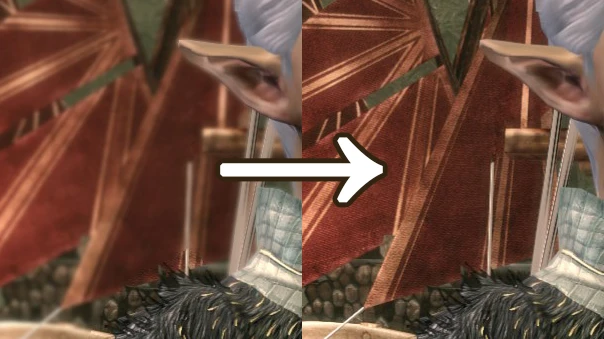
This mod will apply to all cutscenes (that aren't pre-rendered). It removes the depth of field effect (where objects are blurrier further away in cutscenes) meaning that the background will appear sharp and in-focus.
About
I made this mod when commanderstrawberry emerged from the long, dark (and orange) winter of having Framebuffer Effects turned off and saw that the depth of field effect had a non-blurred halo around fur. If you dislike the depth of field effect for that or any other reason, or just want to turn it off temporarily (eg for screenshots of background prop mods), then this mod is for you!
(The fur/hair halo happens because the DoF effect only applies to parts of the background not occluded by the full 3D model, and doesn't take transparency texture effects into account.)
The mod is absolutely tiny (about 2KB), and made in the same way as my Fade blur removal mod, by stopping the shaders from being called. As a result it may even improve performance, but I haven't tested this.
(If you have Framebuffer Effects turned off for performance reasons and your computer has more than 3GB of RAM, I highly recommend you get the 4GB/LAA (large address aware) patch that allows daorigins.exe to utilise more than 2GB of RAM. Everything looks so much less orange with Framebuffer Effects on.)
Installation
Extract in the usual override folder (\Documents\Bioware\Dragon Age\packages\core\override).
To uninstall, delete the file at any time.
Compatibility
This mod's file (da_dof.ffx.xml) clashes with Pixelated shaders begone, which also changes that file. If you just wish the vanilla DoF looked better, then I highly recommend you just get PSB instead (you may well want my bugfix for it though). The vanilla DoF effect involves resizing the frame image smaller then blowing it back up again; PSB removes that resizing, and as a result the DoF is less pixelated and also not as severely blurry. You can see a comparison between the de-pixelated DoF and vanilla DoF in this mod's images.
If you want to use both the rest of PSB and this mod, you'll need to either delete the relevant file (da_dof.ffx.xml) from PSB, or make sure this mod loads later than PSB (whichever duplicate file is loaded last is the one that is seen in-game) by making sure the folder this mod is in comes alphabetically later than the one PSB is in.
Mods prominently shown in screenshots:
[]Elven Scenery (look at those gorgeous aravels)
[]Pixelated shaders begone
[]Vignette Be Gone
[]Elf update (head and eye meshes only)
[]Elf Proportions
[]AP Neural Enhanced Textures (clothes/armour/
📊 Mod Details
- Game
- Dragonage Mods
- Author
- Ashhawk
- Version
- 1.0
- Downloads
- 4,164
- Endorsements
- 280
- Category
- Visuals and Graphics
- Created
- 12/4/2021
- Updated
- 12/4/2021
🔧 How to Install Dragon Age: Origins Mods
Download from Nexus Mods.
📖 Full step-by-step install guide for Dragon Age: Origins →
Visit the official mod page for specific installation instructions for this mod.
🎮 Need cheat codes or console commands? Check ur gaming wiki for Dragon Age: Origins commands, item IDs, and more.
Keep browsing — more Dragon Age: Origins mods await