DAO launcher redesigned
⚪ Last updated 2012Preview
🔍 Analysis
- 👍 4.3% endorsement rate — high engagement, a strong quality signal
- 🏆 #23 of 44 User Interface mods in this game by downloads
📋 About This Mod
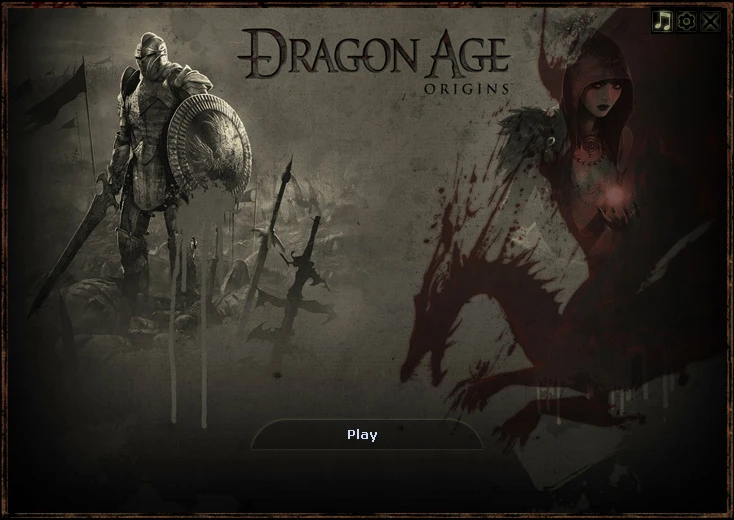
A simple launcher UI without ads or buttons you will most likely never use, in order to reveal more of the background.
Description
This is a simple launcher UI with buttons you will likely never use removed. To configure your game, there's a new button in the upper right corner that looks like a gear. Only the "play" textual button is kept, there's no "install", "uninstall", "support", "documentation", "website", nor "exit" textual buttons. If you want to quit the launcher use the "X" button in the upper right corner. And there are definitely NO ADS (or "News" as Bioware calls it)!
Installation
Go to the "data" folder of your game's installation directory: ..\Dragon Age\data\ Rename the "launcher" folder to anything, ex. "launcher.orig", and the "DAOriginsLauncher.xml" file to for ex. "DAOriginsLauncher.orig". Extract the zip archive (that you can download from the "Files" tab) into your "data" directory.
To uninstall, simply revert these steps: delete the "launcher" folder and the "DAOriginsLauncher.xml" file and replace them with the backups you made (from the above ex. "launcher.orig" and "DAOriginsLauncher.orig").
You still need to install the main file for the optional file to work. To enable the developer's console, download the optional "DAO launcher redesigned console" file, extract it to your game's "data" folder and replace the "DAOriginsLauncher.xml" file with it (the archive also contains image files for the second button). This will add a second button below "Play", named "Play (Console)", with which you can access the game with console mode enabled.
To replace the background music of the launcher just replace the "background.wma" file from your "data/launcher" folder with any ".wma" file you like (just name it "background.wma").
You can find this mod and more on: www.parochy.com
📊 Mod Details
- Game
- Dragonage Mods
- Author
- Parochy
- Version
- 12.07.12
- Downloads
- 3,739
- Endorsements
- 160
- Category
- User Interface
- Created
- 7/12/2012
- Updated
- 7/20/2012
🔧 How to Install Dragon Age: Origins Mods
Download from Nexus Mods.
📖 Full step-by-step install guide for Dragon Age: Origins →
Visit the official mod page for specific installation instructions for this mod.
🎮 Need cheat codes or console commands? Check ur gaming wiki for Dragon Age: Origins commands, item IDs, and more.
Keep browsing — more Dragon Age: Origins mods await