Tranquil complexion
⚪ Last updated 2018Preview
🔍 Analysis
- 👍 5.8% endorsement rate — high engagement, a strong quality signal
- 🏆 #263 of 305 Face and Hair mods in this game by downloads
📋 About This Mod
There was no word
For heaven or for earth, for sea or sky.
All that existed was silence.
Then the Voice of the Maker rang out,
The first Word,
And His Word became all that might be:
Dream and idea, hope and fear,
Endless possibilities.
Hey you! Yeah, you! Do you like headcanons? Do you like angst? Do you like religious oppression and horrible disfiguring scars? Well BOY have I got the mod for YOU!
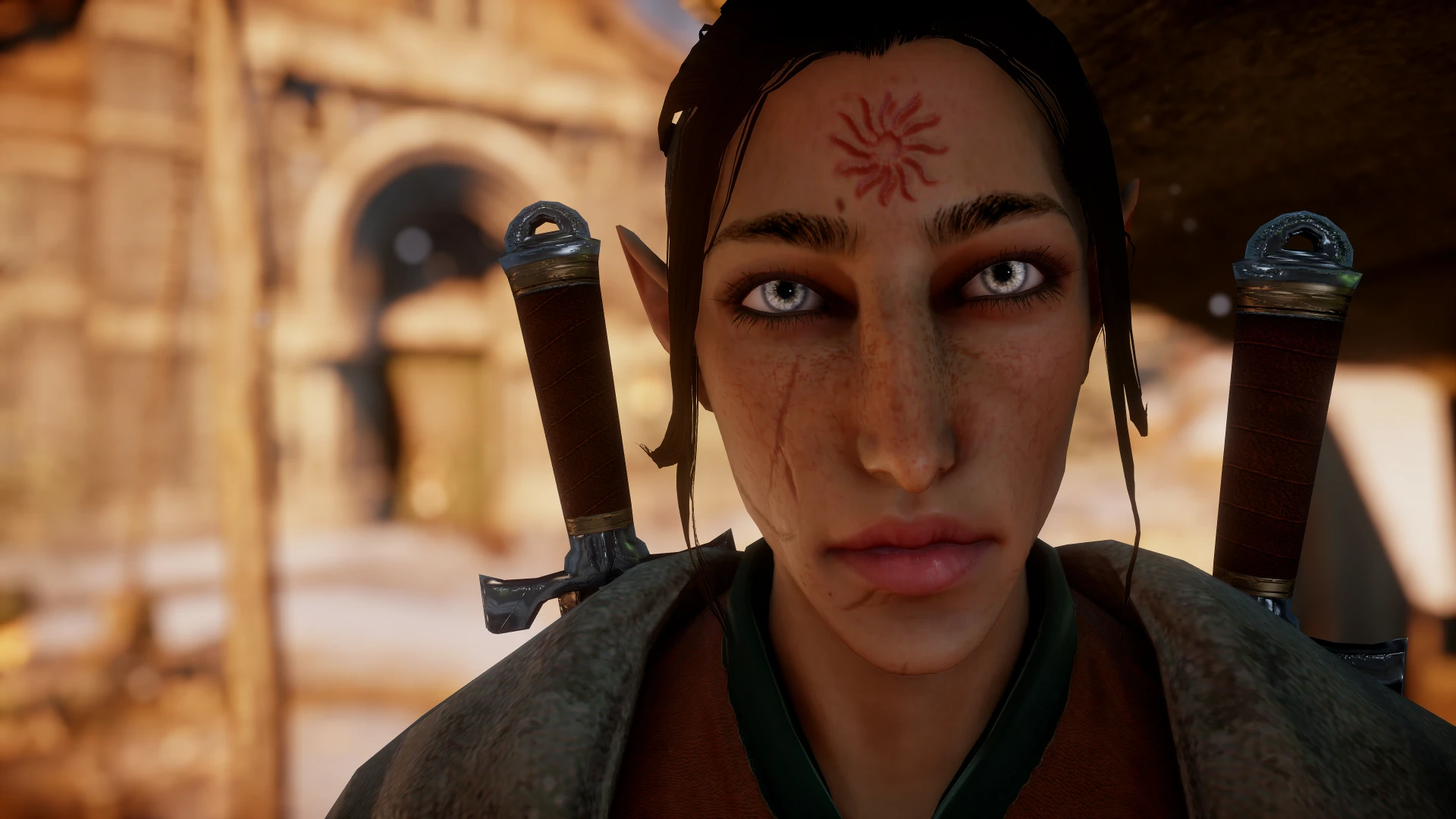
This mod adds a Tranquil brand by editing the diffuse and normal map on Calpernia's complexion for the Inquisitor. So, it's also got cute little freckles and such. I've got a non-Inquisitor Tranquil OC and I wasn't satisfied with the Tranquil brand as a tattoo, because I wanted it to look unsettling and disfiguring, as if it were very painful to apply. So here we are!
-
[]The male complexion replaces the FIFTH slot, the female complexion replaces the THIRD slot.
[
]It is deshined, so not compatible with Trespasser and parts of the other DLCs. Frostymod version coming eventually. You're welcome to edit back in the default specular map in the meantime if you need it.[]I've playtested the male version fairly extensively but the female one was a quick conversion. Let me know if there's any weirdness.
[]Because some NPCs will share this complexion, it will show up on some random NPCs, though I could not tell you for sure which ones exactly.
[]Also, humans, elves, and dwarves all share the same complexion files, so this will show up on dwarven Inquisitors, possibly on dwarven NPCs as well, though I hadn't noticed any. You may want to uninstall if playing a dwarf Inquisitor.
[]Because of the way the facial textures wrap around the mesh, the brand WILL look distorted on certain face shapes. There's nothing I can do about that. You can mitigate that somewhat by adjusting the forehead/brow sliders, but if it looks weird and squished, you'll probably just want to pick a different face shape. It looked great on my OC who I made this for to begin with and decent on MOST face shapes I played with, so.
[]I can add the Tranquil brand to other complexions by request provided the original creator has given permission or listed their complexion as a modder's resource.
If playing an elf, I'd recommend also using:
- []No Tattoo Option for Elves
- Elven Circle Mage Background
The original complexion was converted for Inquisitors by Ascendia, and you can find the originals here: male, female.
3-20-18: added new version, ciri's complexion (no scar/no brows) for women. again, original conversion by ascendia, see above.
A small cosmetic mod that adds a tranquil brand to Calpernia's complexion for the Inquisitor in Dragon Age: Inquisition. With 41 endorsements and last updated in 2018, it's a niche addition for players who want that specific lore-accurate detail on their character.
✨ Key Features
📊 Pros & Cons
✅ Pros
- Lore-friendly for fans who want that Tranquil look on their Inquisitor.
- Simple cosmetic tweak—doesn't mess with gameplay or balance.
- Lightweight and easy to install (just drop-in files).
⚠️ Cons
- Tiny niche appeal—only 41 endorsements, so it's not a widely used mod.
- Last updated in 2018—might not be compatible with the latest game patches or DLC.
- No screenshots or detailed instructions provided by the author, so you're flying blind on what it looks like.
For Dragon Age: Inquisition players who want to add a lore-accurate Tranquil brand to their Inquisitor's face. If you're into role-playing a Tranquil character or just want that distinctive mark, this is for you. Skip if you're looking for more noticeable visual overhauls or gameplay changes.
💡 Beginner Tips
- Since it's a cosmetic mod, you'll need to place the files in your Dragon Age: Inquisition mod folder (usually Documents/BioWare/Dragon Age Inquisition/Mods).
- Use the Frosty Mod Manager if you're on the latest version, as older mods may need conversion.
- Check the mod's file structure—if it's a .daimod, you'll need to merge it with other mods using DAIMod Manager.
📊 Mod Details
- Game
- Dragon Age Mods
- Author
- witchlamb
- Version
- 1
- Downloads
- 713
- Endorsements
- 41
- Category
- Face and Hair
- Created
- 3/18/2018
- Updated
- 5/22/2018
🔧 How to Install Dragon Age Mods
Download from Nexus.
📖 Full step-by-step install guide for Dragon Age →
Visit the official mod page for specific installation instructions for this mod.
🎮 Need cheat codes or console commands? Check ur gaming wiki for Dragon Age commands, item IDs, and more.
Keep browsing — more Dragon Age mods await