Tess complexion and sliders
⚪ Last updated 2016Preview
🔍 Analysis
- 👍 4.0% endorsement rate — high engagement, a strong quality signal
- 🏆 #8 of 298 Sliders mods in this game by downloads
📋 About This Mod
DISCLAIMER: This mod is a modder's resource now. You are free to use them for your own modding shenanigans, the only thing I ask - please mention that you used my assets and provide the links to my mods.
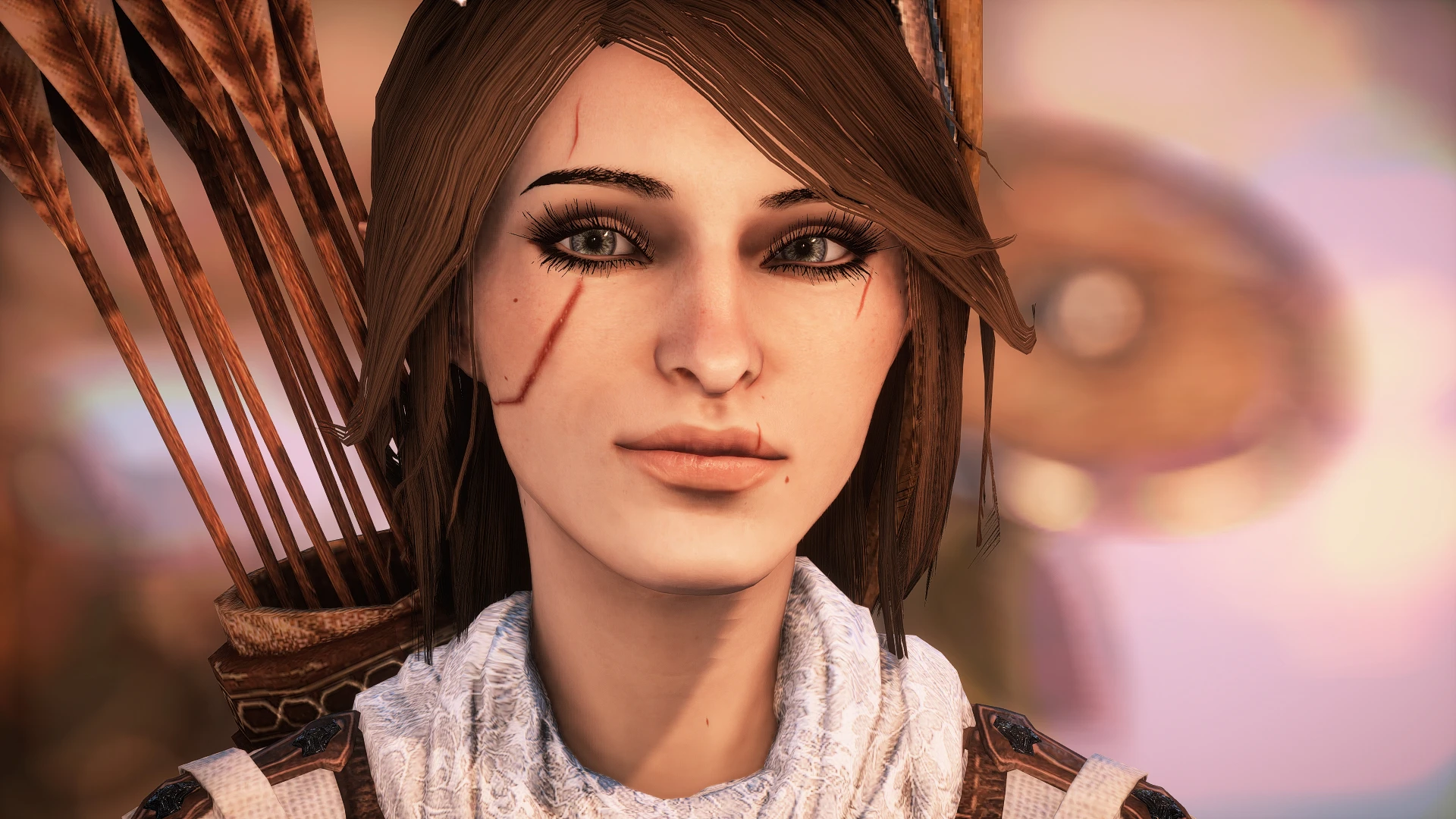
Yes, I’m sharing my baby. Please be gentle with her, she is very dear to my heart. I should warn you that her complexion is detailed and much sharper than what I had previously done before. Also she is probably the most realistic of them all. Anyways she is not smooth, especially in some lighting, but she looks good imho. I spent the longest on her. Comes with scars and without scars. But since its for my established character I’m not changing anything more about her, please don’t ask.
Since this has come up several times - Tess is a skinny twig elf :)
Mods she uses: Longer hair and scar-less complexion: Yennefer complexion V02 - real version with only black eyeliner, or Tess no scars complexion here Eyelashes by me Eyes by ramccoid Eyebrows by settrah Hair by Cos86 Hair re-tex by Skaramoosh Warpaint by Sho
Shorter hair and scarred complexion: Scarred complexion here Eyelashes by me Eyes by ramccoid Eyebrows by settrah Hair by guidethisonekalaheria Hair re-tex by Skaramoosh No tattoo option for elves
Saves are up, two in total: 1. At the beginning of prologue on the starting bridge. She has longer darker hair, blue stripe instead of vallaslin and the non-scarred complexion, the scars are from the stock ones. 2. In Haven next to Cassandra. Ligher shorter hair, no tattoos on face, complexion is scarred, the stock scars were removed.
She is called Tessa and she is an archer. The name is very simple and very human on purpose. Its not supposed to be elven. Please dont ask me to recreate her for a different class or name. I have trouble recreating my own characters so they always end up one of a kind.
REQUIREMENTS:
- []ModManager 0. 53 or later []Patch 9
Compatibility: Does not work with the Black Emporium, so you either have to start a new game, or make two versions of a mod manager update folder - with and without this mod. Then visit the Black emporium (without this mod), switch to complexion 3, save, exit the game, put a merged mod folder in the Update folder with this mod and play the game.
Used in screens: SweetFX Lostis Preset A lot of personal tweaks with Cinematic Tools Graphic settings
A compact slider mod for character creation, offering Tess complexion options and slider adjustments. With 686 endorsements and 17,061 downloads, it's a community favorite despite its minimal description. Last updated in 2016, it may be outdated for current game versions.
✨ Key Features
📊 Pros & Cons
✅ Pros
- Community-approved with 686 endorsements — clearly a hit.
- 17,061 downloads show real demand for this kind of tweak.
- Simple slider mod — easy to install and use.
⚠️ Cons
- Last updated in 2016 — might not work with the latest game patches.
- No install instructions or compatibility notes from the author.
- Description is just 'My lovely bby, please be gentle' — zero detail on what exactly it changes.
For character creation enthusiasts who want more complexion variety and slider precision. If you're on an older game version and love tweaking your character's look, this is worth a shot. Skip if you need up-to-date compatibility or detailed documentation.
💡 Beginner Tips
- Check if your game version is compatible — the mod is from 2016, so it may need a patch.
- Back up your character preset files before installing to avoid conflicts.
- If you use a mod manager, let it handle the files for cleaner uninstallation.
📊 Mod Details
- Game
- Dragon Age Mods
- Author
- RealArideya
- Version
- 0.1
- Downloads
- 17,061
- Endorsements
- 686
- Category
- Sliders
- Created
- 12/23/2015
- Updated
- 2/8/2016
🔧 How to Install Dragon Age Mods
Download from Nexus.
📖 Full step-by-step install guide for Dragon Age →
Visit the official mod page for specific installation instructions for this mod.
🎮 Need cheat codes or console commands? Check ur gaming wiki for Dragon Age commands, item IDs, and more.
Keep browsing — more Dragon Age mods await