More Colorful Dragons
⚪ Last updated 2015Preview
🔍 Analysis
- 👍 7.9% endorsement rate — high engagement, a strong quality signal
- 🏆 #171 of 451 Models and Textures mods in this game by downloads
📋 About This Mod
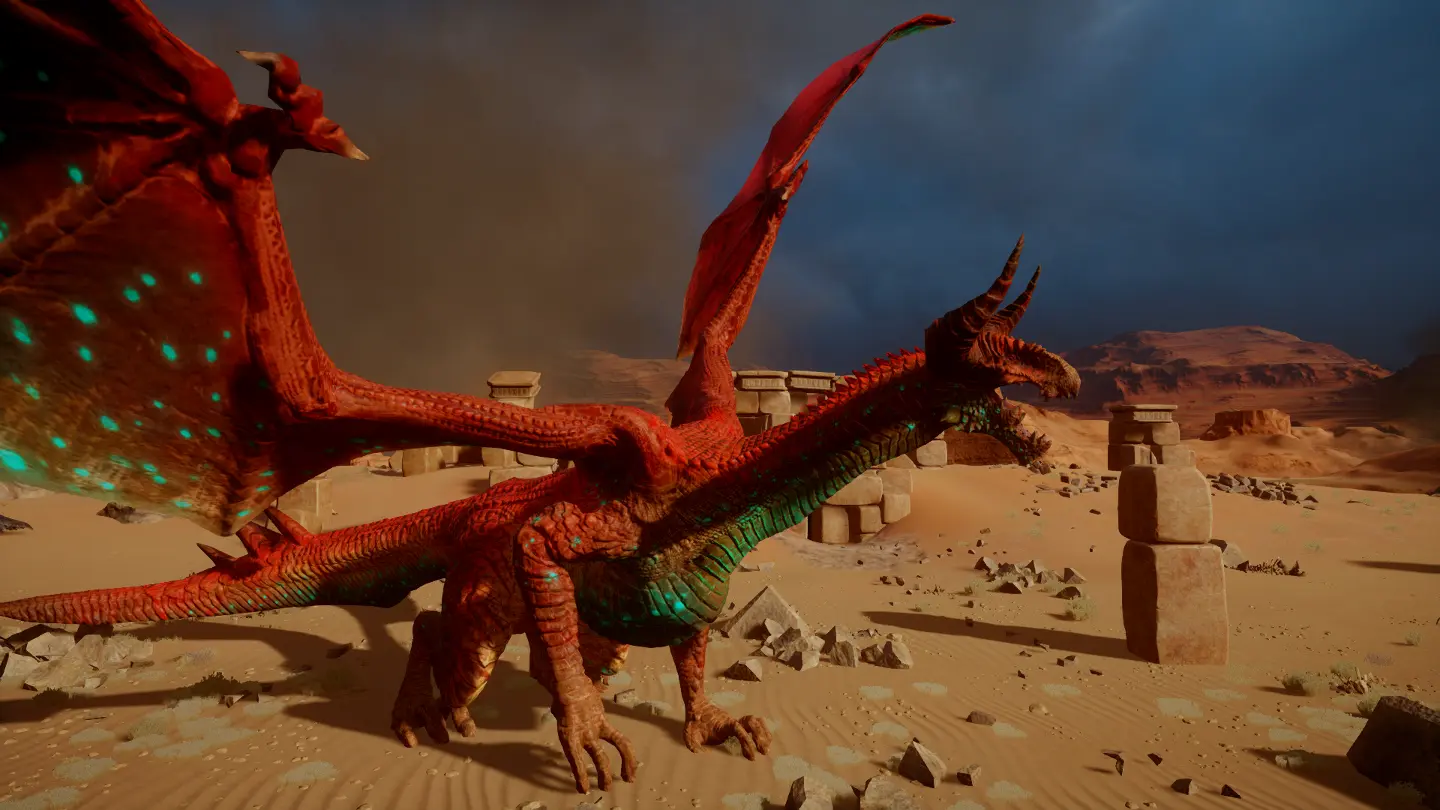
More Colorful Dragons
The title says it all :) Intensive Colors for all Highdragons
Installation Instructions Patch 7 / Patch 6 / Patch 5
Mod Manager v0. 50
1) Download DAI Mod Manager v0. 50 or v0. 51(supports daimod files AND distributable mods)by Ehamloptiran/new patch friendly version by Zhentar 3) Extract the zip archive into a new folder named DAI Mod Manager v0. 50 5) Create a new folder for your mod files 6) Launch ModManager v0. 50 and set the right paths and select all your desired mods(nothing to tick).
SOSM Extract the 7z archive in the Mod folder you have associated with DAI Mod Manager. Installation Instructions for Patch 6
Installation: - Extract the archive and put the "colorfuldragons daimod" folder at a place of your choice(for example "Mods" folder on the desktop). - For implementing use Ehamloptiran's Mod Manager tool → Here
How to install mods for up to date Dragon Age Inquisition Game: 1) Copy the content of the Patch folder to a new folder named Vanillapatch. 2) Delete Patch.daimod from the modmanager v0. 48 folder. 3) Use ModManager v0. 48 to merge your mods IMPORTANT tick Force rescan of Patch. Save to a new folder named Merged. 4) Rename the folder named Patch to PatchV. Rename the folder named Merged to Patch. How to add more mods? - Delete Patch folder and PatchV folder - Rename the Vanillapatch folder to Patch - Use ModManager v0. 48 and select all your desired mods IMPORTANT tick Verbose Logging. - Rename the folder named Patch to PatchV. Rename the folder named Merged to Patch.
- ----------------------------------------------
- Check out my other Mods:
- Tiny BF3 Loading Tile Click
- Corypheus Glowing Face Click
A compact texture mod that gives all Highdragons in Skyrim more vivid and intensive colors. With 337 endorsements and 4,289 downloads, it's a niche favorite for players wanting a visual refresh without overhauling the game. Last updated in 2015, so compatibility with current versions is uncertain.
✨ Key Features
📊 Pros & Cons
✅ Pros
- Community-tested and liked (337 endorsements) — a solid pick for dragon visuals.
- Lightweight and straightforward — just drop in and go, no bloat.
- Gives dragons a fresh, vibrant look that stands out from vanilla.
⚠️ Cons
- Last updated in 2015 — may not play nice with the latest Skyrim patches or mods.
- Only affects Highdragons — if you want variety across all dragon types, this won't cut it.
- No detailed install instructions or compatibility notes from the author.
For Skyrim players who want their dragons to pop with more color without a full visual overhaul. If you're a screenshot enthusiast or just tired of the same old gray dragons, this is a quick win. Skip if you're looking for gameplay changes or dragon variety beyond color.
💡 Beginner Tips
- Since it's a texture mod, make sure to place it in your Data folder or use a mod manager to avoid overwriting other dragon textures.
- If you use other dragon texture mods, load this one after them to ensure its colors take priority.
- Check your mod manager's preview feature to see the new colors before committing in-game.
📊 Mod Details
- Game
- Dragon Age Mods
- Author
- Wodjanoi
- Version
- v1.0
- Downloads
- 4,289
- Endorsements
- 337
- Category
- Models and Textures
- Created
- 2/20/2015
- Updated
- 3/13/2015
🔧 How to Install Dragon Age Mods
Download from Nexus.
📖 Full step-by-step install guide for Dragon Age →
Visit the official mod page for specific installation instructions for this mod.
🎮 Need cheat codes or console commands? Check ur gaming wiki for Dragon Age commands, item IDs, and more.
Keep browsing — more Dragon Age mods await