LL Inquisition Faction
⚪ Last updated 2015Preview
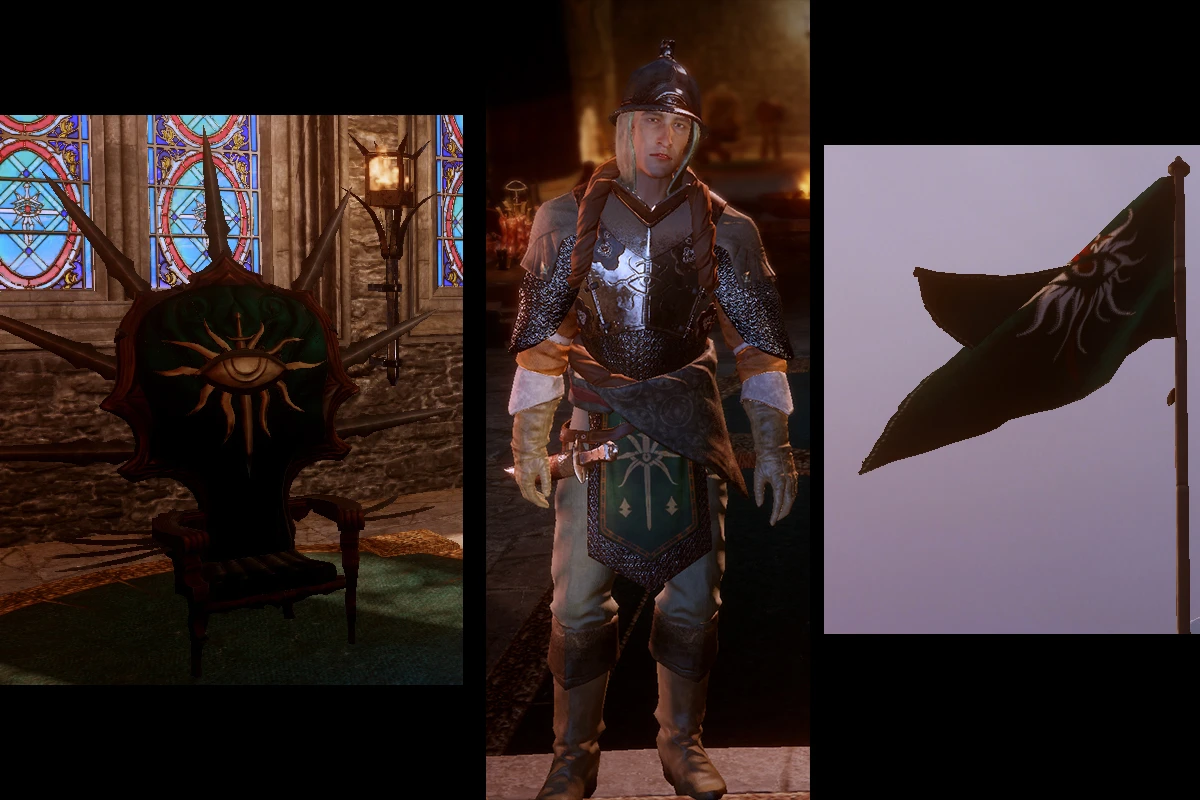
🔍 Analysis
- 👍 4.7% endorsement rate — high engagement, a strong quality signal
- 🏆 #74 of 451 Models and Textures mods in this game by downloads
📋 About This Mod
Mistress Lazzuli, As you know, the Inquisition has split from the Chantry right from the beginning. As such it has it's own emblem and heraldic colors. The time has come to display them proudly and to put an end to the confusion that may still remain about our association with the Chantry.
Therefore, it is with great pleasure that I inform you that your establishment has been selected to provide the Inquisition with the skills it needs in this endeavor. You are tasked to remove all traces of the Chantry red from our paraphernalia and replace it with our own colors of emerald, black and gold.
Yours truely Ambassador Montilyet
- --------------------------
- Update
- 03/12/2015: Added the missing Qunari male file for the Formal wear
- Repackaged the files for patch 5
- 03/06/2015: Added 2 optionnal extension packages: Extension 01 that includes stainglasses and banners in Skyhold and Extension 02 that includes Skyhold furniture.
- --------------------------
- This mod removes the red from all of the Inquisition Faction paraphernalia and replaces it with a green, black and gold theme. It also includes a formal dress retexture that is used in Halamshiral. Works for all races/genders.
Installation: - You will need the MOD Manager to install it. - Remove previous version prior to installing a new one - Unzip "LL_inquisition_faction.zip" in your mod folder - Follow the instructions for the MOD Manager.
- ***************************
- Mods with patch 6
- Zhentar has published a fix to DAI MOD MANAGER that allows us to use mods with Patch 6.
- Here's the original post: http://www.reddit.com/r/dragonage/comments/317dkg/no_spoilersannouncement_how_to_run_mods_with/
Part 1 - Setting up the game folders ------------------------------------------------------ 1) In the "Update" folder of your game, make a copy the folder "Patch" and named it "Vanilla_v6". It's now your backup copy of Patch 6 in case you need a fresh one. 2) Before doing a merge always make sure you have a fresh copy of the Patch 6 in your Patch folder.
Part 2 - Merging the mods ---------------------------------------- 3) In your DAI Mod Manager folder, delete the Patch.daimod. 3A) If you do not have a Patch.daimod file in your DAI Mod Manager folder, execute step 5 once. You can delete the merged files created, you will not need them. Go back to step 3, you should now have a Patch.daimod. 4) Replace it by Patch.daimod creat
This cosmetic mod retextures all Inquisition Faction paraphernalia from red to a green, black, and gold theme, including a formal dress retexture for Halamshiral. It works for all races and genders, offering a unified color scheme for players who prefer a different aesthetic.
✨ Key Features
📊 Pros & Cons
✅ Pros
- Community favorite with 549 endorsements and over 11k downloads.
- Simple cosmetic change that gives the Inquisition a fresh, cohesive look.
- Covers all faction paraphernalia, so your whole army matches.
⚠️ Cons
- Last updated in 2015, so it may not be compatible with newer game patches or DLC.
- Only changes colors—no new models or textures beyond the retexture.
- No screenshots or detailed previews in the description, so you can't see the result before installing.
For Dragon Age: Inquisition players who want to change the Inquisition's color scheme from red to green/black/gold, especially those who enjoy role-playing or want a more unified look. Skip if you're looking for gameplay changes or new armor models—this is purely cosmetic.
💡 Beginner Tips
- Make sure to back up your original game files before installing, as this mod replaces vanilla textures.
- If you use a mod manager like Frosty Mod Manager, you can easily toggle this mod on and off without messing up your game.
- Check the mod's comments section for any reported issues with specific DLC or patches, since it's an older mod.
📊 Mod Details
- Game
- Dragon Age Mods
- Author
- LapisLazzuli
- Version
- 1.2
- Downloads
- 11,748
- Endorsements
- 549
- Category
- Models and Textures
- Created
- 3/2/2015
- Updated
- 3/12/2015
🔧 How to Install Dragon Age Mods
Download from Nexus.
📖 Full step-by-step install guide for Dragon Age →
Visit the official mod page for specific installation instructions for this mod.
🎮 Need cheat codes or console commands? Check ur gaming wiki for Dragon Age commands, item IDs, and more.
Keep browsing — more Dragon Age mods await