LL Crafting Material fixes
⚪ Last updated 2015Preview
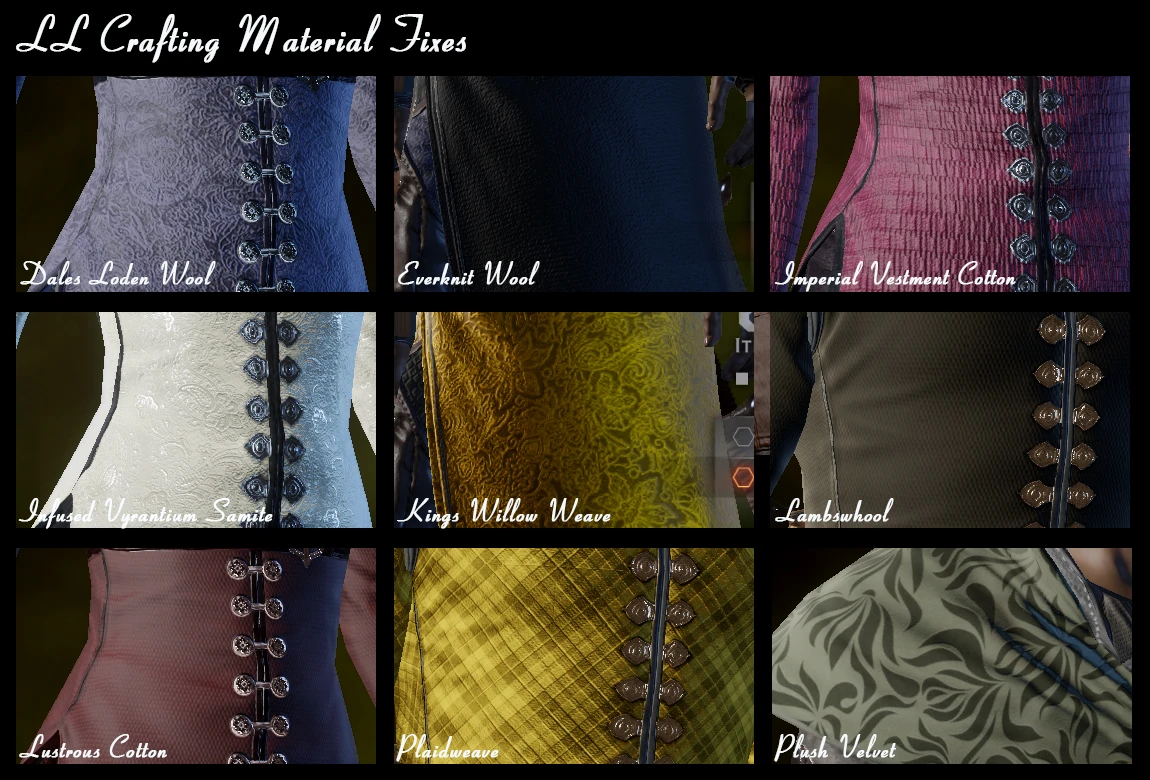
🔍 Analysis
- 👍 3.5% endorsement rate — high engagement, a strong quality signal
- 🏆 #1 of 62 Crafting mods in this game by downloads
📋 About This Mod
Greeting fellow Thedasians,
Tired and depressed by the fabrics and leather offered at your local requisition depot? Weep no more! I am please, nay, overjoyed to offer you some of my private stock. Free of charge! Ay, free of charge! 'Cause, I too, got tired of the drab stuff available.
For a prettier Thedas!!
- Lapis Lazzuli, jack of all trades, master of many
- --------------------------
- Update
- 03/23/2015: Added missing leather
- Changed some of the leather already in the mod
- Packaged some of the leather as individual files
- 03/19/2015: Repackaing of metals as individual files.
- 03/17/2015: Added new modified textures
- Repackaged the files to be more granular. Included an individual file for each of the fabric found in the Fabric Fixes mod.
- ------------------------
- This mod modifies the look of some of the cloth and leather. Changes include higher resolution, change of patterns or change of color.
Installation: - You will need the MOD Manager to install it. - Remove previous version prior to installing a new one - Unzip "LL_crafting_material_fixes.rar" in your mod folder - Follow the instructions for the MOD Manager.
- ***************************
- Mods with patch 6
- Zhentar has published a fix to DAI MOD MANAGER that allows us to use mods with Patch 6.
- Here's the original post: http://www.reddit.com/r/dragonage/comments/317dkg/no_spoilersannouncement_how_to_run_mods_with/
Part 1 - Setting up the game folders ------------------------------------------------------ 1) In the "Update" folder of your game, make a copy the folder "Patch" and named it "Vanilla_v6". It's now your backup copy of Patch 6 in case you need a fresh one. 2) Before doing a merge always make sure you have a fresh copy of the Patch 6 in your Patch folder.
Part 2 - Merging the mods ---------------------------------------- 3) In your DAI Mod Manager folder, delete the Patch.daimod. 3A) If you do not have a Patch.daimod file in your DAI Mod Manager folder, execute step 5 once. You can delete the merged files created, you will not need them. Go back to step 3, you should now have a Patch.daimod. 4) Replace it by Patch.daimod created by Zhentar. You can download it here in the file section or on the original post mentionned above. 5) Launch DAI MoD Manager, select the mods you want to merge then hit "Merge". You can save the result whereever you want. In my case I use \Documents\BioWare\MERGED.
IMPORTANT - DO NOT use the "Force Rescan" option. It will override the fix
LL Crafting Material fixes is a small cosmetic mod for Skyrim that improves the appearance of cloth and leather crafting materials with higher resolution textures, new patterns, and color changes. It has 5,335 endorsements and 152,940 downloads, last updated in 2015.
✨ Key Features
📊 Pros & Cons
✅ Pros
- Community favorite with 5,335 endorsements and 152k downloads
- Simple visual upgrade for crafting materials without gameplay changes
- Lightweight and easy to install
⚠️ Cons
- Last updated in 2015 — may be outdated for current Skyrim versions
- Only affects cloth and leather, not other materials
- No screenshots or detailed previews provided
For Skyrim players who want a quick visual refresh for cloth and leather items without overhauling the whole game. Skip if you're looking for gameplay changes or texture overhauls for all materials.
💡 Beginner Tips
- Place the files in your Skyrim Data folder or use a mod manager for easy uninstallation.
- Load order rarely matters for texture-only mods, but keep it above mods that alter the same textures.
- Check the mod's compatibility with other texture overhauls you use to avoid conflicts.
📊 Mod Details
- Game
- Dragon Age Mods
- Author
- LapisLazzuli
- Version
- 1.3
- Downloads
- 152,940
- Endorsements
- 5,335
- Category
- Crafting
- Created
- 3/2/2015
- Updated
- 3/23/2015
🔧 How to Install Dragon Age Mods
Download from Nexus.
📖 Full step-by-step install guide for Dragon Age →
Visit the official mod page for specific installation instructions for this mod.
🎮 Need cheat codes or console commands? Check ur gaming wiki for Dragon Age commands, item IDs, and more.
Keep browsing — more Dragon Age mods await