Lead Them or Fall - CC Sliders and Saves collection
⚪ Last updated 2017Preview
🔍 Analysis
- 👍 4.6% endorsement rate — high engagement, a strong quality signal
- 🏆 #72 of 298 Sliders mods in this game by downloads
📋 About This Mod
Most of these were previously in separate posts, but I have decided to condense all my sliders into one mod page.
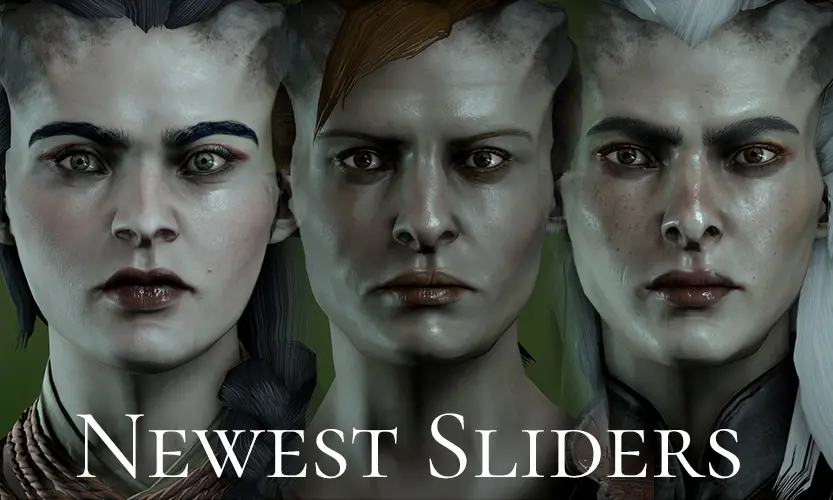
Newest sliders 21/04/2017: Essra, Ayda and Basira Adaar
Newest sliders 23/08/2016: Terani Lavellan, Ylva Cadash, Einin.
HOW TO USE SLIDERS
-
[]Firstly, extract the zip file to a new folder and open the images in an editing program. Resize them to match your screen resolution. The images provided are 1920x1080.
[
]Start Inquisition and check your display settings. Set it to run in windowed fullscreen mode then return to the main menu to create a new game.[]Once you have chosen your gender, race and class, alt+tab out of the game and open the folder containing the slider image files.
[]Open the first image using the windows photo viewer (it is the default program for opening images). Click on the "actual size" icon in the lower right corner.
[]Position your mouse over a slider position or graph point on the image and alt+tab back to the game. The pointer should remain in place and you can use the right/left arrow keys to set the slider to match or left-click to set the graph point.
[]Use the up/down arrow keys to go to the next option and alt+tab out of the game again. Go to the next image and repeat the process until you have worked through each CC screen.
HOW TO INSTALL SAVES
-
[]Extract the zip file to a new folder.
[
]Find your saves folder. It is usually under Documents/Bioware/Dragon Age Inquisition/Save.[]Copy or cut and paste the save files you want into the saves folder.
[]Start the game and select Load from the menu and find the save you want to load.
HUMAN
Iseut Trevelyan (F)
-
[]Hair: French Braid v2 by Aileani & SK Hair re-texture- Realistic by Skaramoosh
[
]Complexion: Isabela female complexion without brows by Kori C[]Eyes: Insane Eyes by Sho
[]Eyebrows: Eyebrows- Updated version by settrah
[]Makeup: New and Improved Makeup 4 by Zolariel
[]Clothes: Immersive Starting Armors - Multiplayer HF Isabela variant by tirnoney
Jocelyn Treveylan (F)
[]Hair: Bun - sideswept bangs by Kadust & SK Hair re-texture- Realistic by Skaramoosh
[]Complexion: Yenefer complexion -
-
[]Hair: French Braid v2 by Aileani & SK Hair re-texture- Realistic by Skaramoosh
A collection of character creation sliders for all races in Dragon Age: Inquisition, including newly added presets for Essra, Ayda, and Basira Adaar. With 76 endorsements and 1,648 downloads, this mod offers a straightforward way to recreate specific looks without needing separate posts.
✨ Key Features
📊 Pros & Cons
✅ Pros
- Solid community backing with 76 endorsements and over 1.6k downloads.
- One-stop shop for sliders—no need to hunt down multiple posts.
- Fresh content added in April 2017, so it was actively maintained at the time.
⚠️ Cons
- Last updated in 2017—likely outdated for current game patches or DLC.
- No screenshots or previews mentioned, so you're flying blind until you try them.
- Only sliders, no save files included despite the title mentioning 'saves'.
For Dragon Age: Inquisition players who love fine-tuning character creation and want a curated set of sliders for all races. If you're after ready-made save files, this isn't it—it's purely slider presets. Skip if you prefer mods with visual previews or active updates.
💡 Beginner Tips
- Follow the slider values exactly—even small deviations can change the look drastically.
- Use the Black Emporium to tweak your character after the intro if you're not satisfied.
- Take screenshots of your character before applying sliders so you can compare and revert if needed.
📊 Mod Details
- Game
- Dragon Age Mods
- Author
- radiuhoh
- Version
- 1.0
- Downloads
- 1,648
- Endorsements
- 76
- Category
- Sliders
- Created
- 8/23/2016
- Updated
- 4/21/2017
🔧 How to Install Dragon Age Mods
Download from Nexus.
📖 Full step-by-step install guide for Dragon Age →
Visit the official mod page for specific installation instructions for this mod.
🎮 Need cheat codes or console commands? Check ur gaming wiki for Dragon Age commands, item IDs, and more.
Keep browsing — more Dragon Age mods await