Evangeline Lavellan Sliders
⚪ Last updated 2021Preview
🔍 Analysis
- 👍 4.6% endorsement rate — high engagement, a strong quality signal
- 🏆 #59 of 298 Sliders mods in this game by downloads
📋 About This Mod
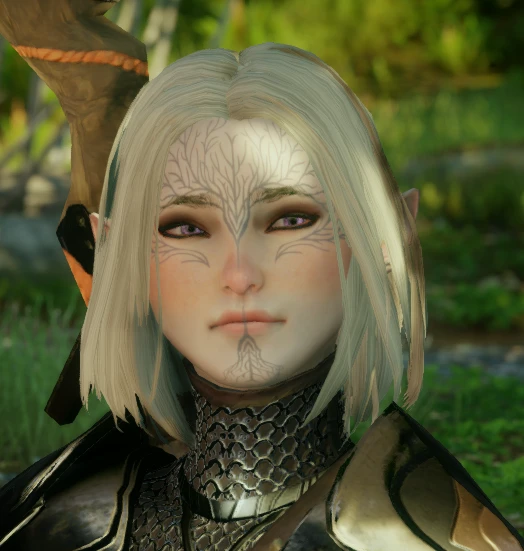
These are the sliders for my favorite inquisitor, Evangeline. I've included a picture of what she would (approximately) look like unmodded.
The mods are a combination of Daimods and frosty. This complexion as far as I'm aware, can't be used in Trespasser/DLCs, and if loaded in Frosty Mod Manager will result in a never-ending load screen.
The preset used is EF Head 3.
I did not include the color/makeup sliders due to the fact I change them endlessly and to allow more range for users. But if you are interested in those, let me know!
Pictured Mods:
Nipuni's Nalia Bob Cut
Hair Retexture by fontofnothing
Libelula PJ's Texture by punygoddess
Porcelaine Complexion by Bububull
Shadowed Eyes for Frosty by Khylian
UPDATE: A good alternative to the complexion mod for the same cheek/nose blush effect! :)
New Makeup with Nose Blush by amievil
Evangeline Lavellan Sliders is a compact cosmetic mod for Dragon Age: Inquisition that provides the exact character creation sliders used by the author for their chubby-faced Inquisitor, Evangeline. With 88 endorsements and 1,921 downloads, it's a niche resource for players seeking a specific look.
✨ Key Features
📊 Pros & Cons
✅ Pros
- Tried and tested look with 88 endorsements from the community.
- Easy to use—just follow the sliders in character creation.
- Gives you a unique, adorable face that stands out from default presets.
⚠️ Cons
- Only provides sliders for one specific look—no variety or alternatives.
- No screenshots or in-game previews included in the description, so you can't see the result before applying.
- Last updated in 2021, so it may not reflect any changes in character creation options if the game has updated since.
For Dragon Age: Inquisition players who want a cute, chubby-faced Lavellan without spending hours tweaking sliders. If you're looking for a quick, community-approved preset to start from, this is for you. Skip if you want more customization options or a different aesthetic.
💡 Beginner Tips
- When entering character creation, have the slider values open on a second screen or write them down—you'll need to match them exactly.
- The sliders are for a Lavellan (elf) Inquisitor, so make sure you choose the right race before applying them.
- If you want to tweak the look, use these sliders as a base and adjust the jaw or cheek sliders slightly to suit your taste.
📊 Mod Details
- Game
- Dragon Age Mods
- Author
- Viddybee
- Version
- 1
- Downloads
- 1,921
- Endorsements
- 88
- Category
- Sliders
- Created
- 7/20/2021
- Updated
- 7/20/2021
🔧 How to Install Dragon Age Mods
Download from Nexus.
📖 Full step-by-step install guide for Dragon Age →
Visit the official mod page for specific installation instructions for this mod.
🎮 Need cheat codes or console commands? Check ur gaming wiki for Dragon Age commands, item IDs, and more.
Keep browsing — more Dragon Age mods await