Cross-Eyed Removal for Varric Talk
⚪ Last updated 2024Preview
🔍 Analysis
- 👍 6.2% endorsement rate — high engagement, a strong quality signal
- 🏆 #19 of 62 Bug Fixes mods in this game by downloads
📋 About This Mod
The frosty mod manager version also removes that same expression from a rather small handful of lines said out in the field (outside of cutscenes.) It definitely doesn't cover them all, just a small handful, because I started on them before realizing later that there were lots more occurrences of this expression outside of cutscenes than I had originally thought, too many for me address fully. But if you see the frosty version edits extra files, that is why.
Q1: What do the DAIMM and frosty in the file names mean?
A1: DAIMM = version of the mod for people using dai mod manager.
Frosty = version of the mod for people using frosty mod manager.
Q2: Do I need to use both the DAIMM and frosty versions of the mod at once?
A2: No, there's no reason to do that.
Q3: Will this work on all inquisitor types?
A3: Should do.
Q4: Will this remove the expression in all other scenes, too?
Q5: Will you add this edit to other dialogues too?
A5: This edit as far as I know has to be done on a line-by-line basis, which makes applying it to other dialogue tricky because there's no "turn off this animation for all dialogues" switch I can tick, each appearance of the expression has to be addressed individually. So I don't think I'll ever be able to apply this edit to all dialogues just because of the sheer amount of them.
That said, for frosty mod manager, if you are able to tell me what line a character is saying when you see this glitch, and which character is speaking at the time under what context e.g X character said Y line as they picked X dialogue option whilst they were doing Z thing during XYZ questline. Then I can look into the issue with that specific line and try fix it.
Saves before the bugged dialogue are appreciated for testing purposes however not 100% needed if you cannot produce one, telling me the above information should suffice.
But, if you would like to supply me with a save file for testing purposes...:
Your save files are the . DAS files located under your documents > bioware > dragon age: inquisition > saves, if you wish to supply me with any, you can upload them to some file hosting website like mediafire.
✨Donations✨
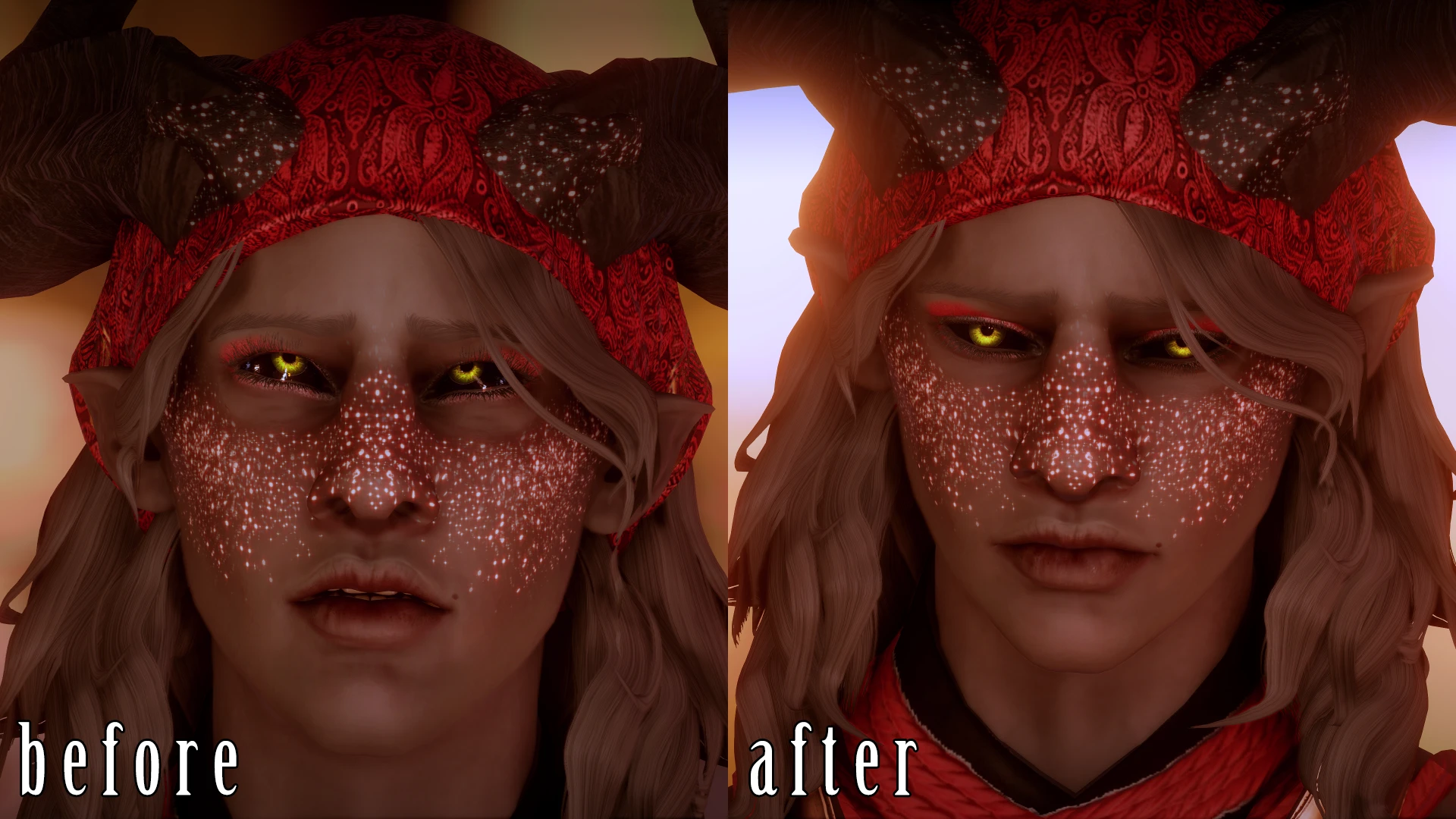
A small bug fix mod for Dragon Age: Inquisition that removes the cross-eyed expression on the Inquisitor during a specific cutscene with Varric at Skyhold. Requires Frosty Mod Manager or DAI Mod Manager. Simple install, 317 endorsements.
✨ Key Features
📊 Pros & Cons
✅ Pros
- Fixes an annoying visual glitch that breaks immersion during a key character moment.
- Community-approved with 317 endorsements and over 5,000 downloads.
- Lightweight and focused—does exactly what it says without extra bloat.
⚠️ Cons
- Only fixes one specific cutscene—other cross-eyed expressions may remain.
- Requires a mod manager, so console players or manual installers are out of luck.
- Last updated in August 2024—may not be tested with the latest game patches.
For Dragon Age: Inquisition players who notice and are bothered by the Inquisitor's derpy expression during that Varric conversation. If you're a stickler for polished cutscenes, this is a must-have. Skip if you don't care about facial animations or rarely talk to Varric.
💡 Beginner Tips
- Make sure you launch the game through the mod manager after installing, or the fix won't apply.
- If you're using Frosty, merge your mods into a single package to avoid conflicts with other cosmetic mods.
- Test the cutscene by reloading a save before the conversation with Varric to confirm the fix works.
📊 Mod Details
- Game
- Dragon Age Mods
- Author
- Dmitrias
- Version
- 1
- Downloads
- 5,110
- Endorsements
- 317
- Category
- Bug Fixes
- Created
- 5/11/2022
- Updated
- 8/2/2024
🔧 How to Install Dragon Age Mods
Download from Nexus.
📖 Full step-by-step install guide for Dragon Age →
Visit the official mod page for specific installation instructions for this mod.
🎮 Need cheat codes or console commands? Check ur gaming wiki for Dragon Age commands, item IDs, and more.
Keep browsing — more Dragon Age mods await