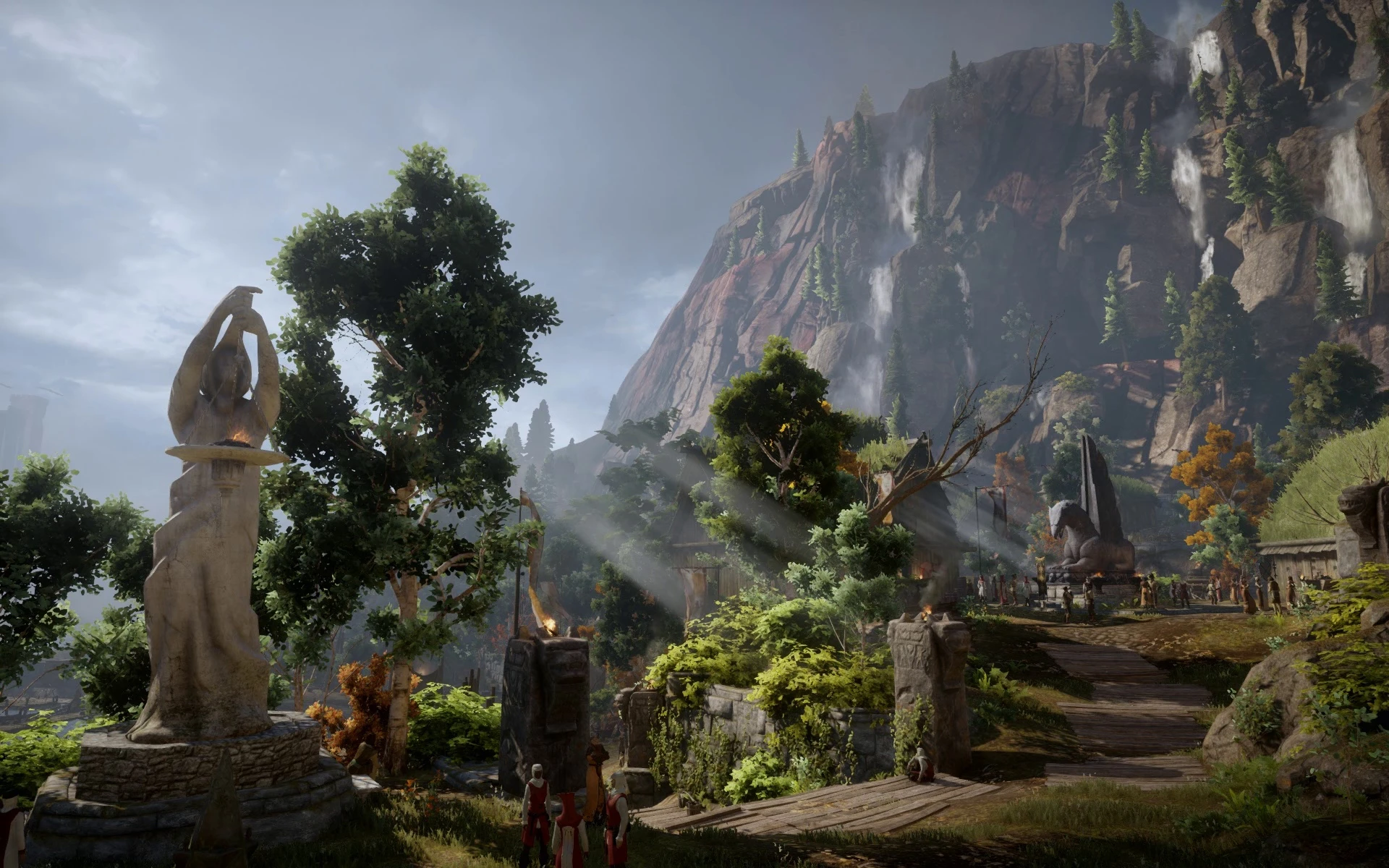
Animated Desktop Wallpaper of Inquisition
⚪ Last updated 2015Preview
🔍 Analysis
- 👍 2.7% endorsement rate — high engagement, a strong quality signal
- 🏆 #8 of 291 Miscellaneous mods in this game by downloads
📋 About This Mod
Scroll down to see previews of the scenes If you have any problems/issues with this mod, please read the description and the FAQ's first before asking.
About I've recorded some beautiful landscape scenes of Dragon Age Inquisition. This scenes are infinite loops, you won't see it when the scene starts again! And you can use them as an animated desktop wallpaper.
If you want to see my animated desktop wallpapers of Skyrim go here!
Requirements - If you use Windows 7 you'll have to download the patcher (Windows 7 DreamScene Activator) - If you use any other system you can apply any videofile with the VLC-Player, thanks to 1355970 for telling me that
How to use with Windows 7: 1. You will need a patch for your computer allowing you the use of video files as a desktop wallpaper. Download the Windows 7 DreamScene Activator 1. 7, you will find it in the downloadsection. 2. Right-Click on the downloaded video file and click on "Set as Desktop Background". 3. Enjoy the Scene!
How to use with VLC Media Player (thanks to 1355970 for writing this instructions): The easiest way to get VLC would be ninite.com, you just check VLC on the list, then click "get installer", and the installer you get this way automatically installs the most recent version of VLC. Once you have VLC installed, run it.
1. in Tools - Preferences - Video, select Directx or Direct3D (depending on the available choices) on your Output dropdown list, click save on the preferences window, restart VLC
2. open the video with VLC (if another media player is the default one, instead of double clicking, choose "Open with ..." in the right click menu, then select VLC)
3. once the video is playing, right click on the video, select Video -> Set as Wallpaper
Optionally, if your screen resolution differs greatly from 1920x1080 (the original resolution of these videos) you can right click again on the now completely black, video area of VLC (the video moved to the desktop already if everything went okay) and select the aspect ratio of your screen at Video -> Crop.
Animated desktop wallpaper featuring beautiful, infinitely looping landscape scenes from Dragon Age: Inquisition. A niche cosmetic mod for fans wanting to bring Thedas to their desktop, with strong community support (994 endorsements) despite its age.
✨ Key Features
📊 Pros & Cons
✅ Pros
- Community-approved with 994 endorsements and over 36k downloads.
- Brings the beauty of Thedas to your desktop with seamless looping scenes.
- Lightweight and easy to set up—just drop the files and enjoy.
⚠️ Cons
- Last updated in 2015—may not work with modern Windows versions or wallpaper engines.
- Only offers landscape scenes; no character or combat animations.
For Dragon Age fans who want to immerse themselves in the game's world even when not playing. Perfect for those who enjoy ambient desktop customization. Skip if you're looking for gameplay mods—this is purely cosmetic.
💡 Beginner Tips
- If you're on Windows 7 or later, you can set the animated wallpaper using a third-party tool like Wallpaper Engine or DeskScapes.
- Make sure your desktop is set to 'Slideshow' or use a video wallpaper app to play the file in a loop.
- Check the file format—if it's a video, you might need to convert it to a format your wallpaper software supports.
📊 Mod Details
- Game
- Dragon Age Mods
- Author
- minielf
- Version
- 1
- Downloads
- 36,321
- Endorsements
- 994
- Category
- Miscellaneous
- Created
- 12/26/2014
- Updated
- 1/19/2015
🔧 How to Install Dragon Age Mods
Download from Nexus.
📖 Full step-by-step install guide for Dragon Age →
Visit the official mod page for specific installation instructions for this mod.
🎮 Need cheat codes or console commands? Check ur gaming wiki for Dragon Age commands, item IDs, and more.
Keep browsing — more Dragon Age mods await