Transfer Item Stats
⚪ Last updated 2014Preview
🔍 Analysis
- 👍 4.8% endorsement rate — high engagement, a strong quality signal
- 🏆 #42 of 177 Miscellaneous mods in this game by downloads
📋 About This Mod
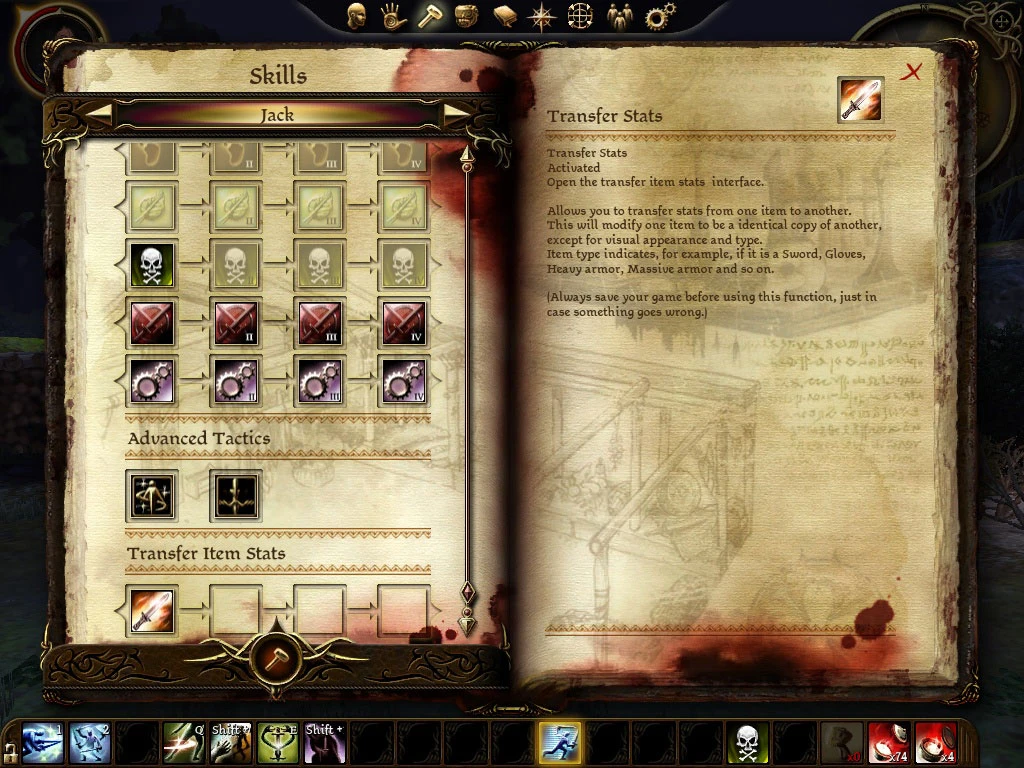
Allows you to transfer stats from one item to another. This will modify one item to be a identical copy of another, except for visual appearance and type. Item type indicates, for example, if it is a Sword, Gloves, Heavy armor, Massive
=========================================================
Transfer Item Stats Mod (TiS)
=========================================================
Work's with Origins and Awakening.
Description: ---------------------------------------------------------
Allows you to transfer stats from one item to another. This will modify one item to be a identical copy of another, except for visual appearance and type. Item type indicates, for example, if it is a Sword, Gloves, Heavy armor, Massive armor and so on.
I created this mod as a way to be able to use third party armor/weapons without breaking the game balance, since most of them come with overpowered attributes or high requirements to equip. With this mod, simple transfer the attributes (stats) from any item you get normally in game to the fancy looking one you downloaded overriding is stats.
Quick usage tutorial:
Use the "Transfer Stats" skill to open the transfer interface. This skill can be found in your character skill panel (Press "K" by default).
- Drag the item with the appearance you want to keep to the left container;
- Drag the item with the stats you want the previous item to have to the left container;
- You should now have two identical items on the container;
- Move them to your inventory;
- Repeat the steps above for other items;
Close Inventory when done.
Important note: When two items are present in the mod container the transfer stat operation will trigger automatically. Make sure you move the items in the right order to the container.
(Always save your game before using this function, just in case something goes wrong.)
Installation: ---------------------------------------------------------
- Extract the contents of the zip file.
- Install the .dazip file using "<Your Game Folder Path>DragonAge\bin_ship\daupdater.exe" or any
- other third party addin manager.
Final notes: ---------------------------------------------------------
Currently there isn't any checks to see if a item is a armor or weapon, this allows any item to be placed in the container (Potions, materials, books, anything that is in your inventory really). This is not intended behavior so, experiment at your own risk.
Version Revision: ---------------------------------------------------------
v0. 3b: Fixed: "Transfer Stats" skill not enabled for some characters. Fixed: "Transfer stats" skill showing during character creation.
v0. 2b: (UPDATE HIGHLY RECOMMENDED) Update to version 0. 2b if you h
📊 Mod Details
- Game
- Dragon Age Origins Mods
- Author
- innov4tor
- Version
- 0.3b
- Downloads
- 10,480
- Endorsements
- 507
- Category
- Miscellaneous
- Created
- 12/1/2014
- Updated
- 12/8/2014
🔧 How to Install DA: Origins Mods
Use DAO Mod Manager.
📖 Full step-by-step install guide for DA: Origins →
Visit the official mod page for specific installation instructions for this mod.
🎮 Need cheat codes or console commands? Check ur gaming wiki for DA: Origins commands, item IDs, and more.
Keep browsing — more DA: Origins mods await