SJCs Tints And Textures
⚪ Last updated 2018Preview
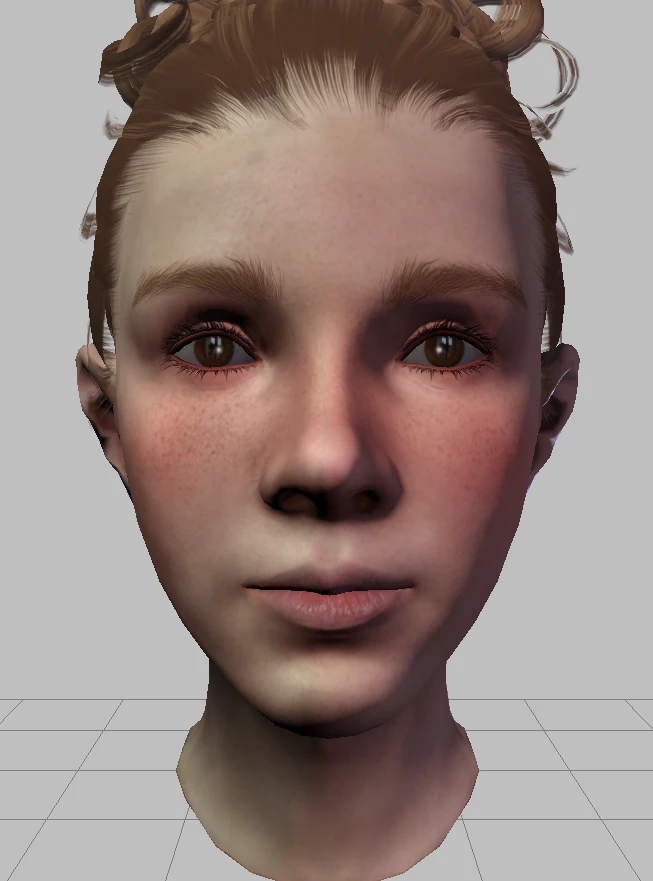
🔍 Analysis
- 👍 3.5% endorsement rate — high engagement, a strong quality signal
- 🏆 #38 of 306 Models and Textures mods in this game by downloads
📋 About This Mod
A collection of textures and tints for use in the Dragon Age Toolset and in-game character creator.
A collection of textures and tints that include;
-
[]6 skin textures (whiter vanilla teeth and realistic teeth options available)
[
]20 eye textures[]10 hair and eyebrow tints
[]10 eye tints
[]10 skin tints
INSTALLATION
-
[]Copy and paste the extracted folder into the override (Documents\BioWare\Dragon Age\packages\core\override OR C:\Program Files (x86)\Origin Games\Dragon Age\packages\core\override).
[]Delete the 'Realistic Teeth' folder if you are not using the Realistic Teeth mod, or the "Vanilla Teeth" folder if you are.
[]Use the 'CharGenMorph Compiler' to compile the 'chargenmorphcfg' file if you want to use them in the in-game complexion slider as well as the DA Toolset. Delete if not.
(Eye textures will require the Dragon Age Toolset to use as they do not have an in-game slider.)
If you're having any issues during the installation process please do not hesitate to ask for help, I will try to help you resolve any issues to to the best of my ability.
-
[]Copy and paste the extracted folder into the override (Documents\BioWare\Dragon Age\packages\core\override OR C:\Program Files (x86)\Origin Games\Dragon Age\packages\core\override).
📊 Mod Details
- Game
- Dragon Age Origins Mods
- Author
- SammyJC
- Version
- 1
- Downloads
- 40,731
- Endorsements
- 1,417
- Category
- Models and Textures
- Created
- 2/4/2018
- Updated
- 2/4/2018
🔧 How to Install DA: Origins Mods
Use DAO Mod Manager.
📖 Full step-by-step install guide for DA: Origins →
Visit the official mod page for specific installation instructions for this mod.
🎮 Need cheat codes or console commands? Check ur gaming wiki for DA: Origins commands, item IDs, and more.
Keep browsing — more DA: Origins mods await