White Teeth
⚪ Last updated 2009Preview
🔍 Analysis
- 👍 5.2% endorsement rate — high engagement, a strong quality signal
- 🏆 #6 of 306 Models and Textures mods in this game by downloads
📋 About This Mod
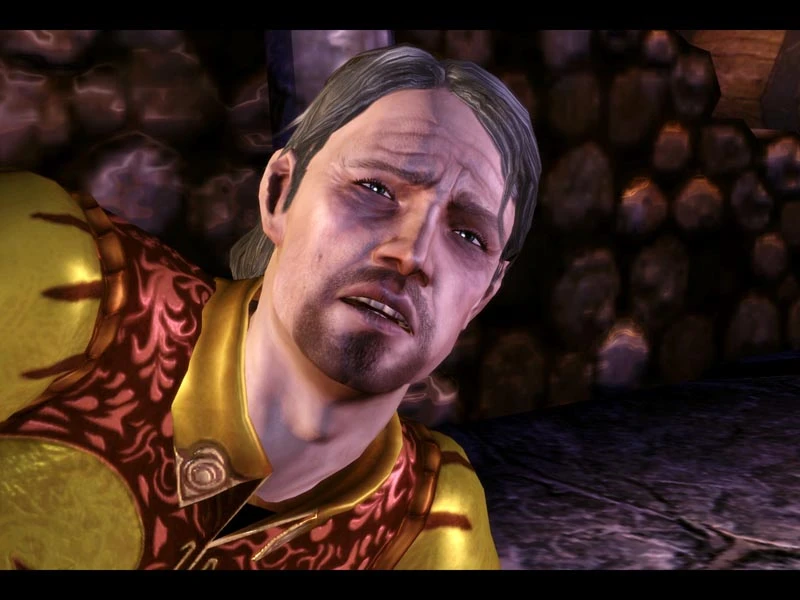
This mod changes the rotten yellowish teeth of all characters to a white color. To Install, simply put \"white_teeth.erf\" into your Override folder. (My Documents\\BioWare\\Dragon Age\\packages\\core\\override) This should be compatible with all other mods and patches, but it will override any changes Bioware or other modders do to the base face textures.
Updates
v 1. 1 - 16. December. 2009
- Added modified normal maps to make upper teeth more reflective. Thus reducing the amount of darkening the upper jaw gets in dark areas and top-down shots. Without HDR (Frame buffer Effects) the lower jaw is now slightly darker in dark areas, but the difference is still smaller than before.
White Teeth is a simple texture mod that replaces the yellowed, decayed teeth of all characters with a clean white shade. It's a tiny, focused cosmetic fix for players who find the default look off-putting. Despite its age, it remains popular with nearly 19,000 endorsements.
✨ Key Features
📊 Pros & Cons
✅ Pros
- Huge endorsement count (18,982) shows it's a beloved classic.
- Does exactly what it says—no bloat, just cleaner teeth.
- Zero performance impact since it's just a texture swap.
⚠️ Cons
- Last updated in 2009, so it may not be compatible with newer game versions or mods.
- Only affects teeth—if you want more extensive cosmetic overhauls, this won't cover them.
For players who are bothered by the default yellow teeth and want a quick, no-fuss fix. It's also great for modders building a vanilla-plus setup who appreciate small quality-of-life tweaks. If you're after a full character overhaul, look elsewhere.
💡 Beginner Tips
- Place the texture files in your Data folder and activate via your mod manager.
- If you use other texture mods, load order matters—put this after any mod that changes character heads.
- Check if your game version is compatible, as this mod is old and may need manual tweaking.
📊 Mod Details
- Game
- Dragon Age Origins Mods
- Author
- JOG
- Version
- 1.1
- Downloads
- 368,301
- Endorsements
- 18,982
- Category
- Models and Textures
- Created
- 11/17/2009
- Updated
- 12/16/2009
🔧 How to Install DA: Origins Mods
Use DAO Mod Manager.
📖 Full step-by-step install guide for DA: Origins →
Visit the official mod page for specific installation instructions for this mod.
🎮 Need cheat codes or console commands? Check ur gaming wiki for DA: Origins commands, item IDs, and more.
Keep browsing — more DA: Origins mods await