Bugfix for Pixelated Shaders Begone
⚪ Last updated 2021Preview
🔍 Analysis
- 👍 2.6% endorsement rate — high engagement, a strong quality signal
- 🏆 #18 of 65 Visuals and Graphics mods in this game by downloads
📋 About This Mod
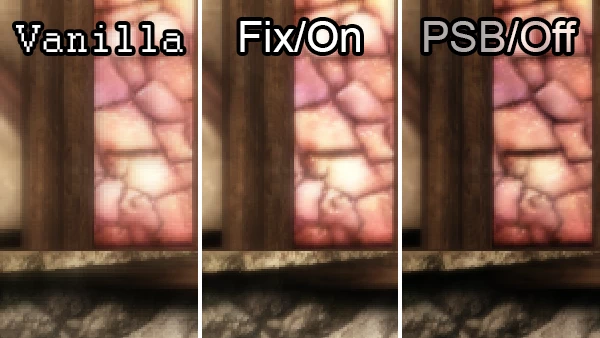
Fixes a bug in the mod Pixelated Shaders Begone that stops the bloom shader working. (Alternatively, turns the bloom off more efficiently.)
(Only use one main version! There are different options available to download.)
Pixelated Shaders Begone by blaidd is a wonderful mod that is very much worth having to make DAO's depth of field effect much less ugly, but if you've ever wondered why it made the bloom look a lot more...subtle, it's because there's a tiny bug that results in the bloom being completely turned off. I've provided an option to turn the bloom back on, and an option to turn it off more efficiently.
This mod can also be used standalone (without Pixelated Shaders Begone) if you only want to affect the bloom.
About
This file will turn the bloom back on, with the de-pixelating fix as the original modder intended. It restores a missing tag closer on line 26.
-
[]With PSB: Bloom will be turned on. The game will appear brighter and slightly softer.
[
]Without PSB: Very little visual change. The bloom may look slightly less intense if you have a smaller screen.Perhaps you don't want the bloom back! This file turns it off more efficiently -- rather than broken code failing, the code that invokes the effect and stores its resources is removed. I don't know if it will improve performance since I don't know how the shaders handle errors, but it shouldn't hurt it.
-
[]With PSB: There will be no visual change.
[
]Without PSB: Bloom will be turned off. The game will appear slightly darker and sharper.XML files can be opened and edited in any plain-text editor (ie something such as Notepad or Notepad++, not a rich-text editor such as Word).
Installation
Choose only one version to download:
-
[]Bloom on: turns the bloom on with the de-pixelating fix applied.
[
]Bloom off: turns the bloom off -- more efficiently than in PSB.Use the extracted file to replace the corresponding da_bloom.ffx.xml file from Pixelated Shaders Begone. This should have been installed somewhere in the usual override folder (\Documents\Bioware\Dragon Age\packages\core\override).
Without PSB
Extract in the usual override folder (\Documents\Bioware\Dragon Age\packages\core\override).
To uninstall, delete the file at any time.
Compatibility
Just make sure there is at maximum one da_bloom.ffx.xml maximum anywhere in your override folder.
Since this is a bugfix, there is an intended "clash" wit
-
[]Bloom on: turns the bloom on with the de-pixelating fix applied.
-
[]With PSB: There will be no visual change.
📊 Mod Details
- Game
- Dragon Age Origins Mods
- Author
- Ashhawk
- Version
- 1.0
- Downloads
- 20,424
- Endorsements
- 529
- Category
- Visuals and Graphics
- Created
- 6/27/2021
- Updated
- 6/27/2021
🔧 How to Install DA: Origins Mods
Use DAO Mod Manager.
📖 Full step-by-step install guide for DA: Origins →
Visit the official mod page for specific installation instructions for this mod.
🎮 Need cheat codes or console commands? Check ur gaming wiki for DA: Origins commands, item IDs, and more.
Keep browsing — more DA: Origins mods await