Combined Status
🟡 Updated this yearPreview
🔍 Analysis
- 👍 0.0% endorsement rate
- ✅ Updated 19 days after the latest game patch — actively maintained
📋 About This Mod
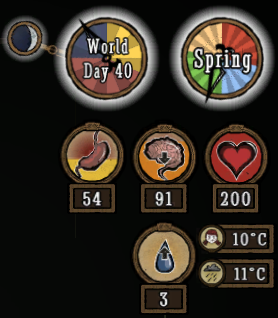
Supports all versions of Don't Starve (Vanilla, Reign of Giants, Shipwrecked, Hamlet, Don't Starve Together). You can also download from GitHub, although that won't auto-update for you. (code contributions also welcome via GitHub) This mod enhances the HUD to better show the player's stats and various information about the world, such as temperature, season, and moon phase. This is a client-only mod, so whoever has enabled it will see the changes, and whoever doesn't won't, regardless of what server you're on and whether the server has the mod or not. Note that unlike Kiopho's Always On Status, I use the game's temperature units directly here, so player temperature can safely vary from 0-70, with freezing/overheating warnings occurring at 5 and 65. (you can change it to C, which works like Kiopho's version, or F if you want) Credits to Kiopho (Always On Status), Soilworker (Season Clock), and hotmatrixx (Better Moon) for making the original mods. I completely rewrote all of the code to be more compatible, aesthetic, and easily maintained going forward. Configuration Options OptionDescription TemperatureWhether to show the temperature of the player. Defaults to Show. Show World TempWhether to show the temperature of the world. Defaults to Hide. Show Temp BadgesWhether to show small images to indicate which temperature is which. Badges only get shown if this is set to Show and both player and world temperatures are enabled. Defaults to Show. Temperature UnitWhether to use the game's internal units (default), or approximations of Fahrenheit or Celsius. In Game Units, the player freezes at 0 and overheats at 70, with warning occurring 5 away. In Celsius, the player freezes at 0 and overheats at 35, with warning occurring 2. 5 degrees away. In Fahrenheit, the player freezes at 32 and overheats at 95, with warning occurring 4. 5 degrees away. Show WaningWhether to show if the moon is waxing or waning by adding new icons. Defaults to Show. (The game normally only shows icons
📊 Mod Details
- Game
- Dont Starve Together Mods
- Author
- rezecib
- Version
- N/A
- Downloads
- 10,255,091
- Endorsements
- 0
- Category
- client_only_mod, interface, tweak, utility, version:1.9.6
- Created
- 1/17/2015
- Updated
- 7/25/2026
🔧 How to Install Don't Starve Together Mods
Subscribe on Steam Workshop. Mods auto-download and install. Launch the game to activate.
📖 Full step-by-step install guide for Don't Starve Together →
Visit the official mod page for specific installation instructions for this mod.
🎮 Need cheat codes or console commands? Check ur gaming wiki for Don't Starve Together commands, item IDs, and more.
Keep browsing — more Don't Starve Together mods await