Gesture Wheel
⚪ Last updated 2022Preview
🔍 Analysis
- 👍 0.0% endorsement rate
📋 About This Mod
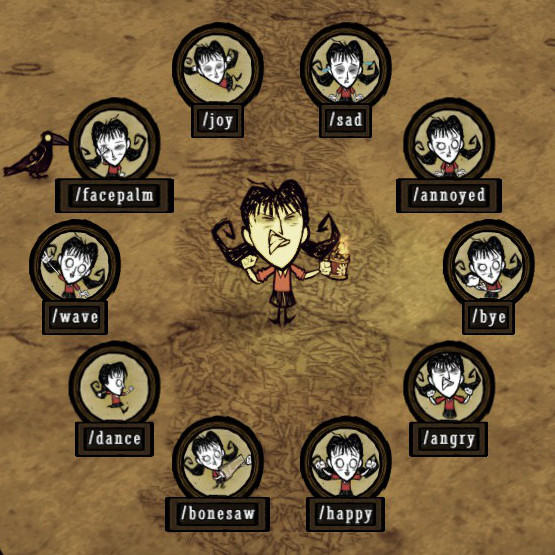
Adds a wheel selection interface for emotes, making it easier to emote. By default, the hotkey is set to G (but you can configure it in the mod config options). Holding G will bring up the gesture wheel, then moving your mouse in a particular direction will select a gesture. When you release G, your character will do the gesture. On controllers, pressing in the left analog activates the wheel, and selection is done by moving the left analog while it's still pressed in (then releasing to make the selection). It's technically bound to Menu Misc 3, which I believe you can rebind in the Controls menu. I included several options that you might want to change: OptionDescription Toggle buttonDefaults to G, but you can set it to any letter key. Hopefully when mods get proper controls options, this will be nicer to work with :) Wheel SizeSets the size of the wheel. Defaults to 1, and can be set from 0. 1 to 2. Show picture or textYou can have it show just the picture, just the text, or both. Center wheelDetermines whether the wheel comes up around your mouse or the center of the screen. Restore cursor positionIf Center Wheel is disabled, this setting doesn't do anything, unless set to Absolute. Otherwise:Relative, the default setting, moves it back where it was before, adding the extra movement you did for the gesture. Absolute sets it back where it was before without adding the extra movement. Center sets the mouse to the middle of the wheel when bringing it up, but doesn't move it afterwards. Off doesn't move the mouse ever. Controller StickLeft (the default) uses the left analog stick to select emotes, and Right uses the right stick. If you want to rebind which stick needs to be clicked in, rebind menu_misc_3 in the game's controller controls menu (you'll most likely want to swap it with the scoreboard button). Limit to 8Off (the default) uses all the emotes, but the wheel is getting pretty crowded (current at 12 emotes), so On limits the wheel to 8 emotes, which are chose
📊 Mod Details
- Game
- Dont Starve Together Mods
- Author
- rezecib
- Version
- N/A
- Downloads
- 2,479,591
- Endorsements
- 0
- Category
- interface, utility, tweak, client_only_mod
- Created
- 12/7/2014
- Updated
- 3/26/2022
🔧 How to Install Don't Starve Together Mods
Subscribe on Steam Workshop. Mods auto-download and install. Launch the game to activate.
📖 Full step-by-step install guide for Don't Starve Together →
Visit the official mod page for specific installation instructions for this mod.
🎮 Need cheat codes or console commands? Check ur gaming wiki for Don't Starve Together commands, item IDs, and more.
Keep browsing — more Don't Starve Together mods await