Modder辅助
⚪ Last updated 2022Preview
🔍 Analysis
- 👍 0.0% endorsement rate
📋 About This Mod
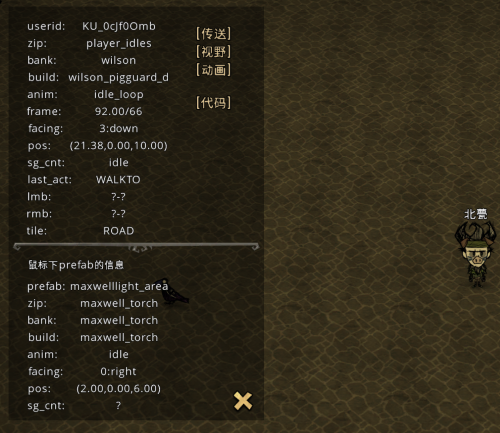
This is a machine translation Foreword This module is intended to help those who are just learning how to make mods, Of course, ordinary players may also use some of the features. Due to my lack of code skills, I only realized some simple and commonly used functions (in fact, I will use t key more). Most of these features would be unnecessary or unnecessary to a mod maker Can be done with simple console instructions, hopefully not laughing. introduce Displays information about the character Displays information about items under the mouse View change The flash Teleport to the specified location Press B to open and close (forget to write other keys, you can manually change) The middle part of the execution code is very weak, and the console similar functions, up and down arrow keys to return to the previous record, TAB typing prompt words Information about characters and items under mouse Explain part of the meaning Zip - the corresponding animation compression package Frame - frames Facing -- The orientation of the animation Sg_cnt - The current SG status Last_act - The action just performed LMB, RMB -- The left and right key action of the mouse against the item Tile -- The area of land on which the character is located Vision change You can change the perspective through input by checking the Constantly Update perspective option Control can be restored by canceling the continuous update perspective Rotate to drop rotation around the view target Default F8 can set objects under the mouse as the field of vision target (use caution, such as the target set to birds, birds fly away will crash, too lazy to do compatibility) Click the broom to restore the default view Paused -- the view is fixed -- true if the value is greater than 0 and false if the value is less than or equal to 0 Cutsence - Also fixed screen, but can change Angle and distance Cutsence Usage method: Click Continuous update, set to True, cancel continuous update [ animation/h1] For ground animation, fill
📊 Mod Details
- Game
- Dont Starve Together Mods
- Author
- 76561198976775947
- Version
- N/A
- Downloads
- 767
- Endorsements
- 0
- Category
- version:1.0.1, client_only_mod
- Created
- 1/30/2022
- Updated
- 1/30/2022
🔧 How to Install Don't Starve Together Mods
Subscribe on Steam Workshop. Mods auto-download and install. Launch the game to activate.
📖 Full step-by-step install guide for Don't Starve Together →
Visit the official mod page for specific installation instructions for this mod.
🎮 Need cheat codes or console commands? Check ur gaming wiki for Don't Starve Together commands, item IDs, and more.
Keep browsing — more Don't Starve Together mods await