Loco Mesh Splitter
🟠 Updated over a year agoThis mod may not work until the author updates it. Check for an update, or see the rollback guide.
Preview
🔍 Analysis
- 👍 1.9% endorsement rate — high engagement, a strong quality signal
- 🏆 #11 of 52 Utilities mods in this game by downloads
📋 About This Mod
If you appreciate this mod, please consider supporting me on Ko-Fi.
Not compatible with:
Enter the Secret Room (game should still run fine, but the DE6 interior will have some z fighting)
What is this thing
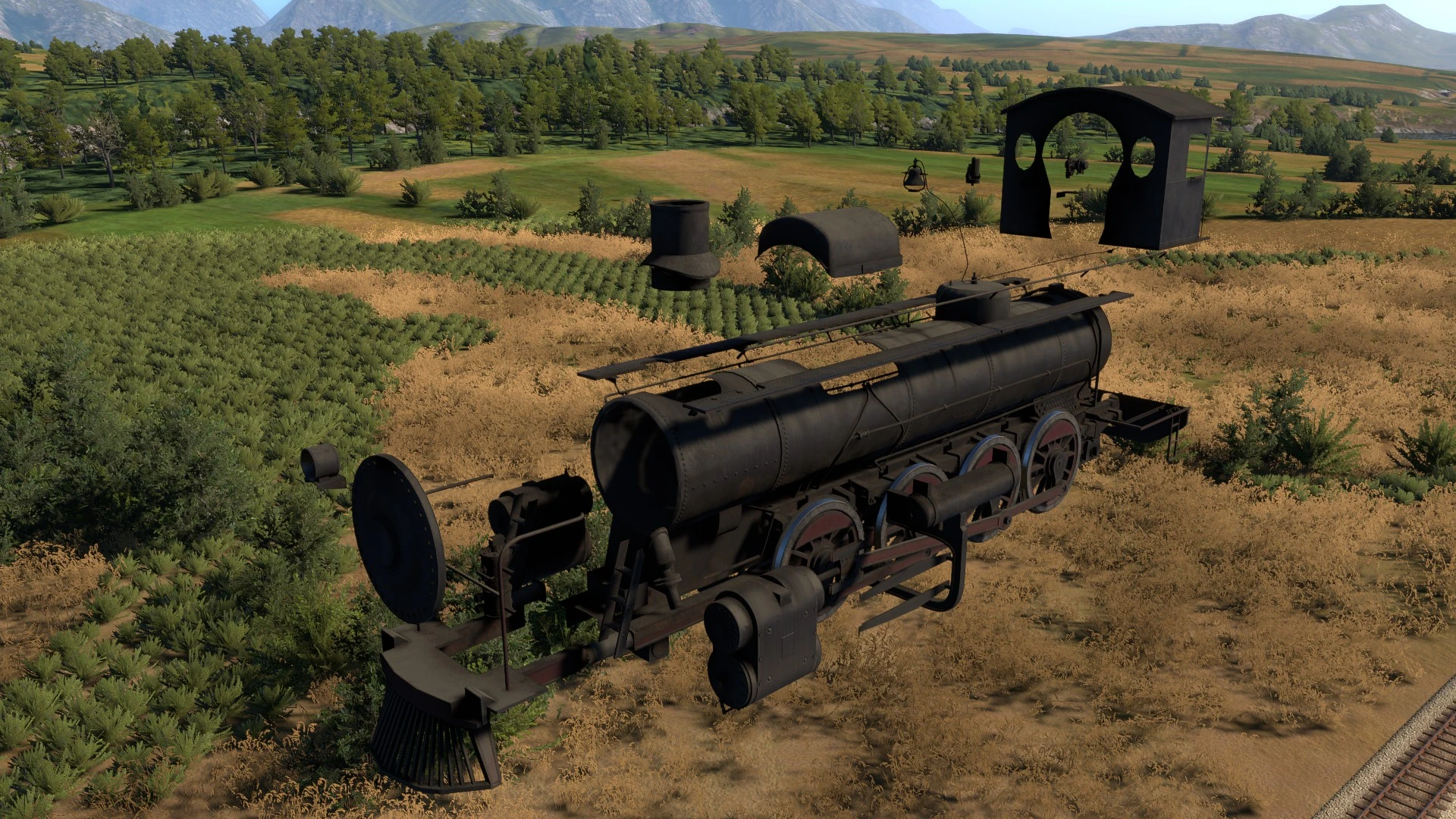
This mod splits apart the meshes of the S282A, S060, DE6, and DE6 slug into many pieces, so that multiple mods can edit the meshes at once.
So Rearranged S282 can edit the cylinders, a different mod could move the headlight, etc.
With just this mod installed, you won't visually notice anything different. It's a framework that other mods can use to edit parts of the S282A, S060, DE6, and DE6 slug.
For now, I'm supporting the S282A, S060, DE6, and DE6 slug, although I might support more in the future if people request more. Let me know if you need something split apart further for your mod, and I can look into it.
Installation
Just drag and drop the zip file into Unity Mod Manager like any other mod.
The game just updated, and now this mod won't load right!
Due to some boring technical details, this mod is very likely to brake with every update to Derail Valley. It's an easy fix, but I'll still have to release a new version of the mod for every update. Wait a day or two, and I'll probably have an update out.
If the mod has been updated, but it's still not working right, then try this:
-
[]Make sure the game is not running
[
]Go to your Derail Valley installation folder[]Go to the folder "Mods\LocoMeshSplitter\assets"
[]Delete the file named "_generated_in_game_version.dat" (this will force the mod to discard all cached locomotive meshes and regenerate them all from the game files)
- Restart the game.
For Mod Authors
If you're just trying to install a mod that depends on Loco Mesh Splitter, feel free to ignore this section.
To make mods depending on this framework, you'll need to know how to code and know C#.
The easiest way to figure out how this mod works is to download and install the Runtime Unity Editor mod, find a spawned LocoS282A in the Object Browser, and navigate to the transform "LocoS282A_Body/Static_LOD0/s282a_split_body(Clone)". There, you'll see all the game objects that the locomotive mesh has been split into. I've also split apart the smokebox lid and put those meshes in "LocoS282A_Body/Static_LOD0/s282a_split_smokebox_door(Clone)".
Note that I'm not modifying the prefab: I'm spawning in these items by patching the TrainCar. Start() method. If you want your code to modify or move the split meshes, you'll have to write a postfix patch for TrainCar. Start(). See the Harmony docs if you don't know how to do this. Make sure your patch loads
Loco Mesh Splitter is a utility framework that splits locomotive meshes to ensure compatibility between mesh-altering mods. It has 252 endorsements and 13,603 downloads, last updated in August 2025. Ideal for modders and players who use multiple locomotive mesh mods.
✨ Key Features
📊 Pros & Cons
✅ Pros
- Solid community trust with 252 endorsements and over 13k downloads.
- Solves a real headache for modders stacking mesh mods.
- Actively maintained — last update was August 2025.
⚠️ Cons
- No detailed instructions or documentation provided by the author.
- Requires understanding of mesh modding to use effectively.
- Limited to locomotive meshes — not useful for other vehicle types.
For modders and players who run multiple locomotive mesh mods and need them to coexist. If you're into train customization and hit conflicts, this is your fix. Skip if you don't mess with mesh mods.
💡 Beginner Tips
- Make sure your other mesh mods are compatible with this framework — check their descriptions.
- Test with a single locomotive first to see how the split works before adding more mods.
- If you're not a modder, this is more of a backend tool — expect a learning curve.
📊 Mod Details
- Game
- Derailvalley Mods
- Author
- SatiricRug
- Version
- 1.1.9
- Downloads
- 13,603
- Endorsements
- 252
- Category
- Utilities
- Created
- 2/2/2024
- Updated
- 8/3/2025
🔧 How to Install Derail Valley Mods
Download from Nexus Mods.
📖 Full step-by-step install guide for Derail Valley →
Visit the official mod page for specific installation instructions for this mod.
🎮 Need cheat codes or console commands? Check ur gaming wiki for Derail Valley commands, item IDs, and more.
Keep browsing — more Derail Valley mods await